AI Agent Observability: The Complete Guide
A systems-focused guide to making AI agents observable: the signals, instrumentation, operating practices, and decisions that turn opaque agent behavior into evidence.
In this guide15 sections
AI agent observability is the practice of recording what an agent tried, which evidence shaped each step, and what the user got in the end, so a person can debug failures, control cost and ship changes with confidence. A normal service either answers or errors. An agent can answer fluently, call the wrong tool twice, spend four times the usual budget and still return a confident, wrong result with a green status code. Observability is how you see that happen.
At a glance
This guide is for engineers and technical leads who run agents in production, or are about to. It gives you a way to decide how much observability you need now, what to record at each level, and which signal to open first for each kind of failure. It is the overview. Where a topic has its own deep dive, we link to it instead of repeating it.
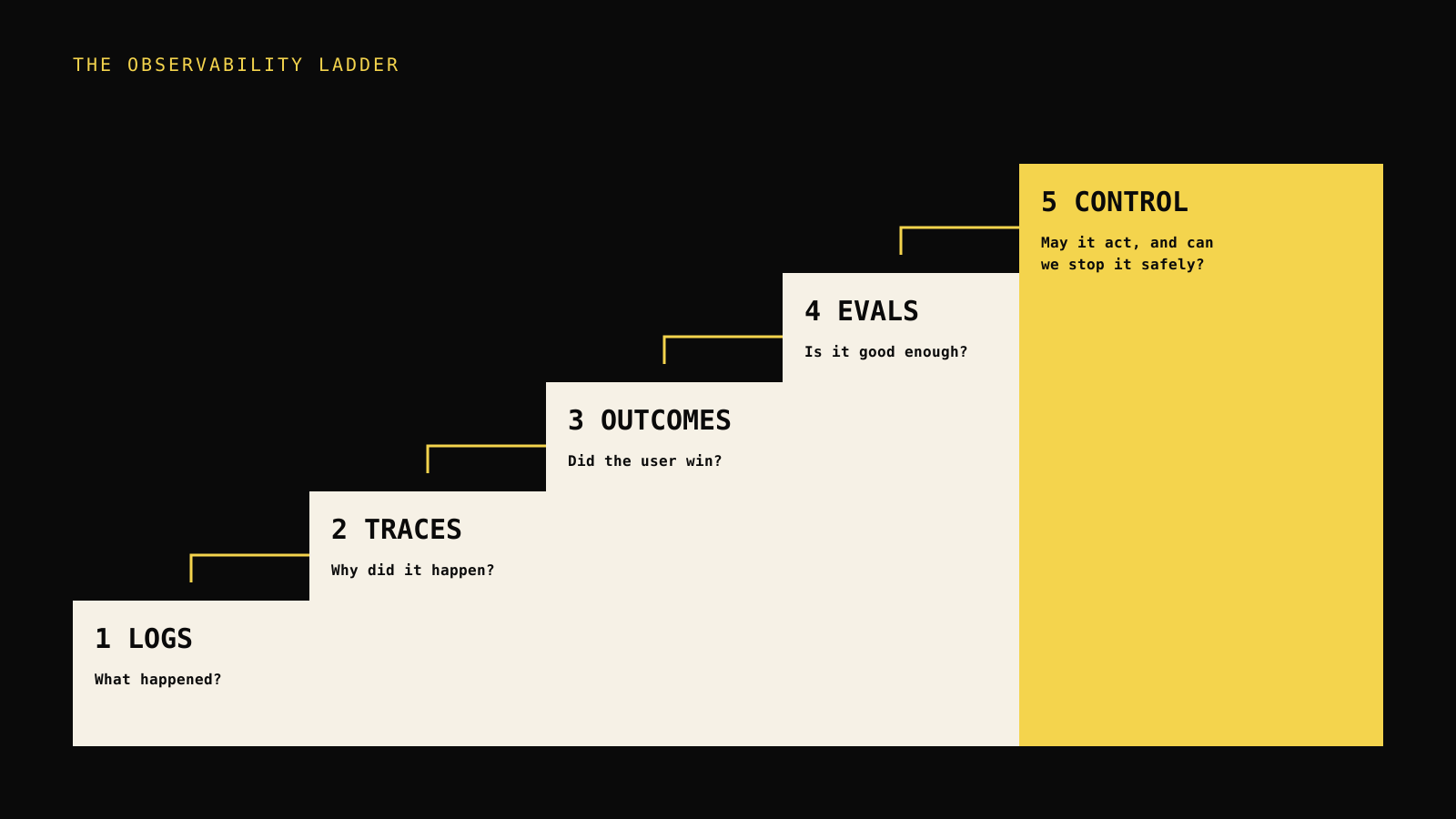
The observability ladder
The model used through the rest of this article has five rungs. Each rung answers a harder question than the one below it, and each one needs the one below to work.
| Rung | Question it answers | What you record |
|---|---|---|
| 1. Logs | What happened? | Timestamped events and errors |
| 2. Traces | Why did it happen? | Parent and child spans for model calls, tools and retrieval |
| 3. Outcomes | Did the user win? | Terminal status, feedback and task result |
| 4. Evals | Is it good enough? | Scores against a fixed set of cases |
| 5. Control | May it act, and can we stop it safely? | Budgets, approvals, alerts and release gates |
Most teams stall at rung 1 or 2. They can see that something happened, but not whether it mattered. Rungs 3 to 5 are where observability starts paying for itself.
Decision rule: Climb one rung at a time, and only record evidence that changes a decision. More events are not automatically more observability.
What agent observability is, and what it is not
Observability comes from systems engineering. A system is observable when you can explain its internal state from the outputs it produces. For an agent, the internal state is the chain of decisions: what it read, what it chose, what it called and what it did with the result. The outputs you need to keep are therefore traces, not only logs.
That definition draws a few useful boundaries.
- It is not only monitoring. Monitoring watches known signals and alerts on them. Observability lets you ask a question you did not plan for, such as which retrieved document led to this answer. The monitoring guide covers the alerting half in depth.
- It is not only LLM logging. Logging prompts and completions covers a single model call. Agents loop, branch, call tools and hand work to other agents. The overview of AI observability explains how the definition grew past model calls.
- It is not APM with a new name. Latency and error rate still matter, but they do not detect a wrong answer. See agent observability versus traditional APM for what carries over and what does not.
- It is not evaluation alone. Evals score quality on known cases. Observability tells you what real traffic did, and gives evals their test cases.
Why agents are harder to see than services
Three properties make agents different from the services most teams already know how to observe.
First, agents are non-deterministic. The same input can take a different path next time, so one reproduction proves little. You need the recorded path of the run that went wrong.
Second, agents fail quietly. A tool that returns stale data does not throw. A model that ignores an instruction does not log an error. The failure is in the meaning, not the status code.
Third, agents spend money as they think. Every loop iteration is a model call with a price. A retry storm or an unbounded loop is a cost incident before it is an outage. The agentic observability article goes deeper on reasoning chains and autonomy failures.
Rung 1 and 2: logs and traces
Logs are where everyone starts, and for a single script they are enough. They stop being enough when a request touches several model calls and tools, because a flat list of lines does not show which call caused which.
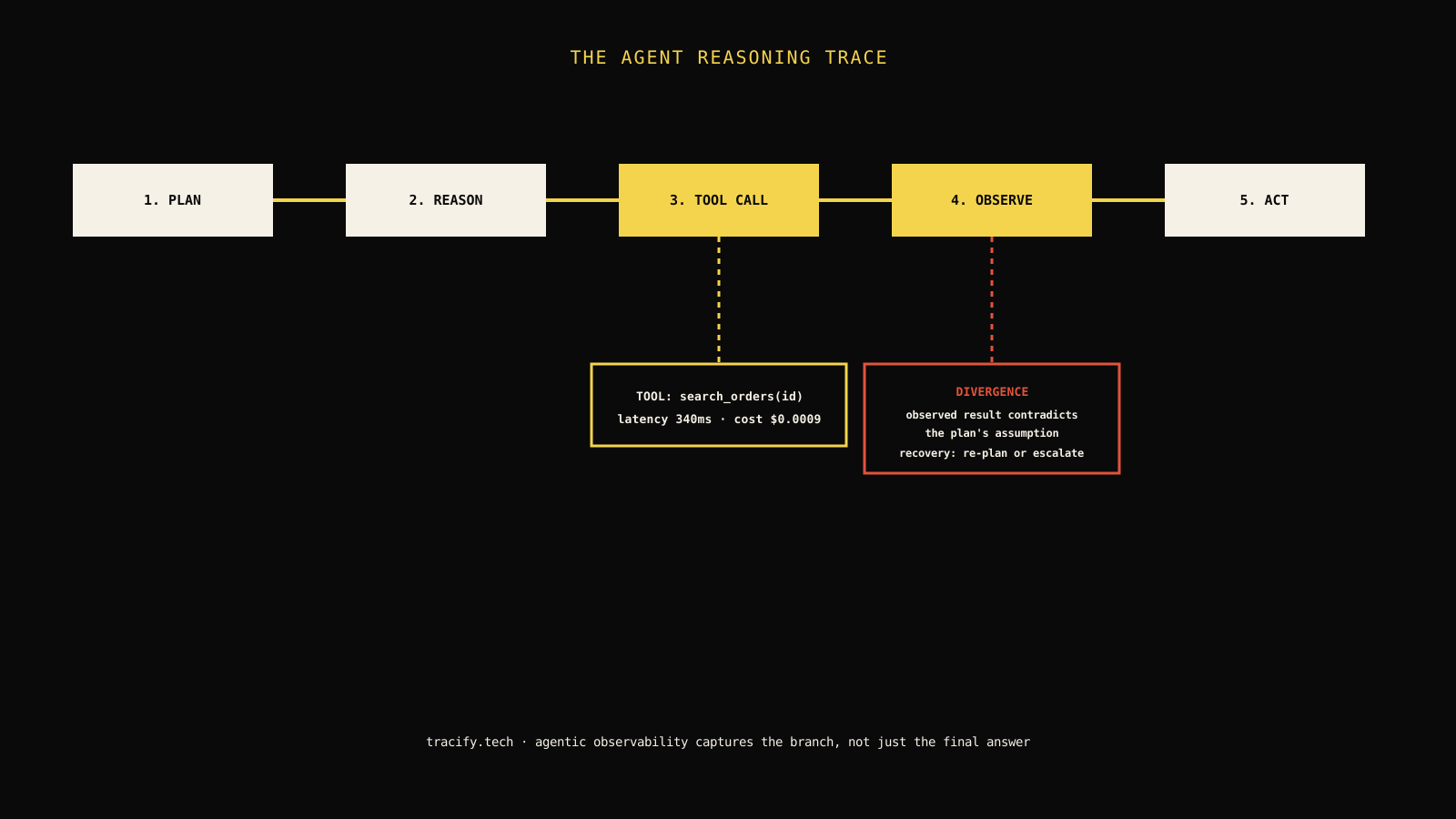
A trace fixes that by tying every step of one run into a tree. The run is the parent. Each model call, tool call and retrieval is a child span with its own input, output, duration and error. When a step starts another step, the second is nested inside the first, so the tree shows the real call structure, including loops.
What a good span records
A span is useful when another person can read it without asking you anything. At minimum, record:
- the type: model call, tool call, retrieval or generic step;
- the input and output, trimmed and with secrets removed;
- the duration and whether it failed, with the error;
- for model calls, the model name, input tokens, output tokens and cost;
- the release or version that produced it, so you can compare before and after.
Deep detail on the schema lives in instrumenting AI agents for observability, and the propagation rules in LLM tracing explained. Here is what the minimum looks like with the Tracify TypeScript SDK. The names come from the TypeScript SDK reference.
import { observe, span, traceAgent } from "tracify-sdk";

const searchDocs = observe(
  async function searchDocs(query: string) {
    return search(query); // your retrieval function
  },
  { type: "retrieval" },
);

export const answer = traceAgent(
  async (question: string) => {
    const docs = await searchDocs(question);
    return span(
      "chat",
      async (step) => {
        const reply = await callModel(question, docs); // your model client
        step.set({
          model: "your-model-id",
          inputTokens: reply.usage.input,
          outputTokens: reply.usage.output,
        });
        return reply.text;
      },
      { type: "llm", input: question },
    );
  },
  { name: "support-agent", environment: "production", release: "2026-10-20" },
);
traceAgent marks the boundary of one run. observe wraps a function so each call becomes a span, and span records a block of work. Anything started inside another step becomes its child automatically, so concurrent runs stay in separate traces. The Python SDK follows the same shape, covered in the Python SDK reference.
If you already use the OpenAI or Anthropic client, or LangGraph, you can wrap the client once and keep your existing calls. That path is described in provider integrations. Anything that speaks OpenTelemetry can also send spans, which the integrations page lists.
Field note: Instrument the boundary of a request first, then add child spans only where you have asked a question the trace could not answer. A trace with five meaningful spans beats one with fifty empty ones.
Read a trace like a story
Open a failed run and read it from the first span, not the last. The last span shows the symptom. The first span where reality and expectation diverge shows the cause. Typical first divergences are a retrieval that returned the wrong document, a tool that returned an empty result the model then ignored, and a model call that received a truncated prompt.
The guide to debugging AI agents in production turns this into a repeatable incident workflow. The anatomy of a Tracify trace is also laid out in trace anatomy.
Rung 3: outcomes
A trace tells you what the agent did. It does not tell you whether that was good. For that you need an outcome attached to the run: did the task finish, did the user accept the result, did a person have to correct it?
Outcomes come from three places.
| Source | Example | Strength | Weakness |
|---|---|---|---|
| Terminal status | Completed, refused, escalated, timed out | Always available | Says nothing about quality |
| Explicit feedback | Thumbs up or down, a rating, a comment | Direct signal from the user | Sparse and biased toward extremes |
| Implicit behavior | The user retried, rephrased or abandoned | Plentiful | Needs interpretation |
Record all three when you can, and always the first. A run with no terminal status is itself a finding: it means something ended without the agent noticing.
Segment before you average
An average success rate hides the failures that matter. Break outcomes down by workflow, release, input type, model and customer. A flat 94 percent can be 99 percent on routine questions and 60 percent on the one question type your biggest customer asks. If you can only add one dimension, add the release, because most regressions arrive with a change you made.
Tracify lets you attach feedback and scores to a trace, described in feedback and scores, so the user's verdict sits next to the spans that produced it.
Rung 4: evals
Evals answer a question traces cannot: is this change better or worse than the last one? You run the agent against a fixed set of cases, score the results, and compare scores across versions.
The cases should come from real traffic. Every bad run you debug is a candidate: add its input and the behavior you expected, and the same failure cannot return unnoticed. The practical steps are in the AI agent evaluation guide, and the regression side in AI agent regression testing.
Keep evals honest
Three habits keep evals trustworthy.
- Freeze the set while you compare versions. Changing cases and code together tells you nothing.
- Read the worst runs, not only the score. A better average with one new severe failure is a regression.
- Refresh from production on a schedule, so the set reflects what users actually ask now.
Tracify's evaluation docs describe how to score runs, and release gates describe how to block a deployment when scores drop.
Which signal to open first
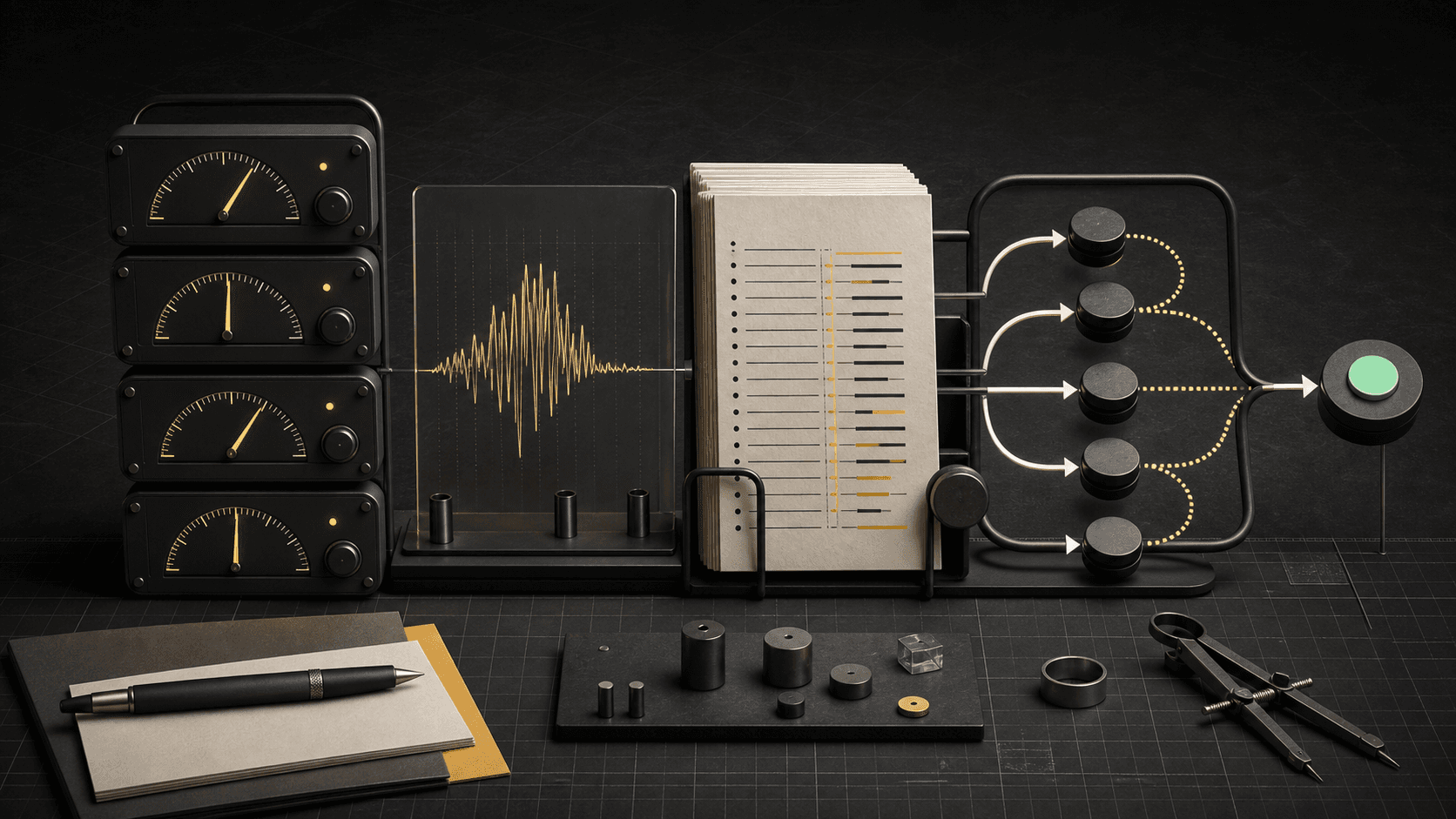
When something is wrong in production, the fastest teams do not browse. They match the symptom to one signal and open that first. The map below shows the five symptoms we see most often, and the table after it adds the reasoning.
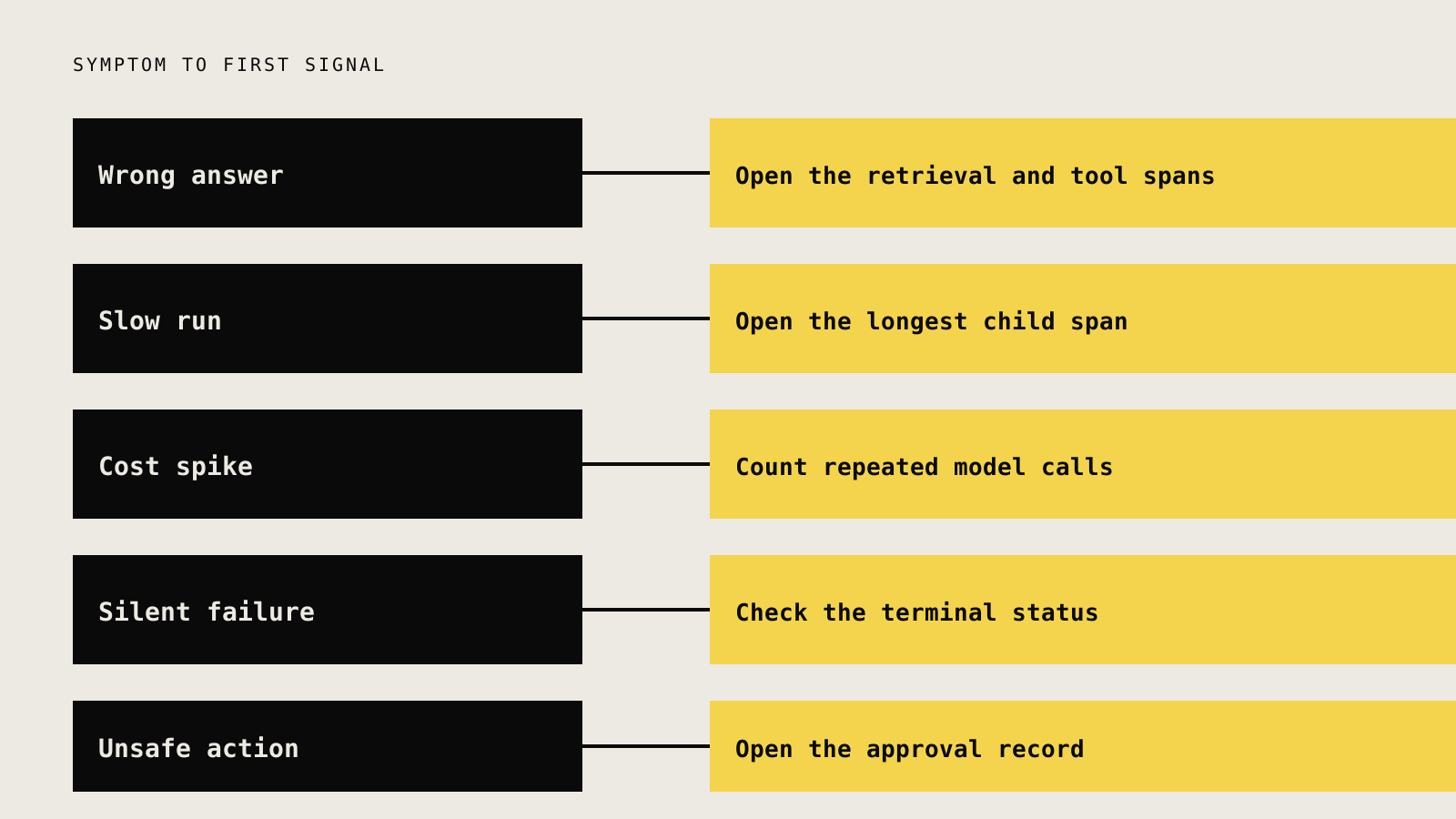
| Symptom | Open first | Why this one | If it looks fine |
|---|---|---|---|
| Wrong or unsupported answer | Retrieval and tool spans | The model can only use what it was given | Read the model span and its prompt |
| Slow run | The longest child span | Latency concentrates in one dependency | Check retries and loop count |
| Cost spike | Number of model calls per run | Cost is calls times tokens | Check prompt size and model choice |
| Silent failure | Terminal status and error spans | Failures can end without an error | Look for runs with no terminal status |
| Unsafe or unexpected action | Tool call arguments and approval record | The action was authorized somewhere | Check the policy and who approved |
Worked example: the refund that should not have happened
Back to the opening scenario. The agent promised a refund the policy does not allow. Status was ok and latency was normal, so no alert fired.
- Open the retrieval span. It returned the refund policy for a different product line, because the query was too broad.
- Open the model span. The model followed the wrong policy faithfully. It did not hallucinate, it was misinformed.
- Decide the fix. The mechanism is retrieval, so change the retrieval filter, not the prompt. Rewriting the prompt would have hidden the symptom.
- Lock it in. Save the input as an eval case with the expected refusal. The next release is checked against it.
Without the trace, the likely response is a longer prompt that says "follow the refund policy carefully". With the trace, the team fixes the cause in one change.
Cost and latency are first-class signals
For agents, cost and latency belong beside correctness, not in a separate finance report. Both are properties of the path the agent took, so they are best read from the same trace.
Record the model, input tokens and output tokens on every model span. Cost follows from those, and the SDK also accepts a cost value when you have it from your own pricing. Tracify does not guess prices for you. The cost tracking docs explain how cost is calculated and shown.
Then watch cost per successful task, not cost per call. A cheap model that fails and retries three times can cost more than a larger model that gets it right once. A rising cost per task with flat traffic usually means more loop iterations or longer prompts.
Control: budgets, approvals and alerts
The top rung is where observability starts to act. Once you can see a run, you can set limits on it and decide who must approve what.
- Alerts route a threshold breach to a person who can act. An alert with no owner is noise with a timestamp. The detail is in the agent monitoring guide.
- Budgets and loop limits stop a runaway run before it becomes an invoice. Set a maximum number of steps and a maximum spend per run.
- Human approval gates irreversible actions such as sending money or messages. The human-in-the-loop guide explains where to draw that line.
- Release gates block a deployment when evals regress.
Security note: Treat traces as sensitive data. They contain prompts, retrieved documents and tool arguments. Remove secrets before sending, limit who can read raw inputs, and choose a data region that fits your obligations. Tracify's SDK removes obvious secrets such as bearer tokens, API keys and password-style values and caps long values, but this is a safety net, not a guarantee. See data regions and the security page for what is stored where.
Fail open
Observability code must never break the agent it watches. Send telemetry in the background, treat a failed send as a warning, and never block the user's request on it. The Tracify SDK logs a warning on a failed send rather than throwing into your agent, and cost ceilings are designed to fail open so that monitoring cannot quietly stop production traffic.
Special cases worth knowing
Some agents need extra care. Each has its own article, so here is only the pointer and the one idea to take away.
| Agent type | One idea to take away | Deep dive |
|---|---|---|
| Multi-agent systems | Trace the handoff, not only each agent | Agentic AI observability |
| Tool servers over MCP | Record the tool contract and the result | MCP observability guide |
| Browser agents | Keep the screenshot or action beside the span | Browser agent observability |
Choosing tools without buying a platform too early
You can start with open standards and a small amount of code. OpenTelemetry gives you a vendor-neutral way to emit spans, and many frameworks already instrument themselves. Move to a dedicated tool when you need the things a generic backend does not do well: reading model inputs and outputs as a conversation, grouping failures, scoring runs and comparing releases.
The guide to choosing AI observability tools lists the real categories and the criteria that separate them. The short version: pick on the rung you need next, not the one you hope to reach someday.
A rollout plan that does not stall
- Week 1: traces for one workflow. Instrument the request boundary and the model and tool calls for your most important workflow. Confirm you can open a real run and explain it.
- Week 2: outcomes. Add a terminal status and, if possible, user feedback. Segment by release.
- Week 3: a first eval set. Take your ten worst recent runs, write the expected behavior, and score them.
- Week 4: one alert and one limit. Alert on something with an owner. Add a step limit and a per-run budget.
- Then repeat for the next workflow. Resist instrumenting everything at once.
Mistakes we see most often
- Logging everything, answering nothing. Huge volume with no outcome or owner attached.
- Averaging away the problem. One flat success rate hiding a failing segment.
- Fixing the prompt instead of the mechanism. Retrieval, tool and policy bugs get patched with wording.
- No terminal status. Runs that simply stop are invisible.
- Raw secrets in traces. Telemetry becomes a second place to leak data.
- Alerts without owners. Nobody acts, so everyone mutes them.
Your checklist
- [ ] One workflow has a trace boundary, and a stranger can explain a run from it.
- [ ] Model spans record model, tokens and cost.
- [ ] Every run ends with a terminal status.
- [ ] Outcomes can be segmented by release.
- [ ] A small eval set exists, made from real bad runs.
- [ ] Secrets are removed and access to raw inputs is limited.
- [ ] One alert has an owner and a first action.
- [ ] A step limit and a per-run budget are set.
Next step
Pick the one workflow that would hurt most if it failed quietly. Instrument its boundary with the SDK, open three real runs (one good, one slow, one wrong), and write down what you could not answer. Add only the evidence that closes those gaps. The Tracify quickstart walks through sending your first trace, and the free plan includes 25,000 spans a month, which is enough to try this on one real workflow.
Frequently asked questions
What is AI agent observability?
It is the practice of recording what an agent tried, what evidence shaped each step and what the user received, so teams can debug failures, control cost and release changes safely. It is built on traces of model calls, tool calls and retrieval, plus outcomes and evaluations.
How is agent observability different from monitoring?
Monitoring watches signals you chose in advance and alerts when they cross a threshold. Observability lets you investigate a question you did not plan for, such as which retrieved document caused a wrong answer. You need both, and monitoring depends on the traces observability provides.
Do I need a special tool, or can I use OpenTelemetry?
You can start with OpenTelemetry spans and a general backend. A dedicated tool becomes worth it when you need to read model inputs and outputs as a conversation, score runs, compare releases and group similar failures.
What should I record on every model call?
The model name, input and output tokens, duration, any error, a trimmed input and output with secrets removed, and the release that produced it. Cost can be derived from tokens or passed in directly.
How do I start without slowing the agent down?
Instrument one workflow at its request boundary and send telemetry in the background so a failed send never blocks a user. Add child spans only when a real question needs them.
Practical field notes from the team building Tracify and operating AI agents in production.
Related posts
Next in the loop
How to Trace LangGraph Agents: Nodes, Tools and Model Calls
Keep reading →