How to Trace LangGraph Agents: Nodes, Tools and Model Calls
Add tracing to a LangGraph agent with one callback handler, read the resulting graph, node, tool and model spans, and avoid the mistakes that double count or hide a loop.

In this guide14 sections
At a glance

A LangGraph agent is a loop. A good trace shows each pass through it as its own branch.
This guide is for developers building agents with LangGraph who need to see what the graph actually did. By the end you will have tracing running on a graph with a single handler, know how to read the spans it creates, and know how to avoid the three mistakes that make LangGraph traces misleading: double counting, missing context and invisible loops.
LangGraph lets you describe an agent as nodes and edges, with state passed along. That structure is a gift for debugging, because the shape of the graph is the shape of the trace. It is also a trap: the graph is a program that decides its own path at run time, so two runs of the same graph can look nothing alike. You need records of the path taken, not just the graph you wrote.
The operating model: Wrap, Run, Read, Bound
- Wrap the run so every callback lands in one trace.
- Run the graph with a Tracify handler in its configuration.
- Read the tree of graph, node, tool and model spans.
- Bound the loops and the cost with limits you can see in the data.
| Step | What you do | What you get |
|---|---|---|
| Wrap | Put the call inside traceAgent | One run per user task |
| Run | Pass a handler in callbacks | Spans for chains, tools and models |
| Read | Open the trace and expand the tree | The path the graph actually took |
| Bound | Set recursion and cost limits | Loops that stop, and bills that stay sane |
What a callback trace records
LangGraph and the LangChain libraries beneath it emit callback events as work starts and ends: a chain starts, a model is called, a tool runs, an error is raised. A tracing handler listens to those events and turns each start and end pair into a span.
The Tracify handler maps the events like this:
| Event in the graph | Span recorded | Notes |
|---|---|---|
| A graph or node (chain) starts and ends | An agent span named after the node | Parent links follow the callback parent ids |
| A tool starts and ends | A tool span named after the tool | Input and output captured, errors recorded |
| A chat model or LLM starts and ends | A model span with the model id | Token usage recorded when the library reports it |
| A model streams tokens | Time to first token | Useful for latency work |
| Anything throws | The span ends with an error type and message | The run is marked failed |
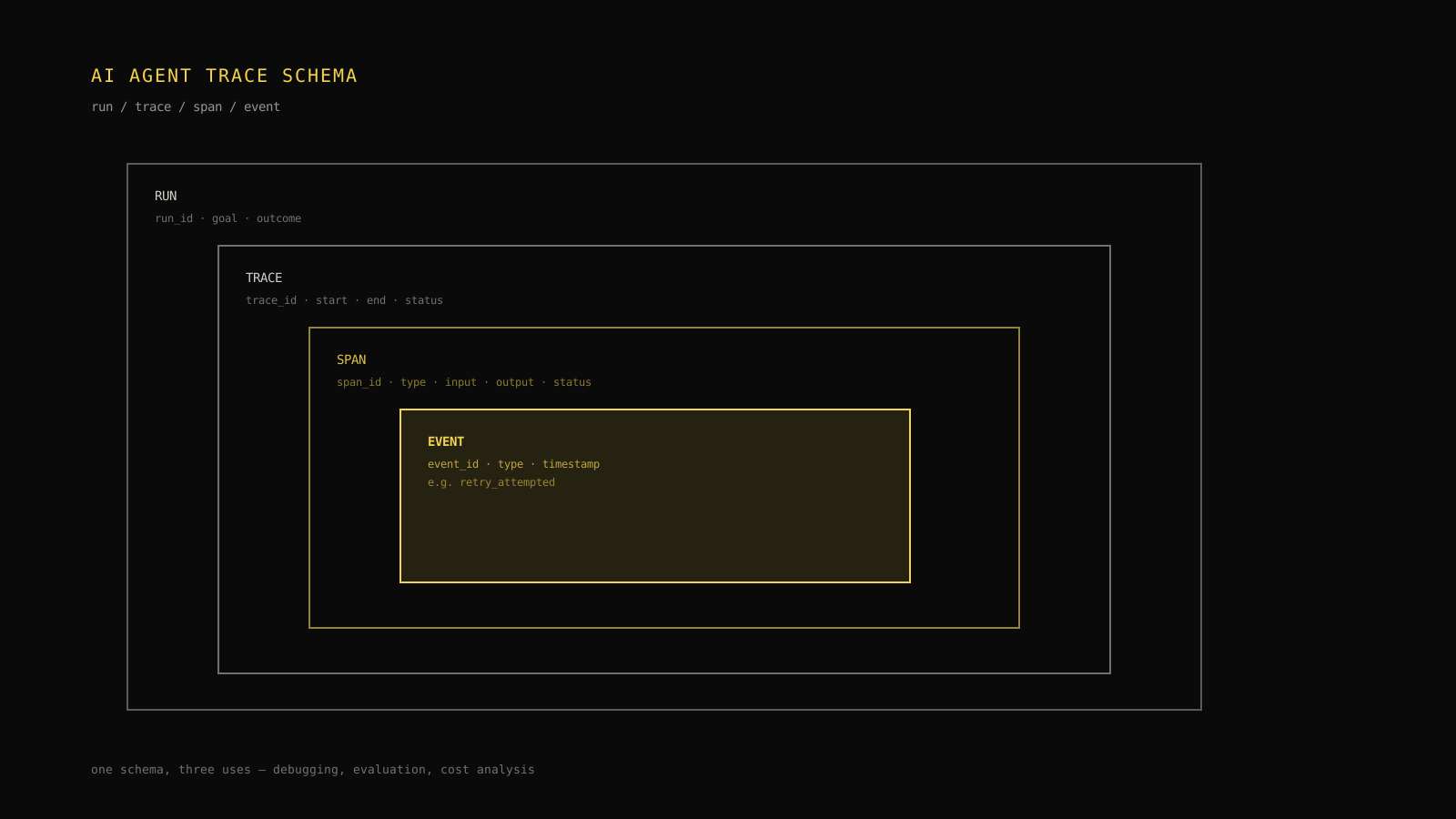
Parent relationships are preserved, so a model call inside a node inside the graph shows up beneath that node. The result is the tree in the diagram above, not a flat list of calls.
Field note: The graph you drew and the tree you get are different things. The graph is possible paths. The tree is the path that actually ran, with repeats. Debug the tree.
Set up tracing in a few lines
You need the SDK, an API key, and one handler.
TypeScript
Install the SDK and set TRACIFY_API_KEY in your environment. Then pass a handler in the invocation configuration of your compiled graph.
import { TracifyLangGraphHandler, traceAgent } from "tracify-sdk";

// One reusable handler. `graph` is your compiled LangGraph graph.
const handler = new TracifyLangGraphHandler();

export const answer = traceAgent(
  async (question: string) => {
    const result = await graph.invoke(
      { messages: [{ role: "user", content: question }] },
      { callbacks: [handler] },
    );
    return result.messages.at(-1)?.content;
  },
  { environment: "production", release: "2026-10-16" },
);
Wrapping the call in traceAgent is optional but recommended. Without it, the first chain the handler sees becomes the root of its own trace. With it, graph activity joins the run you started, and you can add session, user and release context in one place.
Python
Install the extra and add the callback to the config:
pip install 'tracify-sdk[langgraph]'
import tracify

graph.invoke(
    {"messages": [("user", question)]},
    config={"callbacks": [tracify.langgraph_callback()]},
)
The same rules apply: the callback records the graph, nodes, tools and model calls with their parents, and a surrounding trace_agent run groups them.
Which calls does it see?
The handler sees what the framework reports through callbacks. Anything your nodes do outside the framework, such as a direct HTTP request or a plain function that never touches a LangChain tool or model, produces no span by itself. If a node does important work that way, wrap that work in a span so it appears in the tree.
import { span } from "tracify-sdk";

async function loadCustomer(id: string) {
  return span("load_customer", () => crm.fetch(id), { type: "retrieval", input: id });
}
Read the tree
Open a run in the trace viewer and you will see the root at the top, then the nodes in the order they ran, with tools and model calls beneath them. Three views are worth knowing.
The waterfall: where did the time go?
The waterfall lays spans on a time axis. Long bars are slow steps; stacked bars that run side by side show parallel work. For a typical agent the slowest bars are model calls, and a tool with a long bar is often the real bottleneck. If a node takes seconds but contains no model or tool call, look for work that is not instrumented.
The graph view: what path did it take?
A graph view draws the steps as nodes and arrows, with repeats counted. For LangGraph this is the most natural view, because it mirrors the graph you built and shows which edges were used and how many times. A loop appears as a repeated arrow between the same two nodes.
The span detail: what went in and out?
Click a span to see its input, output, tokens and error. For a model call, check that the prompt contains what you expect. For a tool call, check the arguments the model chose and the result it received. Most agent bugs are visible at this level: a wrong argument, an empty result, a result so long it crowds out the task.
Avoid the three common mistakes
Mistake 1: recording the same model call twice
If you add the LangGraph handler and also wrap the provider client with a Tracify wrapper, the same model call can be recorded twice: once from the framework callback and once from the wrapper. Token counts and cost then double. Use either the framework's model callbacks or a wrapped provider for each model call, not both.
Which should you choose? The handler is simpler and gives you the graph structure, tools and models in one place. A wrapped provider client captures more provider-level detail, such as the raw usage breakdown and request ids, and works the same whether or not LangGraph is involved. If you use both, make sure the model calls inside the graph are recorded by only one of them.
Mistake 2: losing the run boundary
Without an outer run, each invocation becomes its own root, which is fine for a single call but awkward for a conversation that invokes the graph many times. Put the whole user task, including retries and follow-up invocations, inside one traceAgent or trace_agent so it appears as a single run with a single cost.
Mistake 3: not seeing the loop
A cyclic graph can run for a long time before any single span looks wrong. Every turn is a normal model call and a normal tool call. The problem shows only as a count. Look at the number of agent-to-tools passes per run and treat the tail as a metric.
| Symptom | What to check in the trace | Likely cause |
|---|---|---|
| Same tool, same input, many times | Tool inputs across turns | No state change between turns, so the stop rule never fires |
| Same tool, slightly different input | Model outputs across turns | Poor tool results, so the model keeps rephrasing |
| Alternating between two tools | Edge counts between nodes | Two nodes undoing each other's work |
| Many turns, rising input tokens | Input size by turn | History grows while no progress is made |
Bound loops and cost
Tracing tells you a loop happened. You still need limits to stop it from happening unobserved.
- Set a recursion or step limit in the graph configuration, so a runaway loop ends with a clear error instead of a large bill. LangGraph has a recursion limit setting for this purpose; check its current documentation for the exact option name in your version.
- Cap tool retries inside the tool itself, and return a clear failure message the model can act on, not a stack trace.
- Watch turns per run as a metric. The median shows normal behavior. The 90th percentile shows the tail you will pay for.
- Alert on cost per run or on daily spend, so a spike reaches a person within hours.
Record tokens and cost
The handler records token usage on model spans when the framework reports it, from the model output's usage fields. It does not guess a price. To see cost, record it with your own rates, either on the spans you create or through a wrapped provider client with a cost function. The token tracking guide explains how to attribute and roll up usage, and the cost estimator helps you plan what a graph will cost before it is in production.
If a graph streams model output, the handler notes the first token, so time to first token appears on streaming model spans. That number matters for chat-style interfaces, where perceived speed depends on the first word, not on the last.
Check the trace before you trust it
A trace is a measurement, and measurements have errors. Before you base decisions on one, run a few checks on a run you understand well.

Pick one source for each model call. Two sources record the same call twice.
| Check | How | What a failure means |
|---|---|---|
| Count the model calls | Compare spans with the calls you expect from the code | Extra spans suggest double recording; missing spans suggest uninstrumented paths |
| Compare token totals | Compare the run's sum with the provider's usage for that call | A gap means a call is untraced or counted twice |
| Follow the parents | Confirm tools and models appear under the node that called them | Flat or detached spans mean the callback parent ids were lost |
| Force an error | Make a tool throw in a test | The span should end with an error type and message, and the run should be marked failed |
| Run two tasks at once | Start two runs in parallel | Their spans must never mix |
Do this once when you set tracing up, and again after upgrading LangGraph or LangChain, because callback behavior is part of those libraries and can change between versions. If a check fails after an upgrade, pin the previous version while you investigate.
Turn a bad run into a regression test
When a trace shows a failure, you have a ready-made test case: the input, the path and the point where it went wrong. Save the input and the expected behavior, such as "stops after two tool failures" or "never calls the refund tool without an order id", and run it whenever the graph changes. The trace tells you the cause; the test makes sure it stays fixed. The wider practice is covered in the guide to agent monitoring.
Compare releases with traces
If you record the release on each run, you can compare two releases directly: turns per run, tokens per run, error rate and latency. A prompt or graph change that looks harmless in one example can shift the whole distribution. Compare the median and the 90th percentile, and look at the same kind of task in both releases.
Know when this approach is not enough
Callback tracing is a good default for LangGraph, but it has limits.
- It sees only what the framework reports. Work outside callbacks needs explicit spans.
- It records what happened, not whether it was good. A clean trace of a wrong answer is still a wrong answer. Pair tracing with evaluation, such as human review or automated scoring on sampled runs.
- It does not replace limits. Tracing a runaway loop does not stop it.
- It depends on library versions. Callback payloads can change between releases, so test after upgrades.
None of these is a reason to skip tracing. They are reasons to treat the trace as one instrument among several.
Handle privacy and failure
Graph state often contains user messages, retrieved documents and tool results. Traces capture inputs and outputs, so decide what you are willing to store.
- Obvious secrets such as bearer tokens and API keys are removed from captured text, and captured content is capped in size, but redaction is not a guarantee for personal data.
- The handler accepts options to turn off input and output capture if the content must not be stored.
- Telemetry should never break the agent. The handler is built so that tracing failures do not replace the graph's own result or error.
Decision rule: If a loop appears in more than a few percent of runs, change the graph or the tool before you raise any limit. A higher limit only makes the loop more expensive.
Security note: Tool arguments are model-generated and can contain data from earlier steps. Treat traces as sensitive, restrict access, and avoid sending tool results with credentials into the prompt in the first place.
Work through an example
A support agent has three nodes: classify, lookup (which calls an order tool) and respond. Users report that some answers take half a minute.
Opening a slow run shows 11 passes between lookup and the model. The order tool returned an error on each of the first eight passes: a timeout from a downstream service. The model, seeing an error message with no guidance, asked the tool again with the same arguments.
Three changes follow from the trace. First, the tool returns a short, specific failure message and stops retrying after two attempts. Second, the graph routes to a fallback response after two tool failures instead of looping. Third, an alert watches the share of runs with more than five passes.
Median latency barely changes, because most runs were fine. The 90th percentile falls from about thirty seconds to under ten. This is the pattern with agents: the average looks healthy while the tail hides the pain, which is why per-run data beats dashboards of averages.
Choose the next move
If you are starting from zero, the quickstart gets a first trace in minutes, and LLM tracing explained covers the concepts behind spans and runs. If your agent already runs in production, add the handler behind a flag, compare a day of traces with your current logs, and use the loop table above to look for the first long-tail run.
Checklist for tracing a LangGraph agent
- [ ] The user task is wrapped in one
traceAgentortrace_agentrun. - [ ] One handler instance is passed in the graph's callbacks.
- [ ] Each model call is recorded by exactly one source.
- [ ] Work done outside the framework is wrapped in spans.
- [ ] A recursion or step limit is set, and failures at the limit are visible.
- [ ] Turns per run and cost per run are tracked, with the 90th percentile.
- [ ] Input and output capture matches your privacy rules.
- [ ] Release and environment are recorded so changes can be compared.
A trace of a graph agent is the closest thing you have to a replay. Make sure it records the path taken, then use it every time an answer surprises you.
Frequently asked questions
How do I add tracing to a LangGraph agent?
Create a Tracify handler and pass it in the callbacks of your graph invocation: in TypeScript, new TracifyLangGraphHandler() inside the config passed to graph.invoke; in Python, tracify.langgraph_callback() in the config. Wrap the call in traceAgent or trace_agent so the whole task is one run.
What does the trace show for a LangGraph run?
A tree of spans: the graph and its nodes, the tools they call and the model calls inside them, with parent relationships preserved, inputs and outputs, latency, token usage when reported, and errors. Repeated passes through a loop appear as repeated branches.
Why are my token counts doubled?
Most likely the same model call is recorded twice, once by the LangGraph callback and once by a wrapped provider client. Use either the framework's model callbacks or a wrapped provider for each model call, not both.
How do I stop an agent from looping forever?
Set a recursion or step limit in the graph configuration, cap retries inside tools, return clear failure messages the model can act on, and add a fallback route. Then track turns per run so you can see loops before they become incidents.
Does tracing slow down the agent or change its behavior?
The handler records events as they happen and is designed so that telemetry failures do not replace the graph's result or error. As with any instrumentation, measure overhead on your own workload, and disable input and output capture if payloads are large or sensitive.
Practical field notes from the team building Tracify and operating AI agents in production.
Related posts
Next in the loop
How to Track LLM Token Usage Per Request, Run and Release
Keep reading →