Instrumenting AI agents for observability
A practical operating model for what to trace, how to structure spans and runs, when to alert, and how to triage failures in production AI agents.
In this guide12 sections
At a glance
You are the engineer who owns an agent in production, and something just broke — a wrong answer, a stuck loop, a cost spike, or a silent timeout — and you need to find the cause without re-reading a week of chat transcripts. This article gives you an operating model for instrumenting agents so that failures are diagnosable by construction: what a span should record, how spans nest into a run, which metrics deserve an alert, and how to triage a pile of failures down to one root cause. It does not cover model selection, prompt engineering technique, or evaluation methodology in depth — those are separate jobs with their own guides. Instrumentation is the discipline of making a run explainable after the fact, and everything below serves that one goal.
The operating model: trace, tier, triage
Three moves, applied in order, turn an unobservable agent into one you can operate with confidence:
| Stage | Question it answers | What you build |
|---|---|---|
| Trace | What actually happened inside this run? | A consistent span and run schema, applied to every call |
| Tier | Which signals deserve a human's attention, and how urgently? | A small set of tiered alerts tied to user impact |
| Triage | Given a pile of failures, which one do I fix first? | A grouping method that turns many failures into few root causes |
Each section below builds one part of this model, in the order you'll actually apply it: instrument first, then decide what to watch, then decide how to respond when it breaks.
Decide what a span actually records
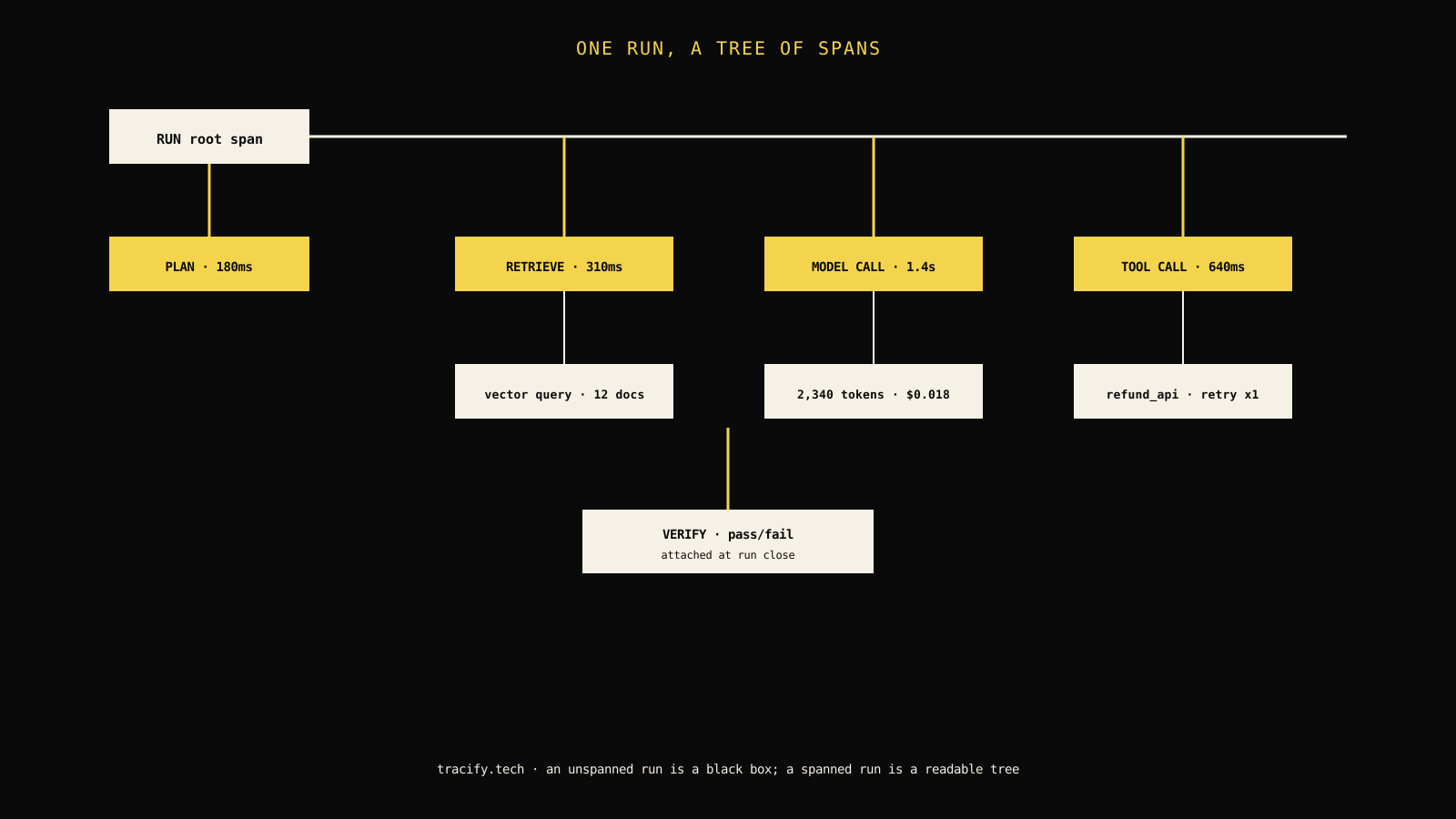
An agent run is not one event — it is a tree of them. A single customer request might trigger a planning step, two retrieval calls, three model calls, one tool call with a retry, and a verification step before the final answer goes out. If you only log the final answer, you can see that something went wrong but never where.
Give every span the same five fields
Whatever your tracing library, converge every span — model call, tool call, retrieval, or custom step — on the same minimal shape:
- Identity: a span ID, a parent span ID, and the run ID it belongs to. This is what lets a UI reconstruct the tree.
- Boundary: a name and type (
model_call,tool_call,retrieval,plan,verify) so spans are comparable across runs. - Timing: start and end timestamps, so you can compute duration and see where time actually goes.
- Payload: the input and output relevant to that step — the prompt sent, the tool arguments, the retrieved document IDs — trimmed of anything you wouldn't want to store.
- Outcome: success, failure, or retried, plus a structured error when it failed.
That fifth field is the one teams skip, and it's the one that makes triage possible later. A span that only records "it ran" gives you activity, not diagnosis.
Field note: The first time an on-call engineer has to explain an incident using only "the model probably hallucinated," that's the signal your spans aren't capturing the tool arguments and retrieval inputs that actually drove the output. Fix the schema before the next incident, not during it.
Attach identity that survives the request
A span tree is only useful if you can find the right tree. Attach a small, consistent set of identifiers to the root span of every run: a user or account ID, a session or conversation ID, a project or agent version ID, and — if the run was triggered by an upstream event — the ID of that event. This is what turns "find the failing run" from a log search into a filter.
// Illustrative: shape of a run's root span metadata, independent of any
// specific tracing SDK. The fields matter more than the exact call shape.
type RunMetadata = {
  runId: string;
  projectId: string;
  agentVersion: string; // prompt/version tag, not just a git SHA
  userId?: string;
  sessionId?: string;
  triggeredBy?: string; // upstream event id, if applicable
};

function startRun(meta: RunMetadata) {
  return {
    ...meta,
    startedAt: Date.now(),
    spans: [] as Array<{ name: string; startedAt: number; endedAt?: number; outcome?: "ok" | "error" | "retried" }>,
  };
}
Without agentVersion on the run, you cannot answer the most common triage question there is: did this start failing after the last prompt change? Teams that skip version tagging end up re-deriving it from deploy timestamps, which is slower and less exact.
Separate the run boundary from the conversation boundary
A common mistake is treating one chat session as one run. For a multi-turn agent, each turn is usually its own run, linked to a shared sessionId. This matters because your metrics — latency, cost, success rate — should be computed per run, not per session, or a single long conversation will silently dominate your averages and hide per-turn regressions.
Read the lower half of the schema: tools and retrieval
Model calls get instrumented first because they're the obvious cost and latency driver. Tool calls and retrieval steps get instrumented second, if at all — and that's backwards, because they're usually where correctness actually breaks.
Tool calls need arguments, not just names
Logging "called refund_api" tells you a tool ran. It does not tell you whether the agent passed the right order ID, the right amount, or a malformed date string that the API silently coerced. Record the resolved arguments (after any templating), the raw response, the HTTP or RPC status, and whether a retry occurred and why.
| Field | Why it matters | Common omission |
|---|---|---|
| Resolved arguments | Shows exactly what the agent decided to send | Logging the tool schema instead of the call |
| Raw response | Distinguishes a tool failure from a misinterpreted success | Logging only "success: true/false" |
| Retry reason | Separates transient infra issues from logic errors | No retry field at all |
| Latency | Tool latency often dominates total run time | Bundled into total run duration only |
Retrieval needs the document version, not just the ID
If your agent uses retrieval-augmented generation, a retrieval span that logs document IDs but not document versions becomes useless the moment the underlying corpus changes. A support agent that gave a correct answer in March against policy-v3 and a wrong one in April against policy-v4 looks, from the transcript alone, like a model regression. The retrieval span is what tells you the ground truth moved, not the model.
Build the run record before you build dashboards
Dashboards are a view over data; they are not the data. Before choosing chart types, decide what a single run record needs to contain so that every downstream metric — latency percentile, cost per task, failure rate — is a query over the same table rather than a separately maintained pipeline.
Compute derived fields once, at run close
Total duration, total token count, total cost, and final outcome should be computed once when a run closes and stored on the run record, not recomputed ad hoc by every dashboard query. This keeps your definitions consistent — "cost" means the same thing on the billing page and the debugging page — and it means a single slow query against raw spans doesn't become the bottleneck for every chart on the site.
Decision rule: If two different dashboards can show a different number for the same run's cost or latency, the derivation logic is duplicated somewhere. Move it to one place — computed at run close, stored on the run record — before adding a third dashboard.
Keep raw payloads separate from the queryable record
Store full prompts, full tool arguments, and full model outputs in a separate, cheaper store (object storage, a blob column) referenced by ID from the structured run record. Query the structured fields — outcome, duration, cost, span names — directly; fetch the raw payload only when an engineer opens a specific run to read it. This keeps your primary query path fast even as raw payload volume grows into terabytes.
Choose the metrics that justify an alert
Not every number worth graphing is worth paging someone over. The instinct to alert on everything you can measure produces an on-call rotation that ignores its pager within a month. Choose metrics along two axes: how directly they reflect user-visible harm, and how much noise they carry at the individual-run level.
Rank signal by user impact, not by ease of measurement
Task success rate and user-reported dissatisfaction are the hardest metrics to compute cleanly but the most directly tied to whether the product is working. Token count and raw latency are the easiest to compute but the least directly tied to user harm — a slow run that still succeeds is a worse problem than a fast run with elevated token count. Order your alerting priorities by the first axis, and use the easy-to-compute metrics as supporting evidence during triage, not as primary alert triggers.
Use rates and windows, not single-run thresholds
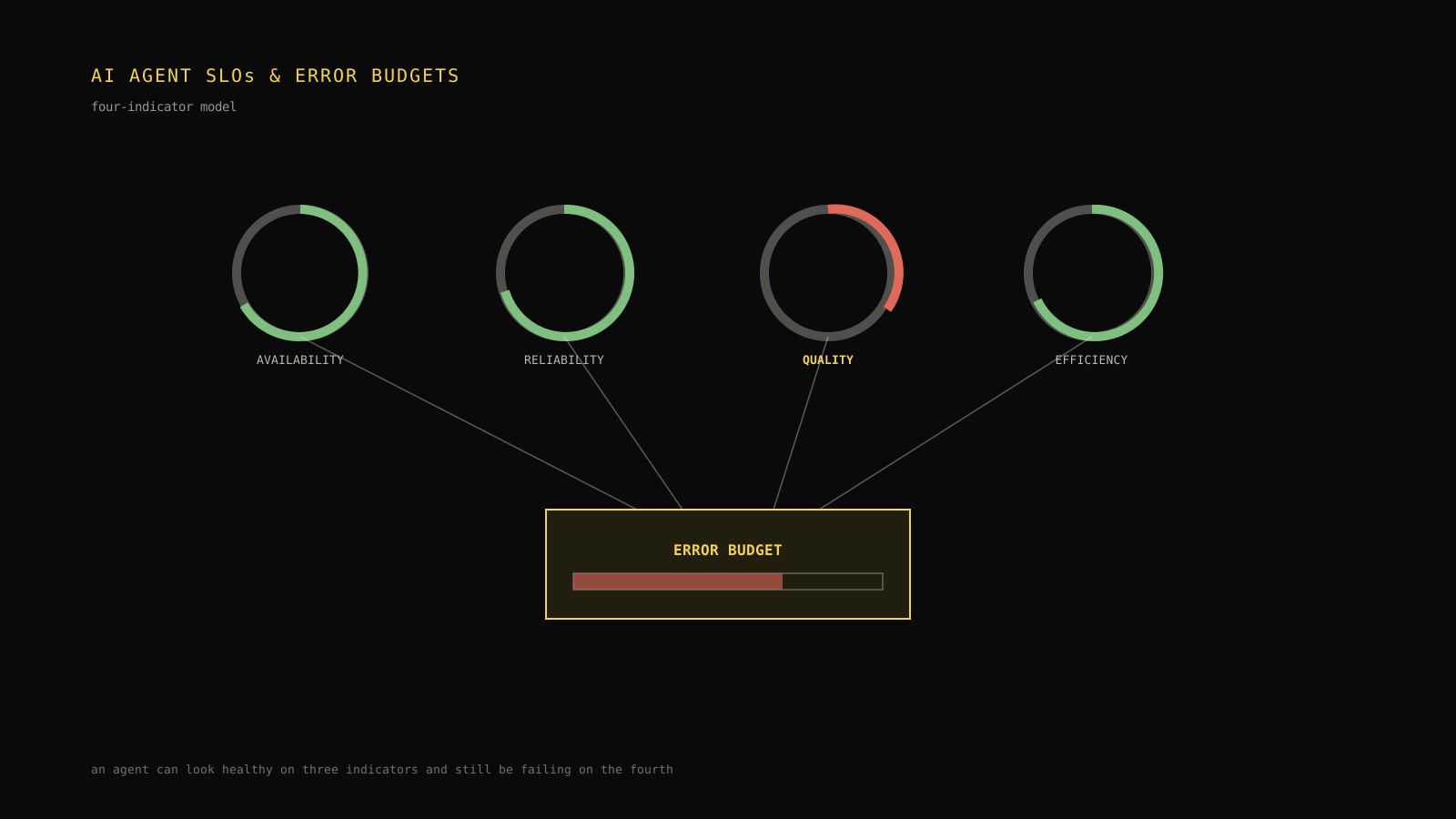
A single failed run is not an incident; it's Tuesday. Alert on sustained deviation — an error rate above baseline for fifteen minutes, a p95 latency above SLO for three consecutive five-minute windows — rather than firing on any individual run that fails or runs slow. This is the same error-budget thinking used in traditional SRE practice, adapted to the reality that AI agent runs have naturally higher per-run variance than a typical API endpoint.

Tier your alerts so paging stays rare
The visual above shows the shape: each tier requires more sustained, more user-visible evidence than the one before it, and only the top tier interrupts a person outside working hours.
Track cost and latency as first-class run fields
Cost and latency are the two metrics that turn from "nice to have" into "someone in finance is asking about this" the fastest, and they're the easiest to get wrong if you don't compute them at the span level.
Attribute cost to the step that spent it
A run's total cost is the sum of its model-call spans' token costs plus any metered tool costs (a paid search API, a paid enrichment call). Compute this per span, not just per run, so you can answer "which step is expensive" instead of only "this run was expensive." A run that costs ten cents because of one oversized retrieval context needs a different fix than a run that costs ten cents because it made six sequential model calls.
Track latency percentiles, not averages
Average latency hides the tail, and the tail is where user complaints come from. Track p50, p95, and p99 per run type (not blended across every agent in your system — a support agent and a research agent have different latency profiles by design). A p50 that looks healthy while p99 climbs is usually an early signal of a retry storm or a slow downstream dependency, visible in the spans well before it shows up as a support ticket.
Span-level cost is what turns a vague budget alert into a specific, testable hypothesis. If yesterday's median run cost $0.02 and today's costs $0.06 with no prompt or model change deployed, span-level data (retrieval: $0.001, model call: $0.015 → $0.048, tool call: $0.004) isolates the cause immediately: the model-call span alone tripled while retrieval and tool cost stayed flat, pointing at either a grown context window or a silent routing change to a costlier model tier — not a diffuse "everything got more expensive" mystery.
Triage failures by grouping, not by reading
When an alert fires and you have two hundred failed runs to look at, reading transcripts one at a time doesn't scale. The fix is a triage funnel: group failures by shared characteristics until you're looking at one representative case per root cause, then read only that one.

Group by failure signature first
A failure signature is a normalized fingerprint: error type, the span name where it occurred, and a coarse category of the input (not the raw input itself, which will be unique per run). Grouping two thousand failed runs by signature routinely collapses them into a dozen or fewer clusters. Most incidents turn out to be one or two clusters accounting for the overwhelming majority of failures — the "long tail" of one-off failures is usually not worth chasing during an active incident.
Find the first divergent span within a cluster
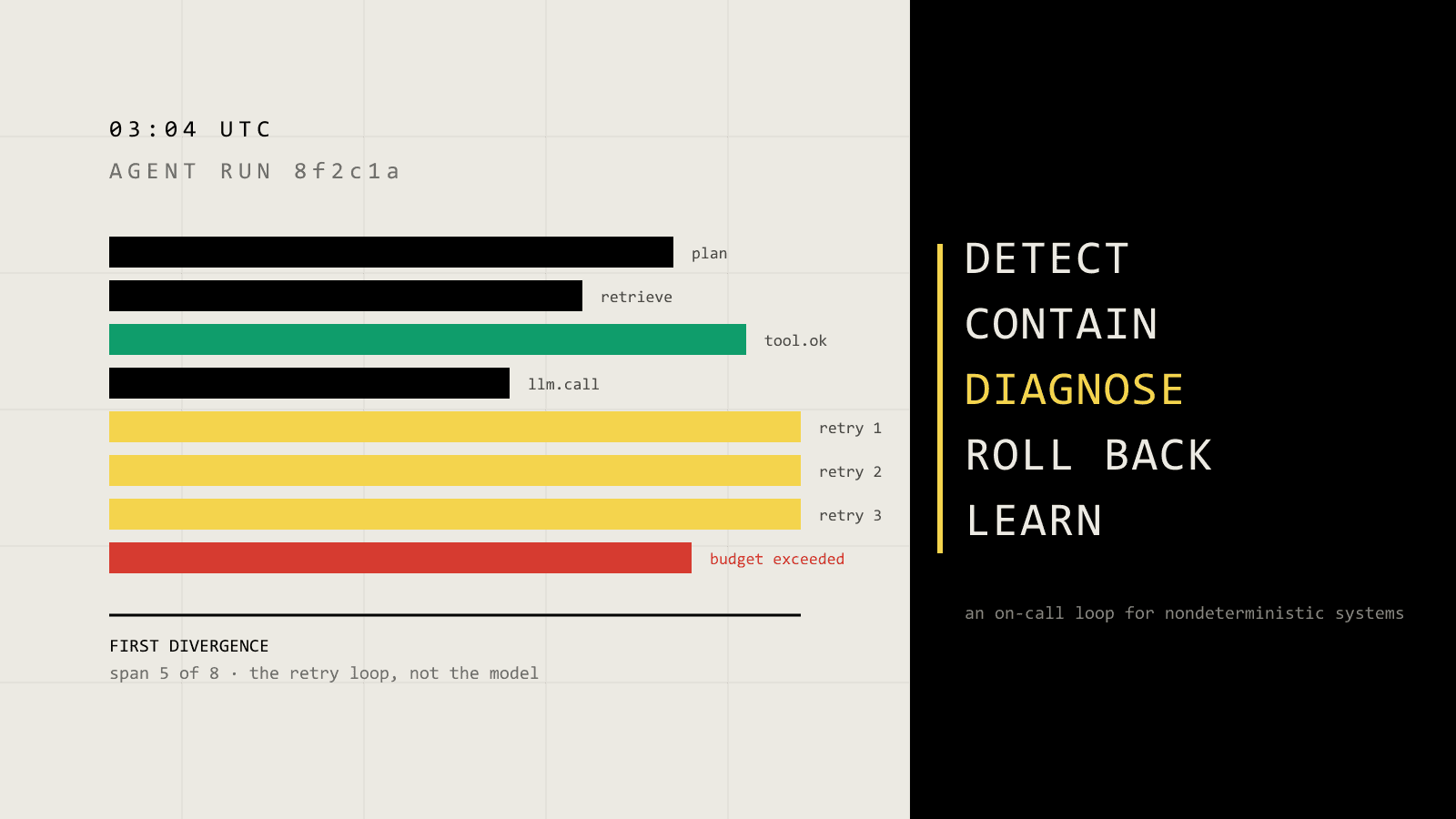
Once you have a cluster, pick two or three representative runs and align their span trees. The first span where they diverge from a known-good run is very often the root cause — a retrieval step that returned zero documents, a tool call that timed out, a model call that received a malformed prompt because an upstream template change shipped alongside an unrelated release. This is the payoff of consistent span naming: aligned trees are only comparable if every run uses the same span names for the same logical steps.
| Symptom in the transcript | Weak interpretation | Better next move |
|---|---|---|
| "The agent gave a wrong answer" | The model hallucinated | Check the retrieval span: did it return the right documents at all? |
| "The agent got stuck in a loop" | The prompt needs better instructions | Check tool-call spans for a retry storm caused by a downstream 5xx |
| "The agent was slow" | The model is slow today | Check span durations — is one specific tool call, not the model, the bottleneck? |
Don't let the cluster hide a second, smaller problem
A dominant failure signature can mask a smaller but more severe one — five runs failing with a data-leak-adjacent tool error can sit unnoticed inside a cluster of two thousand timeout errors. After grouping by frequency, do a second pass grouping by severity: any cluster touching security boundaries, financial actions, or PII handling gets reviewed regardless of size.
Protect the security boundary in your traces
Instrumentation that captures full prompts, tool arguments, and model outputs is, by construction, capturing whatever sensitive data flows through the agent — customer PII, internal documents, sometimes credentials passed as tool arguments by mistake. Treat trace storage as a security boundary, not just a debugging convenience.
- Redact at the span boundary, not after storage. Strip or mask known-sensitive fields (SSNs, card numbers, auth tokens) before the span is written, using a fixed allowlist/denylist rather than best-effort scrubbing after the fact.
- Scope trace access by project and role. An engineer debugging one customer's agent should not have standing access to every other customer's raw payloads. Tie trace visibility to the same project-level permissions that govern the rest of the platform.
- Set a retention window and honor it. Raw payloads with customer data should expire on a defined schedule; keep only the derived, non-sensitive metrics (duration, cost, outcome) indefinitely for trend analysis.
- Never let example or test runs share a project with production data. Sandbox and demo agents should write to isolated projects, not filtered views over production traces, so a permissions bug can't leak real customer data into a walkthrough.
None of this is optional once real user data flows through the agent, and it's meaningfully cheaper to build redaction into the span-writing path from day one than to retrofit it after a compliance review flags six months of unredacted logs.
Compare the meaningful trade-offs
Deeper instrumentation is not free, and pretending otherwise leads to either an unusable amount of stored data or spans so shallow they don't help during an incident.
Granularity vs. storage cost. Span-per-token tracing is rarely worth it; span-per-logical-step (model call, tool call, retrieval, verification) captures the decisions that matter without exploding storage. If you're unsure where to draw the line, draw it at "would an engineer want to see this as a separate row when debugging," not at "can I technically capture this."
Synchronous vs. asynchronous instrumentation. Writing spans synchronously in the request path adds latency to every run; writing them asynchronously (buffered and flushed) risks losing spans if the process crashes mid-run. Most production systems batch-flush spans asynchronously but keep the run's terminal outcome (success/failure) written synchronously, so at minimum you know a run happened and how it ended even if some span detail is lost.
Alert sensitivity vs. pager fatigue. Lowering alert thresholds catches problems earlier but increases false positives; every threshold change should be paired with a look at how many additional pages it would have generated over the last month of data, not just whether it "feels right" in the moment. A threshold nobody trusts gets muted, which is worse than no alert at all.
Roll instrumentation out without breaking the agent you're watching
A practical staged rollout looks like this: instrument one agent's model-call spans first (highest value, lowest schema risk), add tool-call and retrieval spans once the run-record schema is stable, then layer in tiered alerting only after you have at least two weeks of baseline data — alerting against a baseline of a few days produces thresholds that don't survive the first normal weekly traffic pattern.
Leave the reader with the next action
- [ ] Every span records identity, boundary, timing, payload, and outcome — including a structured error, not just a boolean.
- [ ] Tool-call spans capture resolved arguments and raw responses, not just names and a success flag.
- [ ] Derived run fields (cost, duration, outcome) are computed once at run close and reused by every dashboard.
- [ ] Alerts are tiered by sustained, user-visible impact, and page-tier alerts stay rare enough to trust.
- [ ] A failure-signature grouping step exists before anyone reads transcripts one at a time.
- [ ] Trace storage redacts sensitive fields at write time and enforces project-scoped access.
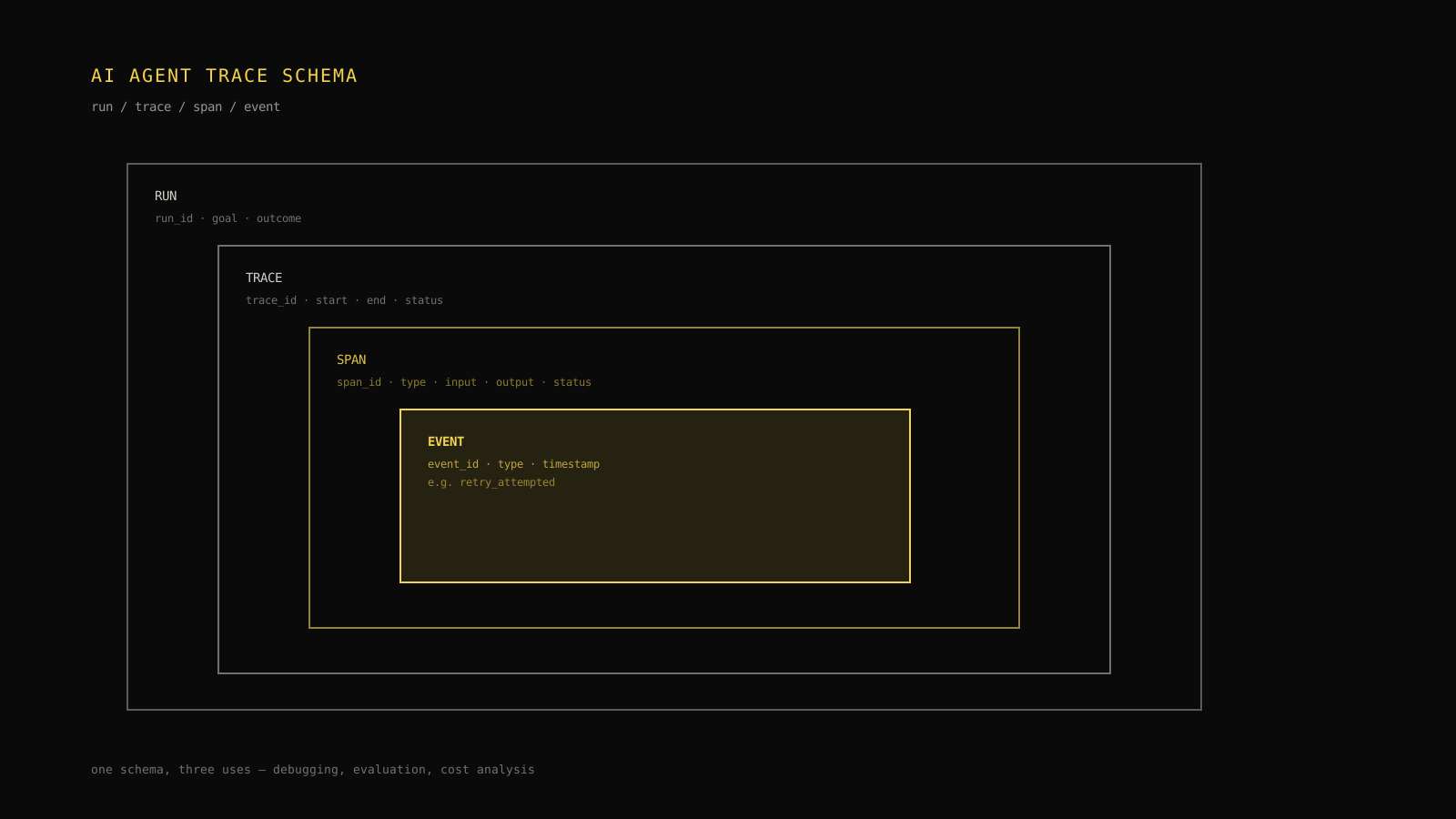
Start with the schema, not the dashboard. A team that agrees on the five span fields and enforces them in code review will out-debug a team with a prettier chart and an inconsistent trace. Once the schema is stable, tiered alerting and failure grouping become queries over data you already have, and the next production incident becomes a triage exercise instead of an archaeology dig. For the schema details that make spans comparable across an entire fleet of agents, see the walkthrough in a dedicated trace schema reference; for turning the alert tiers above into concrete SLOs and error budgets, see the companion guide on setting SLOs and error budgets for agents; and for what to do once a page-tier alert actually fires, see the incident response playbook on handling an AI agent incident in production.
Frequently asked questions
What's the minimum span schema worth enforcing before scaling an agent to production traffic?
Five fields on every span: identity (span ID, parent ID, run ID), boundary (name and type), timing (start/end), payload (trimmed input/output), and outcome (success, failure, or retried, with a structured error). Skipping the outcome field is the most common gap, and it's the one that blocks fast triage later.
Should every model call, tool call, and retrieval step get its own span, or is run-level logging enough?
Run-level logging alone can't localize a failure to a specific step. Instrument at the level of a logical decision the agent made — a model call, a tool call, a retrieval query — so a failure trace can point at the exact step that diverged from expected behavior.
How do you avoid paging on-call for every noisy single-run failure?
Tier alerts by sustained, user-visible impact: single-run anomalies go to the dashboard only, sustained drift during business hours goes to a chat channel, and only a sustained error-budget burn or user-visible failure spike pages someone. Review page-tier alert volume monthly — if it's high, the tiering needs adjustment, not the on-call rotation.
What's the fastest way to triage a batch of failed runs after an alert fires?
Group failures by a normalized failure signature (error type, span name, coarse input category) before reading any individual transcript. This typically collapses hundreds of failures into a handful of clusters; align span trees within the dominant cluster to find the first divergent span, which is usually the root cause.
What sensitive data ends up in agent traces, and how should teams handle it?
Full prompts, tool arguments, and model outputs routinely carry customer PII and sometimes credentials passed by mistake. Redact known-sensitive fields at the span-writing boundary, scope trace access by project and role, set and honor a retention window for raw payloads, and keep sandbox or demo agents writing to isolated projects rather than filtered production data.
Practical field notes from the team building Tracify and operating AI agents in production.
Related posts
Next in the loop
Monitoring vs observability: What actually explains an AI agent failure
Keep reading →