AI Observability Tools: How to Evaluate and Choose
A practical buyer's guide to AI observability tools: the categories that actually exist, the criteria that separate a real evaluation from a feature checklist, and an adoption order that avoids a stalled rollout.
In this guide9 sections
At a glance
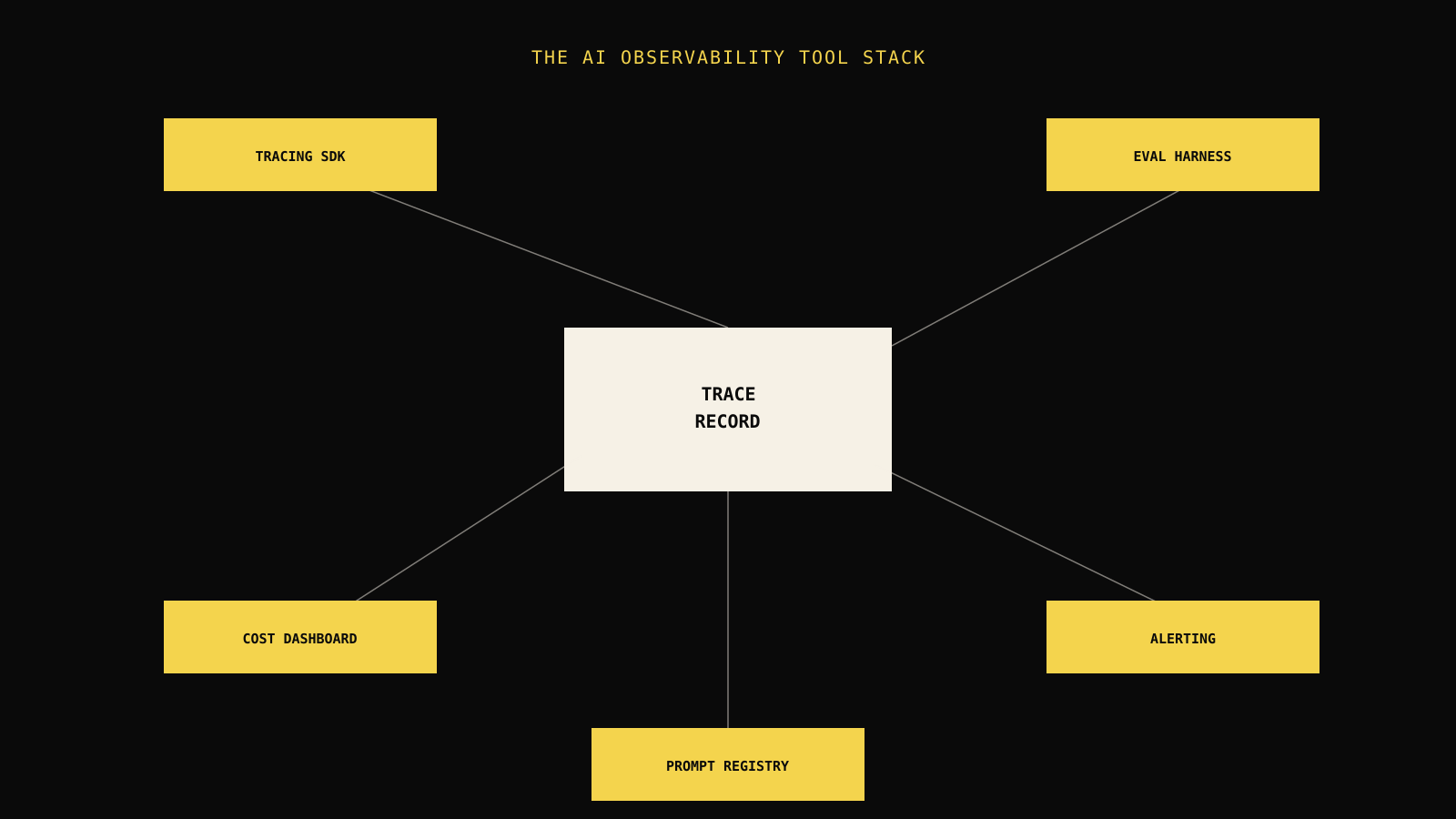
"AI observability tools" is used to describe a wide range of products that solve different problems: tracing SDKs that capture what happened, evaluation harnesses that judge whether it was good, cost and latency dashboards, alerting systems, and prompt/version registries. Buying the wrong category — or assuming one tool covers all five — is the most common reason AI observability rollouts stall after the pilot.
| Reader | Job | This guide's boundary |
|---|---|---|
| Engineer or platform owner evaluating tools | Choose a category and shortlist without re-learning the whole market from scratch | Explains categories, criteria, and adoption order; does not rank named vendors |
This guide assumes you already know what AI observability is and want to move from definition to a concrete tool decision. If you are deciding between an assembled toolchain and a single integrated platform, AI observability platform covers that specific trade-off in more depth.
The five real categories
Vendors market broadly, but the underlying tool space breaks into five functions. Understanding which one you actually need prevents buying a tracing tool and being surprised it does not evaluate quality, or buying an evaluator and being surprised it does not capture production traces.
| Category | Core job | Signal it is missing when absent |
|---|---|---|
| Tracing SDK / OpenTelemetry integration | Capture the causal path of a request through model calls, tools, and retrieval | "What actually happened in this one run?" goes unanswered |
| Evaluation harness | Score outputs against a rubric, ground truth, or policy | "Was it any good?" goes unanswered |
| Cost and latency dashboard | Attribute spend and time to workflows, models, and releases | "Did this get more expensive or slower?" goes unanswered |
| Alerting and routing | Turn a threshold breach into an owned, actionable notification | Regressions are visible only to whoever happens to check a dashboard |
| Prompt / version registry | Track prompt, model, and configuration changes over time | You cannot connect a quality shift to the change that caused it |
Tracing tools
A tracing tool's job is narrow and mechanical: capture every meaningful step of a request — prompt, model call, tool call, retrieval, retry — with a stable identifier connecting them, and make that trace inspectable later. LLM tracing explained covers the technical shape of this in detail, including OpenTelemetry span conventions for LLM calls.
// Illustrative: a minimal tracing wrapper around a model call.
import { startSpan } from "tracing-sdk";

async function callModel(prompt: string, runId: string) {
  const span = startSpan({ name: "model.call", runId, attributes: { model: "gpt-4.1" } });
  try {
    const result = await model.generate(prompt);
    span.setAttribute("output_tokens", result.usage.outputTokens);
    return result;
  } finally {
    span.end();
  }
}
A tracing tool alone will show you this call happened, its latency, and its token count. It will not tell you whether the output was correct — that is a separate category.
Evaluation harnesses
Evaluation tools apply a rubric, a rule, an LLM-as-judge grader, or a comparison to ground truth, and produce a score per run. The useful ones support running the same evaluation against a fixed regression set before and after a change, so a quality shift is attributable to a specific prompt, model, or data change rather than showing up as an unexplained trend. AI evaluation metrics covers choosing metrics that map to your actual failure modes instead of a generic composite score.
Decision rule: An evaluation tool that cannot run against a versioned baseline is a scoring calculator, not a regression-detection system. Confirm baseline comparison before treating "evaluation" as a checked box.
Cost and latency dashboards
These attribute spend and time to specific workflows, models, and releases, ideally down to the level of "this workflow's cost per successful task went up 30% after last week's release." Without workflow-level attribution, a cost dashboard tells you spend went up without telling you why, which limits it to a finance report rather than an operational tool.
Alerting and routing
Alerting turns a detected regression into a notification with an owner and a next action. The quality bar here is not "can it fire an alert" — every tool can do that — but whether the alert carries enough evidence (a representative trace, the metric that moved, the likely cause) that the recipient can act without first reconstructing context from scratch. AI agent monitoring covers designing alerts that lead to a decision instead of accumulating as noise.
Prompt and version registries
A registry tracks what changed and when: prompt template versions, model versions, retrieval index versions, and the release each production run used. Without this, a quality regression is visible but not attributable — you know something got worse on Tuesday, but not which of the four changes deployed that day caused it. Attribution, not just detection, is what turns a regression into a fixable bug instead of a mystery someone eventually gives up investigating. Prompt versioning in production covers this category specifically, including how to keep a rollback path available when a prompt change ships alongside a model or retrieval change in the same release window.
Who owns each category
Tool selection often stalls because no one has assigned ownership of the categories before the shopping starts. A tool nobody owns becomes a tool nobody maintains, regardless of how capable it is on paper.
| Category | Typical owner | What they need from the tool |
|---|---|---|
| Tracing SDK | Platform or backend engineer | Low integration friction, minimal performance overhead |
| Evaluation harness | ML/AI engineer or workflow owner | Custom grader support, baseline comparison |
| Cost and latency dashboard | Engineering lead or finance partner | Workflow-level attribution, exportable reports |
| Alerting and routing | On-call engineer or operations lead | Clear ownership routing, actionable evidence in the alert |
| Prompt/version registry | Whoever ships prompt or model changes | Fast versioning with minimal process overhead |
Naming an owner per category before evaluating tools changes the conversation from "which tool has the most features" to "which tool does the job the person actually responsible for this signal needs done." A tracing tool evaluated only by a platform engineer, without input from whoever owns evaluation, tends to under-weight evaluation flexibility — and vice versa.
Evaluation criteria that actually discriminate
A feature checklist ("supports tracing: yes, supports evaluation: yes") rarely separates a tool that will still be useful in six months from one your team will quietly abandon. Use criteria that predict long-term fit instead.
| Criterion | Weak signal | Strong signal |
|---|---|---|
| Integration effort | Requires rewriting application code around a proprietary SDK pattern | Wraps existing OpenTelemetry instrumentation with minimal code change |
| Trace depth | Captures only the final prompt and response | Captures retrieval, tool calls, retries, and intermediate reasoning steps |
| Evaluation flexibility | Only ships fixed, generic metrics | Supports custom rubrics and task-specific graders alongside built-ins |
| Baseline comparison | Shows current scores only | Compares runs against a versioned regression set automatically |
| Alert ownership | Sends to a shared channel | Routes to a configurable owner with attached evidence |
| Data handling | Unclear retention, no redaction controls | Explicit retention policy, field-level redaction, access controls |
| Pricing model | Scales unpredictably with trace volume | Predictable cost tied to usage you can forecast |
A worked comparison
Consider a team choosing between a point tracing tool and a broader evaluation-first tool for a customer support agent that calls three internal APIs.
| Observation | Weak interpretation | Better next move |
|---|---|---|
| The tracing tool shows every API call cleanly | "We have observability" | Ask: can it tell us if the answer built from those calls was correct? If not, it solves half the problem |
| The evaluation tool scores answers well in a demo | "Evaluation is solved" | Ask: does it capture the tool-call trace needed to explain why a low score happened? If not, you get a number with no cause |
Neither tool alone is wrong — they answer different questions. The failure mode is assuming either one, purchased alone, closes the loop. A team that has only bought tracing often believes it has "AI observability" simply because a dashboard exists; the gap only becomes visible the first time someone asks whether quality is trending up or down and nobody can answer with more than an anecdote.
This gap matters most for workflows with real consequences: a coding assistant that silently starts generating insecure patterns, a support agent that starts approving refunds it should escalate, or a document pipeline that starts missing a required disclaimer. In each case, tracing alone would show the workflow completing successfully — the failure is entirely in the evaluation layer, and a team without one will not see it until a customer, auditor, or support ticket surfaces it manually.

Build the case for a shortlist
Once you know your category needs, narrow the shortlist with a short structured process rather than an open-ended market scan:
- Name the workflow you are protecting. A single support agent, a coding assistant, a document pipeline — pick the one with the highest cost of silent failure.
- List the evidence that workflow needs. Does it call tools? Retrieve documents? Run multi-turn? Each answer adds required trace fields.
- Score three to five candidates against the criteria table above, using your actual workflow, not the vendor's demo data.
- Run a two-week pilot on real (or realistic synthetic) traffic before committing, and check whether the team actually opens the tool during an incident — adoption is the real test, not the sales call.
Field note: The tool your team keeps open during an actual incident, three months after adoption, is the one that won. A tool nobody opens after week two, no matter how capable, has failed regardless of its feature list.
An adoption order that avoids a stalled rollout
Buying every category at once — tracing, evaluation, cost dashboards, alerting, and a registry — in a single procurement cycle is the most common way an AI observability initiative stalls: too much surface area to configure well, and no working end-to-end example to show for months of setup.

A workable order:
- Instrument first. Get one workflow fully traced before evaluating anything. You need evidence before you can judge it.
- Evaluate second. Attach a small, hand-curated regression set (ten to twenty cases) to that traced workflow and get a baseline score.
- Alert third. Route the single most consequential metric to a real owner. Resist adding every possible alert at once.
- Govern last. Add retention policy, access controls, and cost budgets once the first three layers are proven useful — governance without working observability underneath it is process without substance.
Where teams overspend early
A common mistake is buying an enterprise-tier evaluation platform with dozens of built-in graders before the team has agreed on what "correct" means for their specific task. Custom, task-specific evaluation criteria matter more than the number of pre-built metrics a tool ships with — a tool with five well-chosen custom graders beats one with fifty generic ones nobody trusts.
Watch for migration risk before it becomes a problem
Vendor lock-in in this space usually shows up quietly: a proprietary trace schema that only that vendor's SDK can produce, an evaluation history that cannot be exported, or an alerting configuration tied to a workflow structure specific to that tool. None of these block adoption on day one, but they raise the cost of switching later, sometimes enough that a team stays with a tool it has outgrown simply because leaving is expensive. Ask any candidate tool directly: if we left tomorrow, what would we be able to take with us, and in what format? A vague answer here is itself informative.
Test integration against your actual deployment shape
A tool that only ships a Python SDK is a poor fit for a team running a TypeScript backend, no matter how strong its evaluation features are. Confirm SDK language support, whether the tool accepts standard OpenTelemetry spans as an alternative to a proprietary SDK, and whether it supports your actual runtime — serverless functions, long-running workers, or edge deployments each have different instrumentation constraints that a generic feature list will not surface.
A serverless function that spins down between invocations needs a trace exporter that flushes reliably before the process terminates, or spans get silently dropped at exactly the moments — cold starts, timeouts — when you most need the evidence. A long-running worker processing a queue of agent tasks needs the tool to handle high span volume without becoming a bottleneck itself. Ask for a reference architecture matching your deployment shape during the trial rather than assuming a generic "supports Node.js" checkbox covers the actual constraint.
Read the lower half visually
Cost is often the deciding factor once functional criteria are close, so weigh it deliberately rather than defaulting to whichever pricing page looks smallest at pilot scale.
| Pricing pattern | Risk at scale | What to ask before signing |
|---|---|---|
| Per-trace or per-event pricing | Cost scales with traffic growth, sometimes faster than revenue | What is the cost at 10x current volume, modeled explicitly? |
| Per-seat pricing | Cheap for small teams, expensive as more engineers need access | Does read-only or dashboard-only access have a lower tier? |
| Flat platform fee | Predictable, but may include unused capability | Does the tier include evaluation and alerting, or are those add-ons? |
When to reconsider an assembled open-source stack
Assembling OpenTelemetry-based tracing, an open-source evaluation library, and a self-hosted dashboard can work well for a team with the engineering capacity to maintain glue code and keep schemas consistent across tools. It tends to break down when the team scales past one or two engineers who understand the whole pipeline, because the seams between separately maintained tools are where identifiers drift and evidence gets lost during an incident, exactly when it matters most. AI observability platform covers this build-versus-buy trade-off directly.
Leave the reader with the next move
- [ ] The workflow you are protecting is named, with its worst-case failure cost stated explicitly.
- [ ] You know which of the five tool categories you actually need, not just "an observability tool."
- [ ] A shortlist of two to three candidates has been scored against your real workflow, not a demo.
- [ ] A two-week pilot on real traffic is scheduled before committing to a contract.
- [ ] The adoption order (instrument, evaluate, alert, govern) is agreed internally so scope does not balloon in week one.
Pick one workflow this week, list the evidence it needs, and run that list against two candidate tools before expanding the search further. A narrow, working pilot is worth more than a wide feature comparison spreadsheet nobody revisits after the contract is signed.
A note on team size
The right category mix scales with team size more than with company size. A five-person startup and a five-person platform team inside a large enterprise face similar constraints: limited engineering time to maintain glue code, and a strong preference for tools that work with minimal configuration. Team size, not company size, is usually the better predictor of whether an assembled toolchain or an integrated platform will hold up over the following year — a larger company with a small dedicated AI platform team faces the same integration-maintenance math as a startup, while a smaller company with a large, well-resourced infrastructure team can absorb more assembly overhead than the headcount alone would suggest.
Frequently asked questions
What are the best AI observability tools for a small team just getting started?
Start by matching category to need rather than a specific vendor: an OpenTelemetry-compatible tracing SDK plus a lightweight evaluation harness covers most early-stage needs. An integrated platform becomes worth the switch once you are maintaining glue code across three or more separate tools.
Do I need separate tools for tracing and evaluation, or should I look for one that does both?
Both approaches work. Separate best-of-breed tools give more flexibility per category but require you to maintain consistent identifiers between them. A single platform covering both reduces integration seams at the cost of some flexibility; weigh that against your team's engineering capacity for glue code.
How much should AI observability tooling cost relative to model spend?
There is no fixed industry ratio, but teams commonly budget observability tooling as a fraction of model API spend, then re-evaluate as trace volume grows. Model the cost at your expected 10x traffic scenario before committing to per-event pricing, since that is where costs often surprise teams.
Can open-source tools fully replace a commercial AI observability platform?
For tracing specifically, yes for many teams — OpenTelemetry is a mature, vendor-neutral standard. Evaluation, alerting, and governance tend to require more ongoing engineering investment to replicate in open source, so the trade-off is usually engineering time versus subscription cost, not capability.
How do I know if a tool actually covers agentic, multi-step workflows or just single LLM calls?
Test it against your hardest real workflow during the pilot, not the vendor demo. Confirm it captures tool calls, retries, and intermediate steps — not only the final prompt and response — and that evaluation can score the path taken, not just the final answer.
Practical field notes from the team building Tracify and operating AI agents in production.
Related posts
Next in the loop
What Is AI Observability? A Practical Definition for Production Teams
Keep reading →