The AI Monitoring Toolchain: Wiring Tools Into One System
A layer-by-layer decision framework for the tools teams actually use to monitor AI and agent systems in production — tracing, evaluation, cost, alerting, and logging — plus where build-versus-buy pays off and where it breaks.
In this guide12 sections
At a glance
Most teams don't fail at AI monitoring because they picked the wrong product. They fail because they bought — or built — pieces that never got wired into one system. A tracing SDK that can't hand its run ID to the alerting tool. A cost dashboard that updates a day after the spend happened. An eval score that lives in a spreadsheet nobody checks after the first sprint.
| Reader | Job | This guide's boundary |
|---|---|---|
| Engineer or platform owner assembling AI monitoring tooling | Decide what to build, what to buy, and how the pieces connect | Explains the monitoring layers, the wiring between them, and a build-versus-buy read for each; does not rank named vendors or repeat a general observability-versus-APM primer |
This guide assumes your team already ships an LLM or agent feature to production and is past the "do we need this" question. If you're still deciding what counts as a real AI observability purchase versus a feature checklist, AI observability tools covers that buying decision directly. This article picks up one step later: once you know the categories exist, how do you actually assemble them into something that pages the right person with the right evidence attached?
The core idea is a monitoring toolchain is judged by its weakest connection, not its strongest tool. A best-in-class tracer wired to a cost tool with no shared identifier is worse in practice than two mediocre tools that share one.
The monitoring signal chain
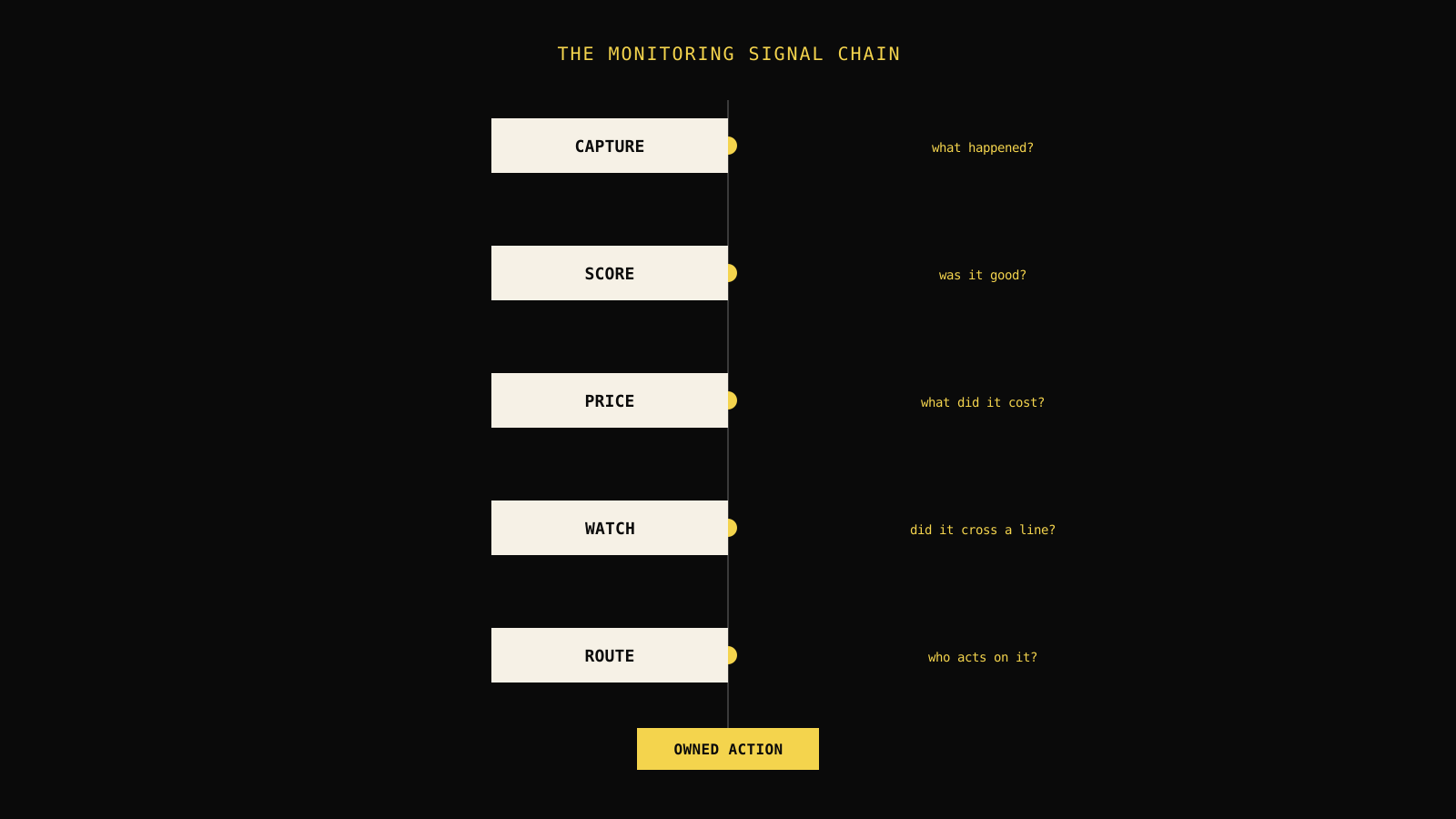
Name the parts before picking products. Every AI monitoring setup — however it's assembled — is really five functions wired in sequence:
- Capture — record what actually happened during a run: inputs, outputs, tool calls, retries, latency, token counts.
- Score — judge whether the run was good, using a rule, a model grader, or a human label.
- Price — attribute a dollar cost to the run and roll it up by feature, customer, or release.
- Watch — compare captured, scored, and priced signals against a threshold and decide whether something crossed a line.
- Route — get the crossing event to a specific owner with enough context to act, not just a notification that something happened somewhere.
Each stage can be a separate tool, a module inside one platform, or a script someone owns. What breaks teams isn't skipping a stage — it's treating each stage as an island. A cost spike (Price) that never reaches an alert (Watch) is invisible until the invoice arrives. An alert (Watch) that fires without a run ID attached forces the on-call engineer back into manual log spelunking during the exact minute that costs the most (Route failure).
Decision rule: Before adding a new monitoring tool, ask which stage it fills and what identifier it needs from the stage before it. If you can't name that identifier, the tool will produce alerts nobody can act on.
Why "monitoring" and "observability" aren't the same job
The two words get used interchangeably in vendor marketing, but they describe different postures. Observability is investigative — a human opens a trace and asks "what happened here, and why." Monitoring is standing watch — a system continuously compares signal against threshold and decides, without a human in the loop, whether anyone needs to be paged right now. Every observability tool can feed monitoring, but not every observability tool does monitoring on its own. A trace viewer that requires someone to open it and look is observability infrastructure; it becomes monitoring only once a rule watches it continuously and routes an exception.
This distinction matters for tool selection. A team that buys a rich trace explorer and calls it "monitoring" has bought half the system — the Capture stage — and skipped Watch and Route entirely. The gap shows up the first time a regression happens overnight and nobody was looking at the dashboard.
Capture: the tools that record what happened
Capture is the foundation every other stage depends on. If a run isn't recorded with enough structure, no downstream tool — evaluator, cost roll-up, or alert — has anything correct to work from.
What a capture tool needs to record
| Field | Why it matters | Common gap |
|---|---|---|
| Run and session identifiers | Lets every later stage correlate back to this exact execution | Generated inconsistently across services, breaking joins later |
| Full step sequence, including tool calls and retries | Distinguishes a slow-but-correct run from a masked failure loop | Only the final prompt/response is kept; intermediate steps are dropped |
| Token counts and model/version metadata | Feeds cost attribution and drift detection without re-deriving it | Version metadata captured at deploy time, not per-run, so a mid-day rollback is invisible |
| Timestamps at each step | Feeds latency SLOs and shows where time is actually spent | Only start/end captured, hiding which tool call caused the delay |
LLM tracing explained covers the mechanics of what a trace record should contain in more depth. The tool decision at this layer is mostly a standards question rather than a feature question: an OpenTelemetry-compatible tracing SDK gives you a vendor-neutral format that most downstream tools — evaluators, cost dashboards, and alerting systems — can consume without a bespoke integration. OpenTelemetry for LLM tracing walks through what that instrumentation looks like for an LLM or agent workload specifically.
Build or buy the capture layer?
Capture is the layer where building leans reasonable for more teams than any other stage, because the underlying standard (OpenTelemetry semantic conventions for gen AI) is mature and vendor-neutral. A small team can instrument spans directly and ship them to whatever backend they choose later, without being locked into one vendor's proprietary SDK format.
The trade-off shows up in retention, query performance, and UI. Raw span storage at meaningful trace volume gets expensive to run well, and building a usable trace explorer — filtering, correlated views across a multi-agent run, replay — is a multi-quarter project most teams underestimate. Most teams build the instrumentation (which is cheap and standard) and buy the storage and explorer (which is not).
Score: the tools that judge quality
Capture tells you a run finished. It doesn't tell you whether the answer was any good. That's a separate function, and it's the one teams most often skip until a quality regression reaches a customer.
Three ways runs get scored
- Deterministic checks — schema validation, exact-match against a known answer, a regex or business rule. Cheap, fast, zero false positives, but only covers questions with a mechanically checkable answer.
- Model-graded evaluation — an LLM judges another LLM's output against a rubric. Covers subjective quality (helpfulness, tone, faithfulness to retrieved context) that deterministic checks can't, but introduces its own calibration and cost.
- Human review — a person labels a sample of runs, usually the disagreement cases between a deterministic check and a model grader, or a stratified sample for ongoing calibration.
// Illustrative: a minimal scoring interface an evaluation tool exposes.
// Real graders return a confidence and rationale, not just a boolean.
type EvalResult = {
  runId: string;
  score: number;       // normalized 0-1
  method: "deterministic" | "model-graded" | "human";
  rationale?: string;
};

function needsHumanReview(result: EvalResult, threshold = 0.15): boolean {
  // Route borderline model-graded scores to a human queue instead of
  // trusting a single automated score near the pass/fail line.
  return result.method === "model-graded" &&
    Math.abs(result.score - 0.5) < threshold;
}
The pattern most teams converge on is a cascade: deterministic checks run on every production run because they're cheap; model-graded evaluation runs on a sample or on flagged runs; human review covers disagreement cases and periodic calibration of the model grader itself. LLM as a judge evaluation and AI evaluation metrics go deeper on choosing and calibrating a grader; this guide's scope stops at how the scoring layer plugs into the rest of the toolchain.
Decision rule: If you can't state the specific failure a metric is meant to catch, don't add it. A generic "helpfulness" score that nobody can act on when it drops is noise, not monitoring.
Build or buy the scoring layer?
Deterministic checks are almost always worth building — they're business logic specific to your product, and no vendor tool can write them for you. Model-graded evaluation is where buying usually wins for teams without a dedicated eval engineer: calibrating a judge model, tracking judge drift over time, and managing rubric versions is a real, ongoing engineering cost that a purpose-built evaluation tool has already absorbed for many teams.
Price: the tools that attribute cost
Cost tracking is the layer most likely to be bolted on after a surprise invoice rather than designed in from the start. That ordering shows in the tooling: a lot of "cost monitoring" is a monthly vendor bill with no connection to which feature, customer, or release drove the spend.
What cost attribution needs from the layers before it
Cost attribution can't function without Capture handing it per-run token counts, model identifiers, and a way to group runs by feature or customer — usually a tag or metadata field set at request time. This is the clearest example in the whole toolchain of a downstream stage being only as good as the identifier discipline upstream. AI agent cost attribution covers the tagging and rollup mechanics directly if this is the layer you're building next.
| Signal | What it catches | Typical latency to detect without dedicated tooling |
|---|---|---|
| Per-run token spend | A single expensive prompt path or retry loop | Days (visible only at monthly invoice) |
| Per-feature spend trend | A feature whose cost-per-task is quietly rising | Weeks, unless tagged and dashboarded |
| Per-customer spend | A single account driving disproportionate cost on a flat-rate plan | Often never, without per-customer tagging |
Build or buy the pricing layer?
Token-to-dollar math is simple arithmetic once you have per-run token counts and current model pricing — that part is cheap to build. What's expensive to build well is the rollup and attribution UI: grouping by feature and customer, handling multiple models and providers with different pricing, and keeping the dashboard current as pricing changes. Most teams build a lightweight per-run cost calculation close to the capture layer and buy (or use a platform's built-in) dashboard for the rollup and trend view, rather than building both ends.
Watch: the tools that decide something crossed a line
This is the layer most often missing entirely, even on teams with solid tracing and evaluation. Capture and Score can both be working correctly and still produce no page, because nothing is comparing their output against a threshold continuously.
Thresholds worth watching, and what breaks them
- Latency SLOs — p95/p99 per endpoint or workflow, not just an average that hides a slow tail.
- Error and retry rate — a rising retry rate is often an earlier warning than an outright failure rate, since retries mask user-visible errors while quietly multiplying cost.
- Quality score drift — a sustained drop in the Score layer's output, distinguished from single-run noise by a rolling window, not a single bad sample.
- Cost per task — a rise here, as in the opening scenario, frequently signals a retry loop or a model routing bug before it shows up anywhere else.
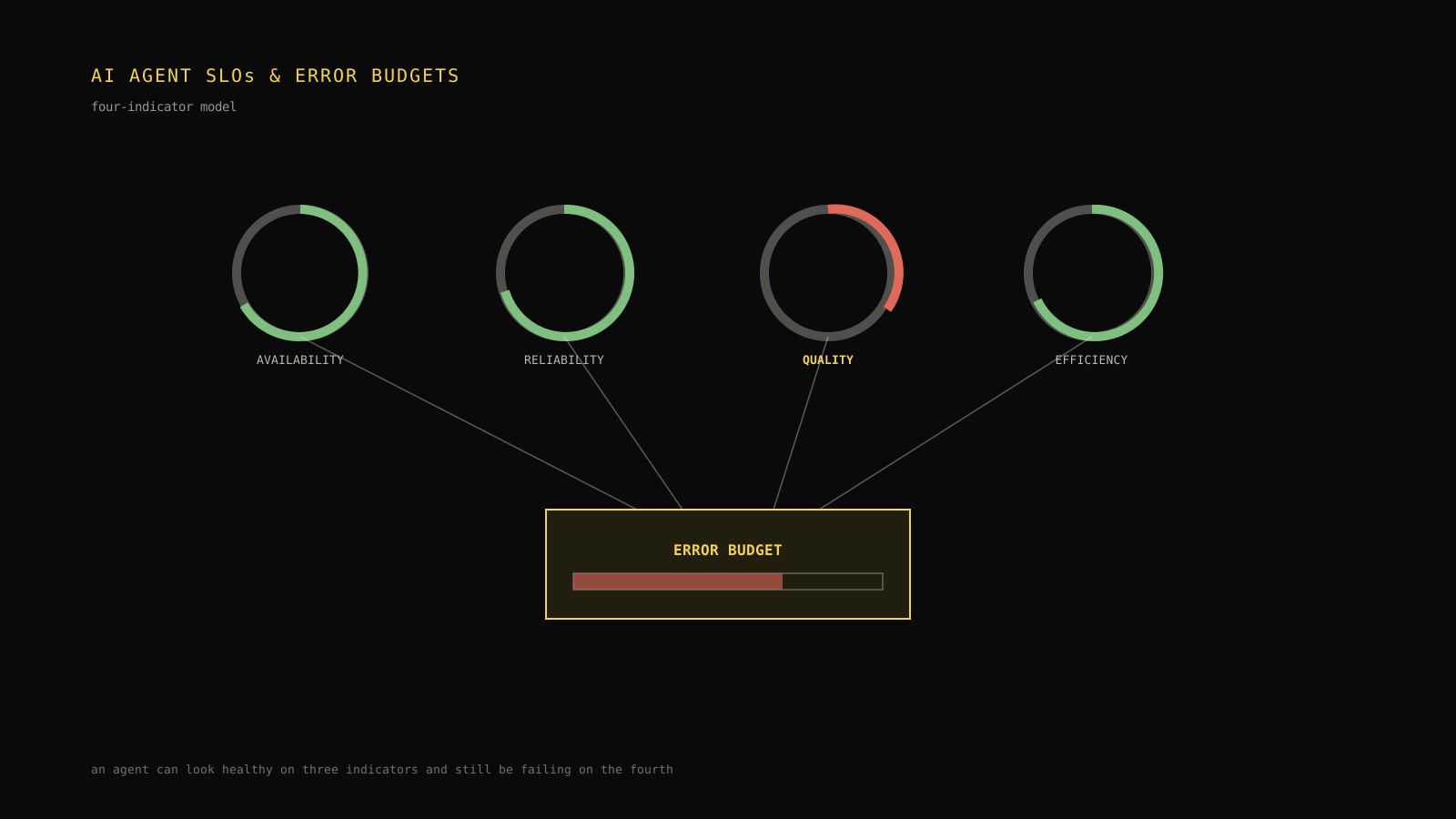
AI agent SLOs and error budgets covers how to set these thresholds so they page on a real regression instead of normal variance. The tool decision at this layer is less about the alerting mechanism itself — most teams already have a paging tool from their general infrastructure stack — and more about whether AI-specific signals (quality score, cost per task, retry rate) are actually wired into it, rather than living only in an AI-specific dashboard nobody's paging system watches.
Build or buy the watching layer?
Reuse your existing paging infrastructure rather than adopting a second, AI-specific paging system — that's a build decision, but a cheap one, since it's mostly wiring a webhook. What you're really deciding at this layer is whether your capture/score/cost tools can emit threshold-crossing events in a format your existing paging tool understands. Some platforms include this natively; assembled toolchains usually need a small glue script that polls or subscribes to each tool's signal and forwards crossings. That glue script is small, but it's also the piece most likely to silently break when one upstream tool changes its API — worth a health check of its own.
Route: getting the alert to someone who can act
An alert that fires without an owner, without the run ID that explains it, or at 3 a.m. for something that can wait until morning is worse than no alert — it trains the team to ignore the channel.

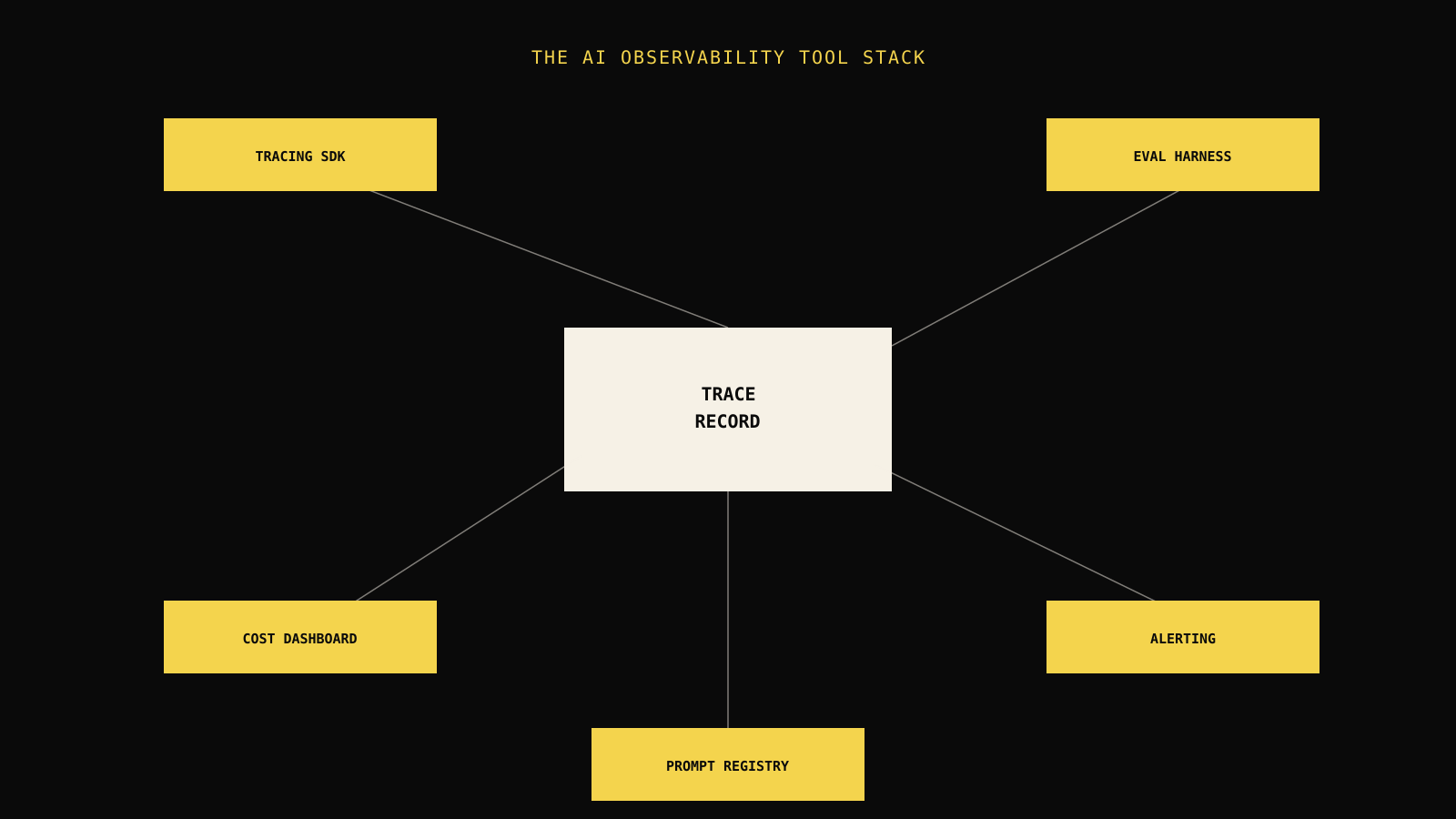
The diagram above is the single most common toolchain failure this guide sees in practice: three tools share a run identifier cleanly, and the fourth — usually alerting, because it was added last and separately — drops it. The result is technically a working alert and a practically useless one, because the person who gets paged has a threshold-crossing notification with no way to jump straight to the run that explains it.
An alert without a link to the run that triggered it is a notification, not evidence, and the gap between those two is what makes the first twenty minutes of an incident slower than it needs to be.
A minimal routing checklist
- The alert includes a direct link to the specific run, trace, or dashboard view that triggered it — not just a metric name and a number.
- The alert has exactly one named owner or on-call rotation, decided before the first incident, not during it.
- The alert states the severity and the expected response time, distinguishing "investigate this shift" from "page someone now."
- Alerts below a meaningful noise floor are batched into a daily digest instead of paging in real time.
AI agent incident response covers the on-call and severity side of this in more depth; this guide's scope stops at ensuring the tooling hands the responder enough evidence to start, not at running the incident itself.
Field note: A team we've seen repeatedly get this wrong ships a cost alert that says "spend up 40% today" with no link back to which feature or run caused it. The on-call engineer spends the first twenty minutes of the incident just finding the evidence the alerting tool already had and didn't attach.
Build versus buy, layer by layer
There's no single right answer to "should we build or buy our AI monitoring stack" — the right answer differs by layer, and it changes with team size more than with company size.

| Layer | Lean build when | Lean buy when |
|---|---|---|
| Capture | You want a vendor-neutral format and have capacity to run trace storage | You need a working explorer UI fast and don't want to run storage infrastructure |
| Score | The check is deterministic business logic specific to your product | You need calibrated model-graded evaluation without a dedicated eval engineer |
| Price | You already have per-run token counts and just need arithmetic | You need multi-model rollups, trend dashboards, and per-customer views |
| Watch | You already have paging infrastructure and just need a webhook | You need AI-specific thresholds (quality drift, cost per task) with no existing equivalent |
| Route | Your paging and on-call rotation already exist | You're standing up on-call for the first time alongside the monitoring tooling |
AI observability platform covers the specific trade-off between an assembled, best-of-breed toolchain and a single integrated platform in more depth — including the identifier-consistency argument that shows up throughout this guide as the recurring failure point.
The seam cost nobody puts on the vendor comparison sheet
Every tool boundary in an assembled toolchain is a place where a shared identifier, a shared schema, or a shared timestamp format can drift. The seams between separately maintained tools are where evidence gets lost, and they tend to break during the exact incident when you need the evidence most. This isn't an argument for always buying an integrated platform — plenty of teams run assembled toolchains successfully — but it is the cost that belongs in the build-versus-buy decision and usually doesn't make it onto a feature comparison spreadsheet.
A rough way to price that seam cost: count how many places a run identifier, a cost tag, or a severity label has to be independently generated or copied across your chosen tools. Each shared identifier is a place a future schema change can silently break the chain — not a one-time integration cost, but an ongoing maintenance tax.
A worked adoption order
Carry one team through the decision. A five-person team shipping a customer support agent has no monitoring tooling yet and a fixed quarter of engineering time to spend on it. In order:
- Instrument Capture first, using an OpenTelemetry-compatible SDK. This is the one layer every later decision depends on, and it's the cheapest to get right early versus retrofit later.
- Add deterministic Scoring for the checks that are pure business logic — did the agent call the refund tool only within policy limits, did the response include a required disclaimer. This catches real regressions with near-zero false-positive cost.
- Wire Price off the same capture data, tagging requests by customer tier at request time so a cost spike can be attributed without reconstruction later.
- Add Watch for the two or three thresholds that would have caught your worst past incident — not a dashboard with forty metrics nobody reviews.
- Confirm Route last, verifying every alert type reaches a named owner with a direct link to the evidence, before declaring the toolchain "done."
Model-graded evaluation and a dedicated cost dashboard UI are deliberately last, not first — a team with working Capture, deterministic Score, basic Price, and one wired alert catches most production incidents before it needs a full evaluation-platform seat for every engineer.
What this framework doesn't solve
This guide stops at wiring the signal chain together. It doesn't cover how to calibrate a specific model-graded rubric, how to design SLO thresholds that avoid alert fatigue, or how to run the incident itself once paged — each of those is a deeper topic with its own trade-offs, linked above. It also doesn't rank specific vendors in each category; the right product choice depends on your existing paging infrastructure, your team's OpenTelemetry familiarity, and your data residency requirements, none of which a general guide can answer for you.
It's also worth being explicit about what a well-wired toolchain does not guarantee: it tells you that something crossed a threshold and hands you the evidence to investigate quickly. It doesn't replace the judgment call about whether to roll back, hold, or ship a fix forward — that decision still needs a human with context the tooling can surface but not make.
Leave the reader with the next move
- [ ] Every stage — Capture, Score, Price, Watch, Route — has an owner, even if that owner is "nobody yet, on the roadmap."
- [ ] A single identifier (run ID) survives from Capture through to the alert a responder sees.
- [ ] At least one deterministic check and one threshold-based alert exist for your highest-risk workflow today, not just a dashboard someone has to remember to open.
- [ ] The build-versus-buy call for each layer is written down somewhere, with the reason, so it survives a team change.
- [ ] The rendered toolchain has been tested against your hardest real workflow, not a clean demo case.
Start with whichever stage is weakest today, not whichever is easiest to buy. A team with strong tracing and no alerting gets more from wiring a threshold into existing paging this week than from evaluating a third trace explorer.
Frequently asked questions
What's the minimum viable AI monitoring toolchain for a small team?
OpenTelemetry-compatible tracing (Capture), a handful of deterministic checks specific to your product (Score), per-run cost tagging at request time (Price), and two or three thresholds wired into your existing paging tool (Watch and Route). Model-graded evaluation and a dedicated cost dashboard can come later.
Do I need a separate alerting tool for AI monitoring, or can I reuse our existing paging system?
Reuse your existing paging system in almost every case. The gap is rarely the paging mechanism itself — it's that AI-specific signals like quality drift and cost per task aren't wired into it yet. Adding that wiring is usually cheaper than adopting a second paging system.
How do I stop alerts from breaking when we add a new monitoring tool?
Treat the run identifier as a contract every tool in the chain must preserve. Before adding a tool, confirm it can both accept and emit that identifier; if it can't, budget for a small adapter rather than discovering the gap during an incident.
Should model-graded evaluation run on every production run or a sample?
Most teams sample, running deterministic checks on every run (cheap) and model-graded evaluation on a percentage or on flagged/borderline runs (cost and latency add up at full volume). Increase the sample rate temporarily around a release to catch regressions faster.
How often should the monitoring toolchain itself be reviewed, separate from the AI system it watches?
Review it at least once a quarter, and immediately after any incident where an alert fired late, without evidence, or not at all. Toolchain drift — a schema change in one tool silently breaking a downstream integration — is itself a failure mode worth monitoring for.
Practical field notes from the team building Tracify and operating AI agents in production.
Related posts
Next in the loop
AI Observability vs MLOps: Where Each Discipline Starts and Stops
Keep reading →