AI Observability Metrics That Matter: Latency, Cost, Quality, and Reliability
The specific AI observability metrics worth tracking — latency percentiles, cost per run, tool-call success rate, groundedness, and reliability — and how to interpret each one correctly instead of reading a single number in isolation.
In this guide16 sections
At a glance
The metrics that matter for AI observability are latency, cost, reliability, groundedness or quality, and tool-call success — and the value of each comes less from its raw number and more from what it is compared against: a percentile instead of an average, a per-workflow baseline instead of a global one, and, critically, another metric it commonly trades off against. This article is a deep dive on the metrics themselves and how to interpret them correctly; for how to lay them out on a screen, see the AI observability dashboard guide.
| Reader | Job | Boundary |
|---|---|---|
| Engineer or team lead deciding what to measure and how to read it | Choose the right metrics and avoid the common misreadings that turn a real trade-off into an apparent free win | Focused on metric selection and interpretation, not dashboard layout (see AI observability dashboard) or rollout process (see AI observability best practices) |
The operating model: one run record, five connected metrics
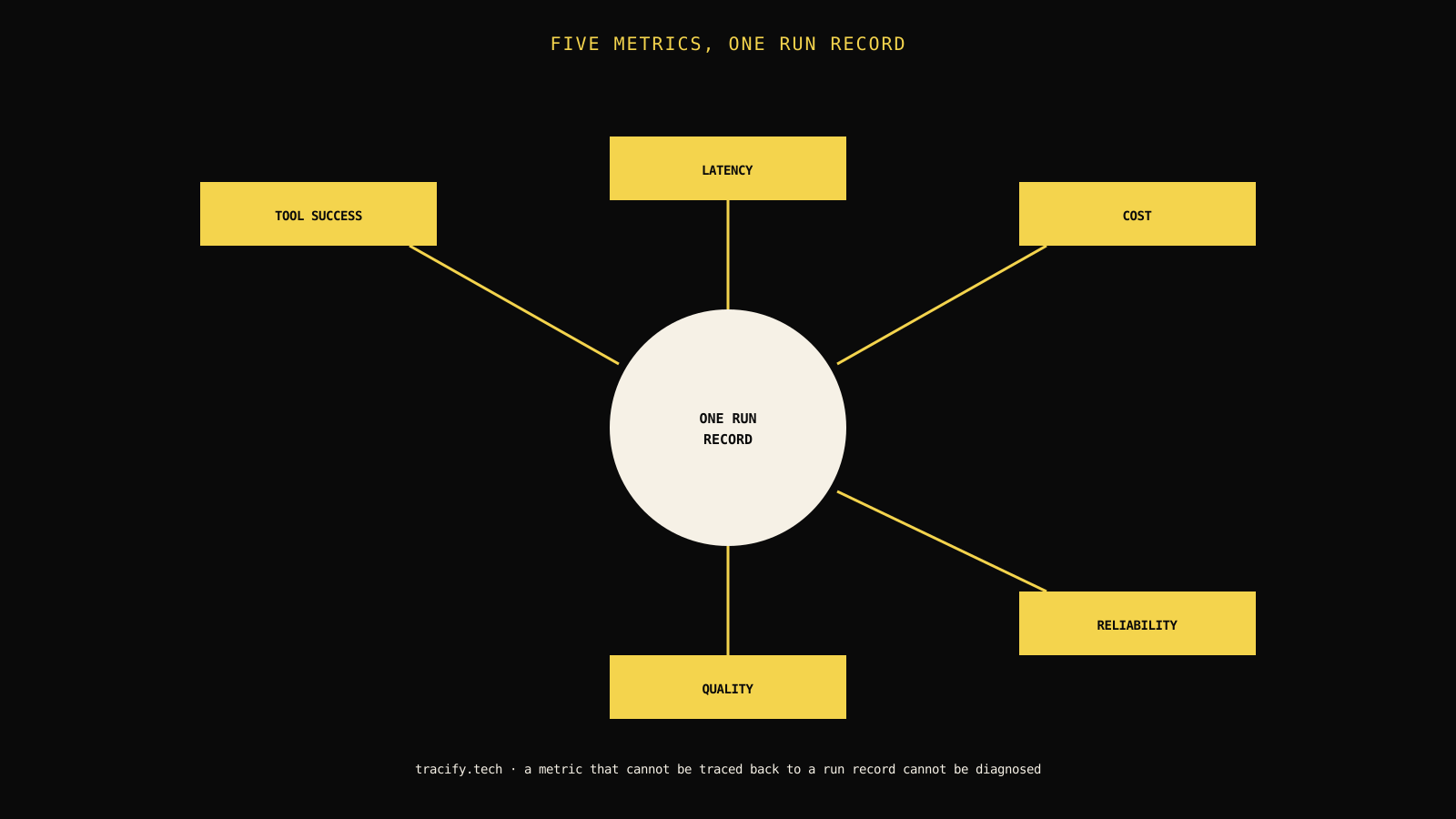
The single most important structural decision in AI observability metrics is not which ones you track — it is whether they are all attached to the same run identity, so any two of them can be compared for the same request instead of read as separate aggregate trends.

| Metric category | What it measures | The metric it most commonly trades off against |
|---|---|---|
| Latency | How long a run takes, end to end and per step | Quality — a faster model or shorter context often costs accuracy |
| Cost | Spend per run, per workflow, per model | Quality — the cheapest model for a given task is rarely the most accurate one |
| Reliability | Error rate, timeout rate, retry rate | Latency — aggressive retries improve success rate but raise tail latency |
| Groundedness / quality | Whether output is accurate, grounded, and policy-compliant | Cost and latency — the checks that improve quality usually add both |
| Tool-call success | Whether tool invocations succeed and are correctly interpreted | Reliability — a flaky tool degrades both dimensions together |
A metric read in isolation almost always tells an incomplete story, because nearly every metric in this list has a natural trade-off partner that a single-metric dashboard will not show. The scenario above — cost down, quality quietly down with it — is the single most common version of this pattern in production AI systems.
Latency: read percentiles, not averages
Average latency is the most commonly misread metric in this entire list, because an average is dominated by the bulk of fast requests and can look completely healthy while a meaningful share of users experience a much slower tail.

Which percentile to track for which decision
| Percentile | What it represents | When to use it |
|---|---|---|
| p50 (median) | Typical experience for a normal request | General trend-watching, not incident response |
| p95 | Experience for the slower-than-typical fifth of requests | Setting SLOs and summary-tile thresholds |
| p99 | Experience for the worst-case tail | Debugging specific complaints and tail-latency incidents |
Decision rule: If your summary dashboard only shows one latency number, make it p95, not the average. p95 is close enough to typical experience to track for trend purposes while still surfacing meaningful degradation that an average would smooth away entirely.
Break latency down by step, not just end to end
End-to-end latency tells you something is slow; it does not tell you what. For any multi-step workflow, latency should be attributed per step — per model call, per tool call, per retrieval step — so a regression can be localized instead of requiring a full manual trace review every time. A single end-to-end latency number without per-step attribution turns every latency regression into a manual investigation that a properly instrumented breakdown would have made a five-second lookup.
Cost: track per-workflow, not aggregate spend
Aggregate monthly spend is useful for a finance conversation and nearly useless for an engineering decision, because it cannot tell you which workflow, which model, or which specific change drove a change in cost.
// Illustrative: attributing cost to the dimension that actually explains a change.
type CostRecord = {
  runId: string;
  workflow: string;
  model: string;
  inputTokens: number;
  outputTokens: number;
  toolCallCost: number;
  totalCostUsd: number;
};

export function costByWorkflow(records: CostRecord[]): Record<string, number> {
  return records.reduce((acc, r) => {
    acc[r.workflow] = (acc[r.workflow] ?? 0) + r.totalCostUsd;
    return acc;
  }, {} as Record<string, number>);
}
Field note: Break cost down by workflow and by model at minimum, and add a tool-call cost component separately from model-call cost wherever tools carry their own per-invocation charges. A cost spike that looks like "the model got more expensive" is frequently actually "a tool retry loop tripled the number of calls," and only a decomposed view distinguishes the two.
Reliability: separate the failure types
"Error rate" as a single number hides which of several very different failure types actually occurred, and each type points at a different fix.
| Failure type | What it means | Typical fix |
|---|---|---|
| Hard failure (exception, non-200) | The system clearly and visibly failed | Standard error handling and retry logic |
| Timeout | The system did not respond within a bound | Investigate whether the bound is too tight or a dependency is slow |
| Silent degraded success | The system returned a response, but a low-quality or incorrect one | Requires a quality check, not just an error-rate check, to detect at all |
Silent degraded success is the most dangerous of the three because it never shows up in a traditional error-rate metric at all — the request "succeeded" by every infrastructure-level measure while still failing the user. This is the specific reason reliability metrics for AI systems cannot be borrowed wholesale from traditional API monitoring; a 200 response is necessary but not sufficient evidence that the request actually succeeded.
Groundedness and quality: define a task-specific baseline
A generic quality score with no task-specific grounding is close to meaningless, because "quality" means something different for a summarization task than for a code-generation task than for a classification task.
Build the quality metric around what the task actually needs
- Summarization or drafting tasks — groundedness against source material is usually the primary signal; factual accuracy matters more than stylistic polish.
- Classification or extraction tasks — precision and recall against a labeled evaluation set, closer to traditional ML metrics than to generative-quality scoring.
- Code-generation tasks — whether generated code compiles or passes tests is a stronger signal than a subjective quality rating.
- Open-ended conversational tasks — a combination of groundedness, policy compliance, and a task-completion signal (did the conversation resolve the user's actual need).
Decision rule: Resist adopting one universal quality score across every workflow type in your system for the sake of dashboard simplicity. A single blended score across dissimilar task types will average away the specific signal each task type actually needs, producing a number that looks stable while hiding real movement in any one workflow.
Tool-call success: measure interpretation, not just invocation
A tool call can succeed at the infrastructure level — no error, a response returned within the timeout — while still producing a bad outcome if the calling system misreads the result. Tool-call success rate needs to capture both layers.
| Layer | What to measure | Why both matter |
|---|---|---|
| Invocation | Did the tool respond successfully, without error or timeout | The infrastructure-level signal, necessary but not sufficient |
| Interpretation | Did the calling system correctly use the tool's result in its next step | The layer that actually determines whether the tool call helped or hurt the outcome |
A tool with a 99% invocation success rate can still be the root cause of a real quality problem if its results are frequently misinterpreted by the calling system, and a metrics setup that only tracks invocation success will never surface that gap. See agentic AI observability for a deeper treatment of tracking tool-call interpretation specifically.
Set alert thresholds against each metric's own shape, not a generic rule
A generic alerting rule — "alert if any metric moves more than 10% week over week" — treats every metric as if it behaved the same way statistically, and it does not. Latency percentiles, cost, and quality scores each have different natural variance, and a threshold that works for one will be far too sensitive or far too loose for another.
| Metric | Natural variance | Threshold approach that tends to work |
|---|---|---|
| p95 latency | Can spike briefly for legitimate reasons (traffic bursts, upstream provider variance) | Alert on sustained elevation over a rolling window, not a single-sample spike |
| Cost per run | Usually stable day to day for a fixed workflow and model | A tighter threshold is appropriate; unexplained movement is more often meaningful |
| Groundedness score | Naturally noisier at low sample sizes | Require a minimum sample size before alerting, to avoid false alarms from small-sample variance |
A one-size-fits-all alerting threshold across dissimilar metrics produces both false alarms and missed regressions, often at the same time on different metrics, because the threshold that is too loose for latency is often simultaneously too tight for cost. Tune each metric's threshold against its own historical variance rather than applying a single organization-wide rule.
Work through a realistic example
Return to the opening scenario: a support-summarization workflow switched to a cheaper model, and cost dropped 30% the same week groundedness began a slow three-week decline.

| Observation | Weak interpretation | Better next move |
|---|---|---|
| Cost dropped 30% immediately after the model swap | "Clean win, no further action needed" | Pull groundedness scores for the exact same population of runs, same week, not a separately sampled quality check |
| Groundedness declined gradually over three weeks | "Unrelated seasonal variation" | Correlate the decline's start date against the model swap's deployment date; a three-week lag from an unrelated cause is a much less likely explanation than a directly correlated one |
| No customer complaints have been reported yet | "Quality is still acceptable" | Check whether the workflow has any user-facing complaint channel at all; a 13-point groundedness drop with zero reported complaints often means complaints aren't reaching the team, not that the drop is harmless |
Diagnose the first divergence
When a metric moves unexpectedly, the fastest diagnostic path is checking its known trade-off partner before assuming an unrelated cause.
Compare the meaningful trade-offs
| Dimension | Reading metrics in isolation | Reading metrics against their trade-off partner |
|---|---|---|
| Speed of interpretation | Faster — one number, one glance | Slightly slower — requires pulling a paired metric |
| Risk of false confidence | High — a win in one dimension can hide a loss in another | Low — trade-offs are visible before a decision ships |
| Dashboard complexity | Lower | Slightly higher, but manageable with the three-tier model covered in the dashboard guide |
| Suitability for high-stakes changes | Insufficient for model or prompt changes with real consequence | Appropriate rigor for any change that could plausibly trade one dimension for another |
Protect the security boundary
Cost and latency metrics are usually safe to expose broadly, but per-run quality and groundedness scores are frequently computed from, or stored alongside, the actual prompt and output content — which can include customer data. Keep the aggregate metric broadly visible while restricting access to the underlying per-run content that produced it, the same access pattern covered in more depth in the dashboard guide. A metrics pipeline is still a data pipeline, and it deserves the same access discipline as the trace data it summarizes.
Read the lower half visually: pick a target, not just a direction
"Lower cost" and "higher quality" are directions, not targets, and a metrics program built only around directions will optimize indefinitely without ever declaring success. Set an explicit target for each metric — a p95 latency bound, a maximum acceptable cost per run, a minimum groundedness score — so a change can be evaluated against a real bar instead of an open-ended "better is always better" that never resolves a trade-off decision.
What changes the recommendation
For an internal, low-stakes workflow, tracking a single primary metric per dimension without full trade-off-pair analysis is a reasonable simplification — the cost of a missed trade-off is low. For anything customer-facing or high-consequence, the full paired-metric discipline described in this article is worth the additional dashboard and process complexity.
Make the operating decision
Choose one metric per category — latency, cost, reliability, quality, tool-call success — and write down its trade-off partner and acceptable target explicitly before your next model, prompt, or pipeline change ships. AI evaluation metrics goes deeper on defining the quality thresholds referenced throughout this article, and reducing LLM costs without hurting quality works through the cost-quality trade-off in full detail.
Leave the reader with the next move
- [ ] Latency is tracked as p95 (at minimum) with per-step attribution, not just an end-to-end average.
- [ ] Cost is broken down by workflow and model, not read only as an aggregate monthly figure.
- [ ] Reliability distinguishes hard failures, timeouts, and silent degraded successes as separate categories.
- [ ] Quality metrics are defined per task type rather than blended into one universal score.
- [ ] Every metric has a stated trade-off partner and an explicit target, checked before — not after — a change ships.
Pick the metric your team currently trusts the most, and ask what its trade-off partner is and whether anyone is actually checking it. If the honest answer is "we don't know" or "nobody is," that pairing is the next thing worth instrumenting, ahead of adding any new metric to the list.
Revisit thresholds after any deliberate system change
A threshold tuned against last quarter's traffic pattern and model version can become stale the moment either changes deliberately — a new model, a new prompt template, a new tool added to an agent's toolkit. Treat threshold review as a required step attached to any planned change of that kind, not a separate maintenance task that happens on its own schedule disconnected from the changes that actually invalidate the old thresholds. A team that remembers to update its dashboards after a model swap but forgets to revisit alert thresholds for the same change will often spend the following weeks either drowning in new false alarms or, worse, missing a real regression because the old threshold was calibrated for a system that no longer exists in production. Add threshold review to the same checklist used for the change itself, right next to the dashboard update, so the two steps travel together instead of one quietly getting skipped.
Frequently asked questions
Should I track average latency or percentile latency?
Percentile, specifically p95 as a minimum for summary tracking and p99 for tail-latency debugging. Average latency is dominated by the bulk of fast requests and can look healthy while a meaningful share of users experience a much slower tail.
Why isn't error rate enough to measure reliability for an AI system?
Error rate only captures hard failures and timeouts. AI systems can also produce a 'silent degraded success' — a technically successful response that is low-quality or incorrect — which never appears in a traditional error-rate metric and requires a quality check to detect.
How often should quality and cost be compared for the same workflow?
Every time either one changes meaningfully, and specifically for the same population of runs rather than separately sampled time windows. Comparing cost and quality trends measured on different underlying data is a common source of false confidence in a cost-saving change.
Is one universal quality score across all workflows a bad idea?
Usually, yes. Different task types need different quality definitions — groundedness for summarization, precision and recall for classification, test-pass rate for code generation. A single blended score across dissimilar tasks tends to average away the specific signal each task type actually needs.
What is the fastest way to diagnose an unexpected metric change?
Check its known trade-off partner first: for cost, check quality; for latency, check reliability and retry rate; for reliability, determine whether it's a hard failure or a silent degraded success. Most single-metric surprises resolve quickly once read against the metric they most commonly trade against.
Practical field notes from the team building Tracify and operating AI agents in production.
Related posts


Next in the loop
AI Observability Best Practices: A Practical Rollout Guide
Keep reading →