AI Observability Dashboard: What to Track and How to Design It
A deep dive on AI observability dashboard design: the three-tier layout that scales from summary to evidence, the alerts that carry a cause and an owner, and why a single composite health score is usually the wrong headline metric.
In this guide14 sections
At a glance
An AI observability dashboard is the day-to-day surface a team uses to judge whether an AI system is behaving as intended — and it earns that job only if it is designed around the decisions a reader actually needs to make, not around whatever metrics were easiest to expose. This article is a deep dive on dashboard design specifically: the three-tier layout from summary to evidence, which KPIs belong at each tier, how alerts should be constructed so they carry evidence instead of just a threshold breach, and the specific failure mode of composite scores that hide offsetting movement.
| Reader | Job | Boundary |
|---|---|---|
| Engineer, team lead, or platform owner designing or evaluating an AI observability dashboard | Design a dashboard that supports real decisions, not just a status report | Focused on dashboard and alerting design; see AI observability metrics that matter for how to interpret the underlying metrics themselves |
This article assumes you already know which metrics matter for your system; if you need that foundation first, AI observability metrics that matter covers the metrics themselves in depth. Here, the focus is purely on how to lay them out, alert on them, and avoid the composite-score trap.
Design around the three-tier decision model
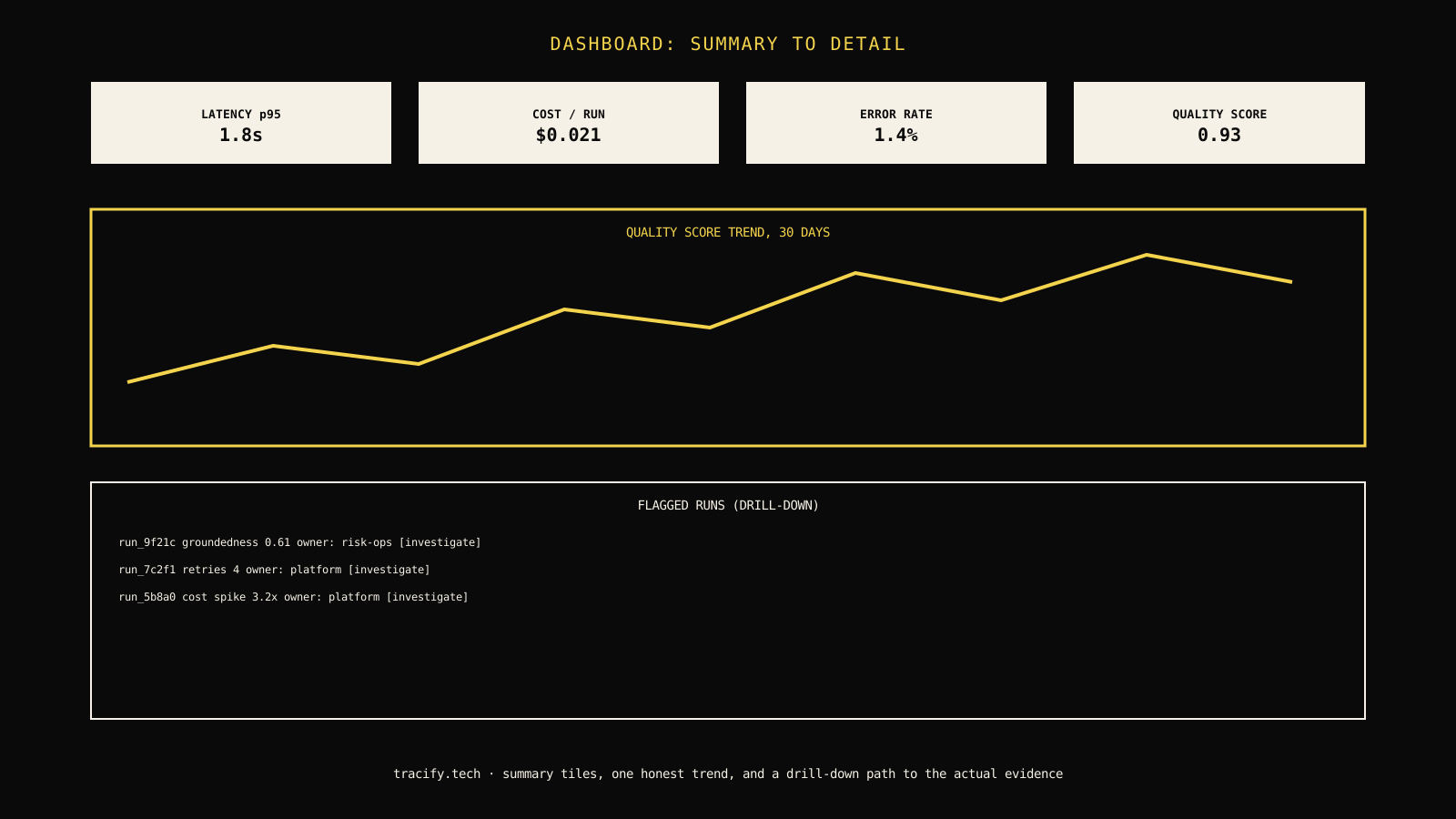
A dashboard that tries to show everything on one screen usually ends up showing nothing clearly. The operating model that works consistently across AI observability dashboards has three tiers, each answering a different question.
The operating model: summary, trend, drill-down
| Tier | Question it answers | What belongs here |
|---|---|---|
| Summary | Is anything currently wrong? | 4-6 KPI tiles with current value and direction of change, scannable in under five seconds |
| Trend | Is this getting better or worse over time? | Time-series charts for the same metrics, against a fixed baseline, not just recent history |
| Drill-down | What specifically is wrong, and what caused it? | A table of flagged runs or incidents linking directly to their full trace |

Each tier exists to answer a different question, and collapsing them into one view is the most common dashboard design mistake — a summary tile answers "is anything wrong," a trend chart answers "is it getting worse," and a drill-down table answers "what exactly happened and why," and no single visual element can honestly answer all three at once.
What belongs on the summary row
The summary row is the first thing anyone sees, and it should be small enough to scan in five seconds without scrolling or clicking. That constraint should drive what makes the cut, not comprehensiveness.
Choose four to six tiles, not twelve
| Candidate metric | Belongs on summary row? | Why |
|---|---|---|
| Latency (p95) | Yes | Directly affects user experience, quick to interpret |
| Cost per run | Yes | Directly affects budget, easy to misread if buried in a report |
| Error rate | Yes | A clear, unambiguous signal something is broken |
| A quality proxy (groundedness, eval score) | Yes | The metric most likely to degrade silently without a summary presence |
| Per-tool latency breakdown | No | Useful, but belongs in drill-down; too granular for a five-second scan |
| Token count distribution | No | Interesting for cost modeling, not for a daily status check |
Field note: If a stakeholder asks "can we add this metric to the summary row" more than once a quarter, that is a signal the summary row has grown past its useful size, not that the new metric deserves a slot. Move it to the trend tier and link to it, rather than crowding the five-second scan.
Build alerts that carry evidence, not just a threshold breach
A dashboard's alerts are where design quality matters most under pressure, because an alert is read during an incident, not during calm review time.

The four fields every useful alert needs
- What broke — the specific metric and threshold, stated in plain language.
- Representative evidence — a link to the actual trace, run, or sample that best illustrates the issue, not just an aggregate number.
- Likely cause — an automatically inferred hypothesis where possible (a retrieval gap, a specific tool's failure rate spiking, a release correlation), clearly labeled as a hypothesis rather than a confirmed root cause.
- Owner — routed to a specific person or rotation, not a shared channel with no assigned responder.
// Illustrative: an alert payload shape that carries evidence and ownership.
type ObservabilityAlert = {
  metric: string;
  threshold: number;
  observedValue: number;
  representativeRunId: string;
  likelyCauseHypothesis?: string;
  owner: string;
  firedAt: string;
};

export function isActionable(alert: ObservabilityAlert): boolean {
  return Boolean(alert.representativeRunId && alert.owner);
}
Decision rule: Do not ship an alert rule to production until it has been tested against a real historical incident and confirmed to produce a representative run reference and a plausible owner assignment. An alert rule that only fires a number with no attached evidence will train the team to ignore the channel it lands in within a few weeks.
Avoid the composite health score trap
A single blended "health score" is tempting because it compresses everything into one number for a status update. It is also the design choice most likely to hide a real regression.

A composite score can stay flat while its underlying dimensions move in opposite directions and cancel each other out — quality declining while cost rises, for instance, can leave a blended score unchanged even though both trends are individually worth investigating. The dashboard's job is to show the reader the trade-off, not to pre-resolve it into a single number that hides which dimension actually moved.
When a composite score is still useful
A composite score is not always wrong to show — it can work well as a single line in an executive summary, as long as it is always presented alongside, or one click away from, the decomposed dimensions that make it up. The failure mode is not the existence of a composite score; it is using it as the only view, with no path back to the individual signals that produced it.
| Use case | Composite score alone | Composite score with decomposition available |
|---|---|---|
| Weekly executive status update | Reasonable as a single headline number | Better, if a click reveals the three underlying dimensions |
| Daily engineering dashboard | Actively hides the signal engineers need | Necessary — engineers need the decomposed view by default |
| Incident response | Actively misleading during triage | Necessary — a responder needs to know which dimension broke immediately |
Work through a realistic example
Consider a team whose dashboard shows a single "agent health" score that has held steady at 91 for a month, while the on-call engineer reports "things feel slower lately."
| Observation | Weak interpretation | Better next move |
|---|---|---|
| Composite health score unchanged at 91 | "The subjective feeling of slowness must be wrong" | Decompose the score into latency, cost, quality, and reliability; a rising latency trend can be fully offset by an improving quality trend inside one composite number |
| No alerts have fired this month | "Nothing is wrong" | Check whether alert thresholds were set against current baseline rather than a fixed historical one — thresholds that auto-adjust to recent data will never fire on a slow drift |
| Drill-down table is empty | "No runs need investigation" | Confirm the drill-down table's filter criteria; an overly narrow filter (only fully failed runs, for example) can hide degraded-but-technically-successful runs entirely |
Diagnose the first divergence
When a dashboard's green status conflicts with a reported user or engineer complaint, the diagnostic path should start with the dashboard's own design choices before assuming the complaint is wrong.
Compare the meaningful trade-offs
A more granular, decomposed dashboard is more useful for diagnosis but takes longer to build and requires more discipline to keep from becoming cluttered.
| Dimension | Composite-score-only dashboard | Three-tier decomposed dashboard |
|---|---|---|
| Build effort | Lower — one number to compute and display | Higher — requires deliberate tier design and alert evidence pipelines |
| Daily usefulness for engineers | Low — hides the signal that matters for action | High — supports real triage and diagnosis |
| Usefulness for executive status updates | High — simple to report | Still workable if a composite view is offered alongside decomposition |
| Risk of false confidence | High — offsetting trends look like stability | Low — each dimension is visible independently |
Design for the on-call reader, not just the daily reader
A dashboard gets two very different kinds of visits: a calm daily or weekly review, and a stressed, time-pressured look during an active incident. Most dashboard design implicitly optimizes for the first case — a polished layout meant to be read carefully — and quietly fails the second, where the reader has thirty seconds and a specific question.
| Design choice | Serves the calm daily reader | Serves the stressed on-call reader |
|---|---|---|
| Rich, multi-panel layout with many charts | Yes — rewards careful reading | No — too much to parse quickly under pressure |
| A single "what changed in the last hour" view | Adds friction for daily review | Directly answers the most common incident-time question |
| Deep links from alerts straight to the relevant drill-down row | Unnecessary for calm review | Saves critical minutes during triage |
The fix is not to redesign the whole dashboard around incidents — it is to make sure at least one path through the dashboard is optimized for speed under pressure, reachable directly from an alert rather than requiring the responder to navigate the full three-tier layout from scratch. A link inside every alert that lands directly on the specific run or metric that triggered it, bypassing the summary and trend tiers entirely, is a small addition that pays for itself the first time it saves a few minutes during a real incident.
Keep the dashboard usable on a phone
On-call responders frequently open a dashboard from a phone, not a laptop, especially outside working hours. A dashboard that only renders usefully at desktop width effectively has no on-call coverage during the hours a phone is the only available device. Verify that the summary tier and the alert deep-link path specifically remain readable and functional at mobile width, even if the full trend and drill-down tiers are harder to use well on a small screen. Prioritizing mobile usability for the summary tier and the alert-to-evidence path covers the highest-value on-call use case without requiring the entire dashboard to be redesigned mobile-first.
Protect the security boundary
A drill-down table that links directly to full run traces is powerful for diagnosis and also a potential exposure point: it can surface raw prompts, tool arguments, and customer data to anyone with dashboard access, regardless of whether they need that detail for their role. Apply role-based access so summary and trend tiers are broadly visible while drill-down access to raw trace content is restricted to those who need it, and audit who accesses the drill-down tier the same way you would audit access to any system holding customer data. A dashboard that makes diagnosis fast should not be the path of least resistance to browsing production customer conversations.
Read the lower half visually: alert fatigue is a design failure
A dashboard that alerts too often on noisy or auto-adjusting thresholds trains its team to ignore it, which defeats its entire purpose. The fix is rarely "add more alerts" — it is tightening the definition of what deserves one, and making the ones that do fire carry enough evidence to act on immediately.
An alert channel with a 95% false-positive rate is worse than no alerting at all, because it actively trains responders to skim past the one real alert buried inside the noise. Measure and track your own alert precision — the share of fired alerts that led to a real, actioned finding — as a metric about the dashboard itself, not just about the system it monitors.
Tune thresholds against a fixed baseline, not a rolling window
A threshold that automatically recalculates against the last seven days of data will quietly widen as a slow regression continues, because the regression itself becomes part of what counts as "normal." An auto-adjusting threshold can make a real, ongoing problem permanently invisible to the alerting system even while the summary tile shows a number moving steadily in the wrong direction. Anchor at least one threshold per key metric to a fixed, deliberately chosen baseline, reviewed and updated only on a scheduled cadence or after an intentional system change — never automatically.
What changes the recommendation
For a small team running a single low-stakes workflow, a simpler two-tier dashboard (summary plus drill-down, skipping a dedicated trend view) is a reasonable simplification that saves build effort without losing much. Once more than one workflow needs coverage, or the system is customer-facing with real consequence for a missed regression, the full three-tier model with evidence-carrying alerts earns its additional build cost quickly.
Make the operating decision
Start by auditing your current dashboard against the three-tier model: does the summary row stay under six tiles, do trend charts compare against a fixed baseline, and does every alert carry a representative run and a named owner? AI observability metrics that matter goes deeper on selecting the underlying metrics this layout should surface, and AI observability platform covers how dashboard capability fits into a broader platform evaluation.
Leave the reader with the next move
- [ ] The summary row holds four to six KPI tiles, scannable in under five seconds.
- [ ] Trend charts compare against a fixed historical baseline, not only recent history.
- [ ] Every alert carries a representative run, a likely-cause hypothesis where possible, and a named owner.
- [ ] Any composite score is shown alongside, or one click from, its decomposed underlying dimensions.
- [ ] Alert precision — the share of fired alerts that led to a real finding — is itself tracked as a metric.
Pull up your current dashboard this week and time how long it takes to answer "is anything wrong right now" versus "what specifically is wrong and who owns it." If the second question takes more than a couple of clicks to answer, that gap is the next design fix, ahead of adding any new chart or panel, and it is worth timing again after each change to confirm the fix actually shortened the path rather than just moving the friction somewhere else in the layout.
Frequently asked questions
How many metrics should be on an AI observability dashboard's summary view?
Four to six KPI tiles, chosen so the summary row is scannable in under five seconds. More granular or specialized metrics belong in the trend or drill-down tiers, linked from the summary rather than crowding it.
Is a single composite health score a bad idea?
Not inherently, but it should never be the only view. A composite score works well in an executive summary as long as its underlying dimensions — quality, cost, reliability — are one click away, because offsetting movements between dimensions can leave a composite score flat while a real regression is underway.
What makes an alert actionable instead of just noisy?
Four fields: what broke, a representative trace or run as evidence, a likely-cause hypothesis where one can be inferred, and a named owner or on-call rotation. An alert missing any of these forces the responder to reconstruct context manually during an incident, which is exactly when that time matters most.
Should trend charts compare to yesterday or to a fixed baseline?
Both have a role, but a fixed historical baseline is essential for catching slow drift. Comparing only to recent history lets a gradual decline hide inside a series of small, individually unremarkable changes that never trip a day-over-day threshold.
Who should have access to the drill-down tier of an AI observability dashboard?
Restrict raw trace and run detail access to roles that need it for diagnosis, since drill-down views often expose raw prompts, tool arguments, and customer data. Keep summary and trend tiers broadly visible, and audit drill-down access the same way you would audit access to any system holding customer data.
Practical field notes from the team building Tracify and operating AI agents in production.
Related posts
Next in the loop
Generative AI Observability: Monitoring Output Quality at Scale
Keep reading →