AI Agent Cost Per Task: How to Measure Unit Economics Beyond Token Usage
A cost-per-successful-task formula for AI agents that accounts for retries, tool calls, and failed runs, not just token price.
In this guide11 sections
Cost per successful task equals total workflow cost — model calls, tool and API calls, retries, and failed attempts — divided by the number of tasks that actually succeeded in that period, not by total runs. This distinction matters because a retried or failed run still costs money and produces no successful outcome, so dividing by total runs (or worse, only counting token spend) understates the real cost of getting one task done.
This article covers the measurement methodology: the formula, what belongs in "total cost," how to segment spend to find where it concentrates, and how the numbers move in a worked retry-waste scenario. It does not repeat general LLM cost-reduction tactics — that ground is covered in reducing LLM costs without hurting quality — and it does not re-introduce the interactive cost calculator tool built for a different job. This is the piece that explains the denominator those two take for granted.
At a glance
The core move in this article is simple to state and easy to skip in practice: stop dividing cost by runs, and start dividing it by successful outcomes.
| Stage | Question it answers | What changes if you skip it |
|---|---|---|
| Total cost | What did this workflow actually spend, across model, tools, retries, and escalations? | Token-only cost understates spend, often by several times |
| Successful task count | How many tasks reached a real, verifiable successful outcome? | Counting total runs instead hides the cost of failure |
| Cost per successful task | What does it cost to get one task actually done? | Without this, "cheaper per call" can still mean "more expensive per outcome" |
Why token cost alone misrepresents AI agent spend
Token price is the easiest number to find and the easiest number to misuse. It lives on a provider's pricing page, it's stable, and it's simple to multiply by a token count from a log line. None of that makes it a good proxy for what an agent workflow costs to operate.
The problem is that token price describes the cost of one model call, not the cost of one completed task. An agent workflow rarely maps one-to-one onto a single call. A single user request might trigger a planning call, two tool calls, a verification call, and — when something goes wrong — a retry of some or all of the above. If the first attempt fails validation and the agent tries again with a different tool sequence, the token cost of that workflow just doubled, but the "cost per model call" figure didn't move, because it was never tracking the workflow — it was tracking the call.
This is why a team can report a flat, reassuring per-call number quarter over quarter while the workflow's actual cost to the business drifts upward. The retry rate can climb, the escalation rate can climb, and the token-cost dashboard shows no change at all, because none of those costs are token costs.
A cost metric that only counts successful, first-attempt calls is measuring the best case, not the average case. Retries, failures, and escalations are not edge cases to be reasoned about separately — they are the workflow's actual cost structure, and any unit-economics number that excludes them is describing a workflow that doesn't exist in production.
There's a second, quieter failure mode: token cost alone can't tell two workflows apart. A workflow that costs $0.02 per call and succeeds 95% of the time on the first attempt is a completely different economic proposition from a workflow that also costs $0.02 per call but succeeds 40% of the time before multiple retries and a fallback to a human. Both report the same per-call number. Only one of them is cheap.
Field note: If your only cost dashboard is priced in tokens or dollars per model call, you have a spend tracker, not a unit-economics model. The two are related but not interchangeable — a spend tracker tells you what you paid; a unit-economics model tells you what it cost to get something done.
The cost-per-successful-task formula
The operating model this article teaches has one formula at its center:
cost_per_successful_task = total_cost / successful_task_count
Everything else in this article is about correctly computing the numerator and correctly counting the denominator. Both are easy to get wrong in ways that flatter the number.
The denominator is successful tasks, not total runs. A "run" is any attempt — successful, retried, or ultimately failed. A "successful task" is a run (or chain of retried runs) that reached a verifiable successful outcome: a resolved ticket, a completed booking, a correctly filled form, a passed downstream check — whatever your product defines as "done, correctly." If you divide total cost by total runs instead of successful tasks, every failed run makes your average cost look artificially low, because it adds to the denominator without needing to have produced anything. That is backwards from what you want a cost metric to reward.
The numerator is total cost, not model cost. Total cost is the sum of every cost component incurred in pursuit of that task, whether or not the individual call that incurred it succeeded. The next section breaks this down component by component.
The formula, expanded
total_cost = model_cost + tool_cost + retry_overhead + escalation_cost

cost_per_successful_task = total_cost / successful_task_count
Illustrative formula — not tied to a specific billing API. Replace each term with your own workflow's real cost sources; the structure (sum every cost source, divide by successful outcomes only) is what matters, not the exact variable names.
A short pseudocode version, useful for a first pass in a notebook or a spreadsheet formula:
# Illustrative only — replace with your own trace and billing data.
def cost_per_successful_task(runs):
    total_cost = 0.0
    successful_task_count = 0

    for run in runs:
        total_cost += run.model_cost
        total_cost += run.tool_cost
        total_cost += run.retry_cost      # cost of every retried attempt in this run's chain
        total_cost += run.escalation_cost # human review/resolution cost, if any

        if run.final_status == "success":
            successful_task_count += 1

    if successful_task_count == 0:
        return None  # undefined — no successful outcomes to divide by

    return total_cost / successful_task_count
Two details in that pseudocode are worth naming explicitly. First, total_cost accumulates across every run, including the ones that ultimately failed — a failed run's cost doesn't disappear just because the task didn't succeed. Second, successful_task_count only increments on a genuine successful outcome, so retried attempts within one task's resolution chain count once toward the denominator, not once per attempt.
What belongs in "total cost": a cost waterfall
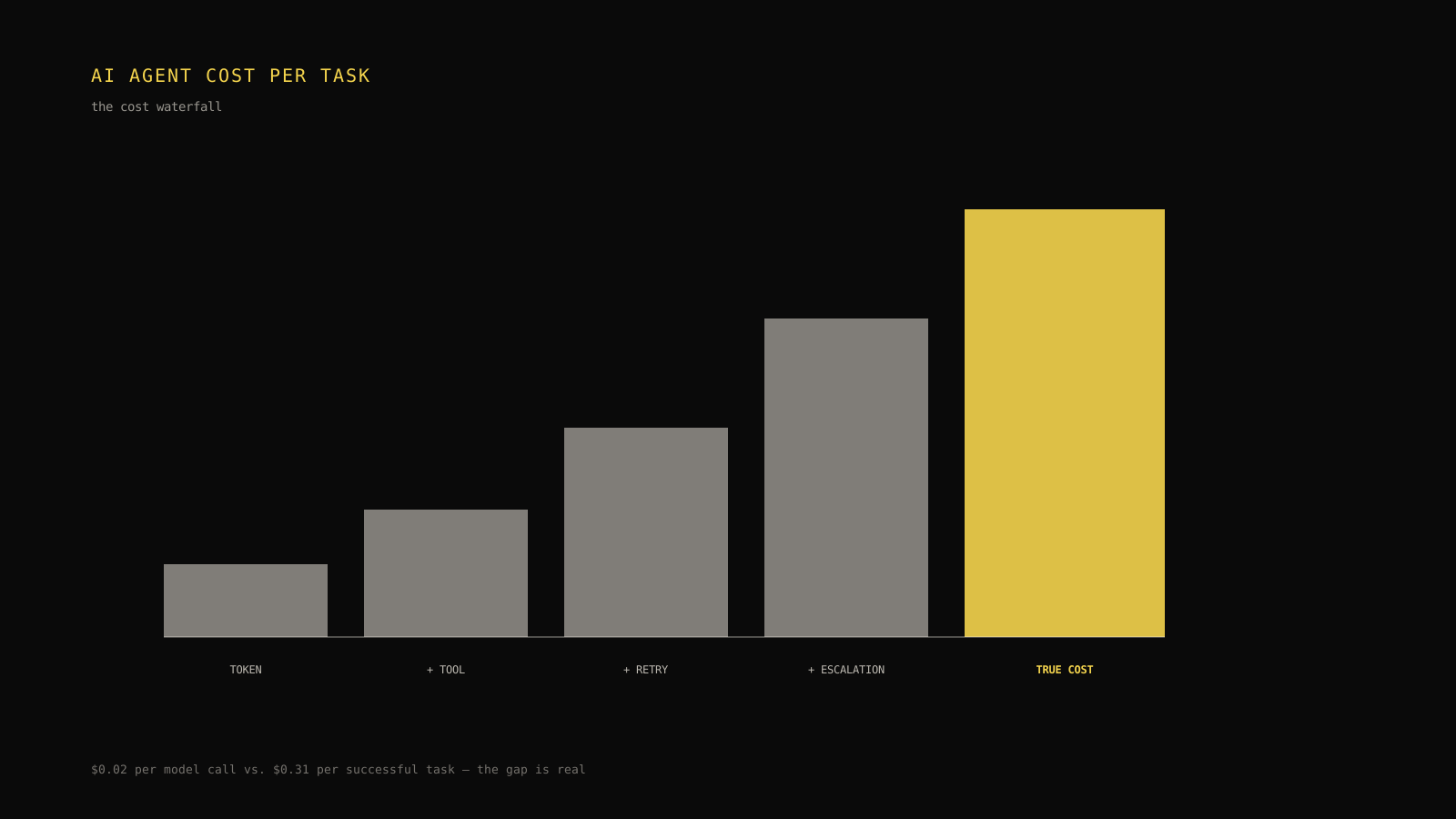
The most useful way to see where an agent workflow's cost actually comes from is a running total — what this article calls the Cost Waterfall. Start at raw token cost, then add each additional cost source in the order it tends to appear in a real trace: tool and API calls, retry overhead, and finally human escalation. Each row shows the running total after that source is added, so the gap between "what we thought we spent" and "what we actually spent" is visible one step at a time instead of buried in a single number.
| Waterfall stage | Added this stage (hypothetical) | Running total | What it represents |
|---|---|---|---|
| Raw model/token cost | $0.020 | $0.020 | The number most cost dashboards stop at |
| + Tool and external API calls | $0.035 | $0.055 | Search, lookup, database, or third-party API cost per attempt |
| + Retry overhead | $0.070 | $0.125 | Additional model + tool cost from repeated attempts |
| + Human escalation cost | $0.185 | $0.310 | Cost of the human time spent resolving what the agent could not |
| True cost per successful task | — | $0.310 | Divided by successful outcomes, not total runs |
Every figure in that table is illustrative, built to match the opening scenario's 15x gap between $0.02 and $0.31. Your own waterfall will have different weights — the point of building one is to find out which stage actually dominates your spend, because it's rarely the one on the pricing page.
Model calls
This is the baseline most teams already track: input and output tokens multiplied by the provider's per-token price, summed across every model call in a run. It's necessary but, on its own, describes only the first row of the waterfall. Treat it as a starting point, not a conclusion.
Tool and external API calls
Agent workflows frequently call out to search APIs, internal databases, third-party enrichment services, or payment and CRM systems. Each of these has its own cost — sometimes metered per call, sometimes a flat subscription cost allocated per use — and none of it shows up in a token-price calculation. A workflow that makes three tool calls per run for a $0.01 lookup fee each has added $0.03 of cost that a token-only view will never surface.
Retries and fallbacks
Retries multiply everything upstream of them. If a run fails validation and the agent retries with the same or a different model, every token and tool cost from that first attempt is sunk, and the second attempt adds its own model and tool cost on top. A workflow with a high retry rate can have its effective cost per run be two, three, or more times its single-attempt cost — well before anything reaches a human. This is usually the largest single gap between "cost per call" and "cost per successful task," and the worked example later in this article shows why.
Human escalation cost
When an agent can't resolve a task and hands it to a person, that handoff has a real, usually much larger, cost — the loaded cost of the human time spent finishing what the agent started or re-doing it from scratch. Because this cost is denominated in labor rather than API pricing, it's easy for it to live in a completely different spreadsheet than the token bill, which is exactly why it tends to be the most underweighted line in a naive cost estimate. If your agent escalates 8% of tasks and each escalation costs many times more than a single model call, that 8% can dominate the average even though it's a small share of total runs.
Decision rule: If your cost waterfall doesn't include a labor-cost line for escalations, your total cost is understated for any workflow with a nonzero escalation rate — add it before comparing cost-per-task across workflows, not after.
Segmenting cost: by workflow, model, customer, and failure type
A single aggregate cost-per-successful-task number tells you whether things are getting better or worse overall. It does not tell you where to intervene. For that, the same formula needs to be computed on slices of the data rather than the whole thing at once.
Four segmentations tend to be the most useful starting points:
- By workflow. Different task types (a simple FAQ lookup versus a multi-step refund process) have structurally different cost profiles. Averaging them together hides the fact that one workflow is cheap and reliable while another is expensive and retry-prone.
- By model. If a workflow can run on more than one model, comparing cost per successful task — not cost per call — across models is the only fair comparison, because a cheaper model with a lower success rate can lose to a pricier, more reliable one once retries and escalations are counted.
- By customer or use case. Some customers or request types are disproportionately expensive to serve, often because their inputs trigger more tool calls, more retries, or more escalations. This is usually invisible in an aggregate number and can matter directly for pricing and account-level margin conversations.
- By failure type. Not all failures cost the same. A failure caught and retried automatically costs a fraction of a failure that reaches a human. Segmenting by failure type shows which failure modes are worth fixing first, ranked by cost impact rather than by frequency alone.
| Segment | Illustrative cost per successful task | What it's likely to reveal |
|---|---|---|
| Workflow: FAQ lookup | $0.04 | Low retry rate, no escalation path needed |
| Workflow: account update | $0.13 | Moderate retry rate from validation failures |
| Workflow: refund processing | $0.31 | High retry rate plus regular human escalation |
| Model: smaller/cheaper model | $0.18 | Lower per-call cost offset by a higher retry rate |
| Model: larger/premium model | $0.15 | Higher per-call cost offset by a higher first-attempt success rate |
| Failure type: tool timeout | $0.02 added per occurrence | Usually auto-retried; cheap per incident |
| Failure type: policy ambiguity | $0.24 added per occurrence | Frequently escalates; expensive per incident |
Two things are worth noticing in a table shaped like that one. First, the "cheaper" model isn't automatically the cheaper choice once its retry rate is priced in — this is the same trap as comparing cost per call instead of cost per successful task, just applied at the model-selection level instead of the workflow level. Second, failure types with a low per-incident cost can still dominate total spend if they're frequent enough, while a rare but expensive failure type (like policy ambiguity requiring escalation) can matter more per occurrence than its frequency alone would suggest. Segmentation is what lets you tell those two situations apart instead of guessing.
Reading a segmentation table as a heatmap
Once you have cost broken out by workflow and by failure type together, it's worth looking at the two dimensions crossed against each other rather than separately. The cell where a high-cost workflow meets a high-cost failure type is where spend concentrates hardest — and it's often not the cell a team would guess from intuition alone.

| Workflow \ Failure type | Tool timeout | Validation error | Policy ambiguity |
|---|---|---|---|
| FAQ lookup | low | low | low |
| Account update | low | moderate | moderate |
| Refund processing | moderate | moderate | high |
Reading this as a heatmap — darker meaning more cost concentration — the refund workflow's intersection with policy-ambiguity failures stands out as the cell worth investigating first, ahead of any lower-cost cell even if that cell fails more often in absolute count. This is the same discipline as the waterfall: make the concentration visible instead of folding it into one number.
Worked example: retry-driven cost waste in a support workflow
Take a hypothetical support-ticket resolution workflow. Before any changes, its cost profile looks like this:
- Model cost per attempt: $0.020
- Tool cost per attempt: $0.035
- Retry rate: 40% of runs require at least one additional attempt
- Escalation rate: 8% of tasks are handed to a human after automated attempts fail
- Escalation cost per handoff: $2.10 (loaded human time)
- Success rate (task eventually resolved, automated or escalated): 96%
Applying the formula: the raw per-attempt model-plus-tool cost is $0.055. Because 40% of runs retry, the expected cost per run — accounting for the extra attempt on those runs — rises to roughly $0.055 × 1.4 ≈ $0.077. Layer in the escalation cost, spread across all runs at an 8% rate: 0.08 × $2.10 = $0.168 added per run on average. That brings total average cost per run to roughly $0.077 + $0.168 ≈ $0.245. Dividing by the 96% success rate to get cost per successful task: $0.245 / 0.96 ≈ $0.255.
Now suppose the team investigates the retry rate specifically — not by switching models, but by fixing the tool timeout that was causing a large share of first-attempt failures (the kind of intervention this article's companion piece on reducing LLM costs without hurting quality covers in more depth). After the fix:
- Retry rate drops from 40% to 15%
- Escalation rate drops from 8% to 4%, since fewer tasks reach the escalation threshold in the first place
- Model and tool cost per attempt, and success rate, are unchanged
New expected cost per run: $0.055 × 1.15 ≈ $0.063, plus escalation cost of 0.04 × $2.10 = $0.084, for a total of roughly $0.147 per run. Divided by the (now slightly improved, but held conservatively flat) 96% success rate: $0.147 / 0.96 ≈ $0.153.
| Metric | Before | After | Change |
|---|---|---|---|
| Retry rate | 40% | 15% | −25 points |
| Escalation rate | 8% | 4% | −4 points |
| Cost per run | ~$0.245 | ~$0.147 | ~40% lower |
| Cost per successful task | ~$0.255 | ~$0.153 | ~40% lower |
Every number in that table is a hypothetical worked example, not a benchmark or a claim about any real customer's workflow — the structure of the calculation, not the specific dollar figures, is what should transfer to your own data. The instructive part is where the improvement came from: not a cheaper model, not a shorter prompt, but a reduction in the retry rate, which is exactly the lever that a token-only cost view can't see at all.
Cost-per-task calculator
- Cost per run
- $0.0917
- Cost per successful task
- $0.0955
- Multiple of raw model+tool cost
- 1.7x
At 40% retries and 96% success, cost per successful task is 1.7x the raw model-plus-tool cost of a single attempt. Lower the success rate further and watch the multiple grow faster than the retry rate alone would suggest.
Static planning tool: it computes cost per successful task from the four inputs above using the formula in this article. It does not call a model or billing API, and the pre-filled values are a hypothetical worked example, not a benchmark.
Try lowering the success rate a few points at a time while holding retry rate steady, then do the reverse. The two inputs don't move the final number symmetrically — a drop in success rate divides straight through the whole numerator, while a rise in retry rate compounds only the model-and-tool portion of it. That asymmetry is the single most useful thing to internalize from this calculator: a workflow's success rate is usually the more leveraged number to fix first, because every point of it scales the entire cost stack, not just one component of it.
Cost per task vs. cost per run vs. cost per token
These three metrics answer different questions, and conflating them is where most cost reporting goes wrong.
| Metric | What it divides by | What it's good for | What it hides |
|---|---|---|---|
| Cost per token | Token count | Comparing raw model pricing across providers | Everything about tool cost, retries, and outcomes |
| Cost per run | Every attempt, successful or not | Understanding total spend velocity | Whether that spend produced anything |
| Cost per successful task | Successful outcomes only | Understanding the real unit economics of the product | Nothing that matters for a budget decision — this is the number to report |
Cost per token is a pricing input, not a unit-economics metric — it belongs in a model-selection comparison, not a business review. Cost per run is closer, and useful for tracking whether total spend is trending up or down, but it still rewards failure by counting a failed attempt the same as a successful one in the denominator. Cost per successful task is the only one of the three that answers the question a budget owner is actually asking: what does it cost us to get one task done, all in.
Setting a cost budget without guessing
Once cost per successful task is measurable and segmented, setting a budget stops being a guess and starts being a constraint you can check against real data.
A workable process looks like this: pick the segment (workflow, model, or customer tier) you're budgeting for, compute its current cost per successful task from the waterfall, and decide what change would move that number — a lower retry rate, a cheaper model with an acceptable success-rate trade-off, a reduced escalation rate. Then set the budget as a target cost-per-successful-task figure for that segment, not as a raw spend cap. A raw spend cap alone gives no signal about whether the spend is buying more successful tasks or just more retries; a target cost-per-successful-task figure does, because it forces the retry rate and success rate into the conversation every time the number moves.
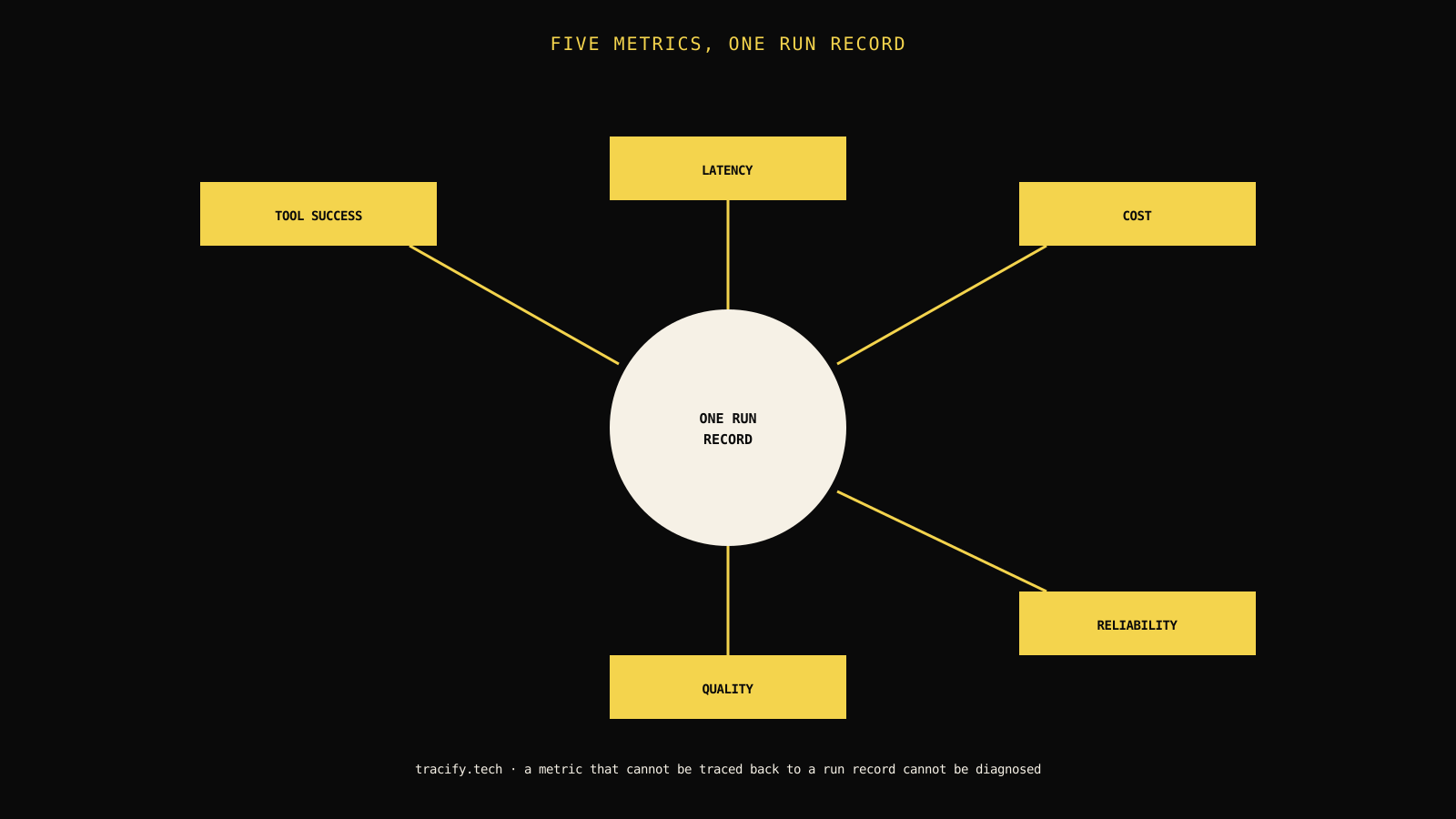
Two guardrails keep this from drifting back into a token-only conversation. First, revisit the cost waterfall whenever the aggregate number moves by more than a small margin, so the team can see which stage moved rather than debating the total in the abstract. Second, treat cost per successful task as one input alongside quality, latency, and reliability metrics — a workflow that hits a lower cost target by silently lowering its success bar has moved a different number in the wrong direction, and the observability metrics that matter for a workflow should be reviewed together with its cost, not instead of it. It's also worth remembering that cost and latency are related but distinct constraints — a workflow that retries faster isn't necessarily retrying cheaper, and optimizing one without checking the other can quietly move the number you weren't watching.
Limitations and what this formula doesn't solve
This formula is a measurement method, not an optimization technique — it tells you where cost concentrates, not how to reduce it. Two specific limitations are worth naming honestly.
First, the formula depends entirely on a reliable definition of "successful task." If your success signal is noisy, delayed, or only partially observable — a ticket marked resolved that gets reopened a week later, for instance — the denominator will be wrong in a way that's easy to miss. Get the success definition right before trusting the number, and revisit it if the product's definition of "done" changes.
Second, escalation cost is a labor estimate, not a metered API cost, and it's usually the least precise number in the waterfall. A rough loaded-cost estimate is far better than omitting escalation cost entirely, but it shouldn't be treated with the same precision as a token-priced line item. When precision matters for a specific decision, get a real number from whoever owns the labor-cost figure rather than guessing.
Make the operating decision
Carrying the worked example through to a decision: the team in the opening scenario didn't need a cheaper model or a shorter prompt to close most of a 15x gap — they needed to see the gap in the first place, broken into stages they could act on individually. That's what the waterfall is for.
- [ ] Total cost includes model, tool/API, retry, and escalation cost — not model cost alone.
- [ ] The denominator counts successful tasks, not total runs.
- [ ] The waterfall shows which stage adds the most cost, not just the final total.
- [ ] Cost is segmented by workflow, model, customer, and failure type before comparing options.
- [ ] Every reported figure is either real data or explicitly labeled as a hypothetical worked example.
- [ ] Cost per successful task is reviewed alongside quality, latency, and reliability, not as a standalone target.
Frequently asked questions
What is cost per task for an AI agent?
Total workflow cost divided by the number of successfully completed tasks, not by total runs or token count alone.
Why doesn't token cost alone represent real spend?
Because it ignores retries, failed runs, tool/API calls, and human escalations, all of which cost money without producing a successful outcome on their own.
How do retries affect cost per task?
Every retry adds cost without necessarily adding a successful outcome, so a high retry rate can make cost per successful task several times higher than cost per run.
How should cost be segmented?
By workflow, model, customer or use case, and failure type, so spend concentration is visible rather than hidden in one aggregate number.
Is a lower cost per run always better?
Not necessarily — a cheaper model with a lower success rate can produce a higher cost per successful task than a more expensive, more reliable one.
Practical field notes from the team building Tracify and operating AI agents in production.
Related posts


Next in the loop
AI Agent Failure Taxonomy: 12 Failure Modes Every Production Team Should Track
Keep reading →