Vellum vs Tracify: LLM Engineering Platform vs Agent Observability Platform
Vellum is a full LLM engineering platform built around a visual workflow canvas and prompt versioning; Tracify is a specialized agent observability platform built around production tracing, cost tracking, and evaluation. Learn where each one earns its place, and how teams run both together.
In this guide13 sections
At a glance
| Dimension | Vellum | Tracify |
|---|---|---|
| Category | LLM engineering platform (build, version, deploy) | Agent observability platform (trace, cost, evaluate) |
| Center of gravity | Development-time iteration | Production-time confidence |
| Workflow authoring | Visual drag-and-drop canvas with branching, tool nodes, routers | Not a workflow builder; instruments code you already wrote |
| Prompt versioning | Native, first-class, diffable, reviewable | Tracks which prompt version ran, does not author prompts |
| Deployment | Publishes workflows as hosted endpoints | Not a deployment target; observes wherever your app runs |
| Production tracing | Workflow-run logs, execution history | Full span-level tracing, session correlation, waterfall views |
| Evaluation | Offline test suites run against workflow versions | Native test library, batch runner, LLM-as-judge, regression gates on live traffic |
| Cost tracking | Execution counts, coarse usage view | Automatic per-call, per-session, per-model cost breakdown |
| Non-engineer collaboration | Strong — PMs and prompt engineers edit directly on canvas | Engineering-facing; dashboards, not an authoring surface |
| Best for | Teams iterating on multi-step LLM workflows before and during rollout | Teams that need to know what happened, what it cost, and whether quality held once traffic is live |
The operating model
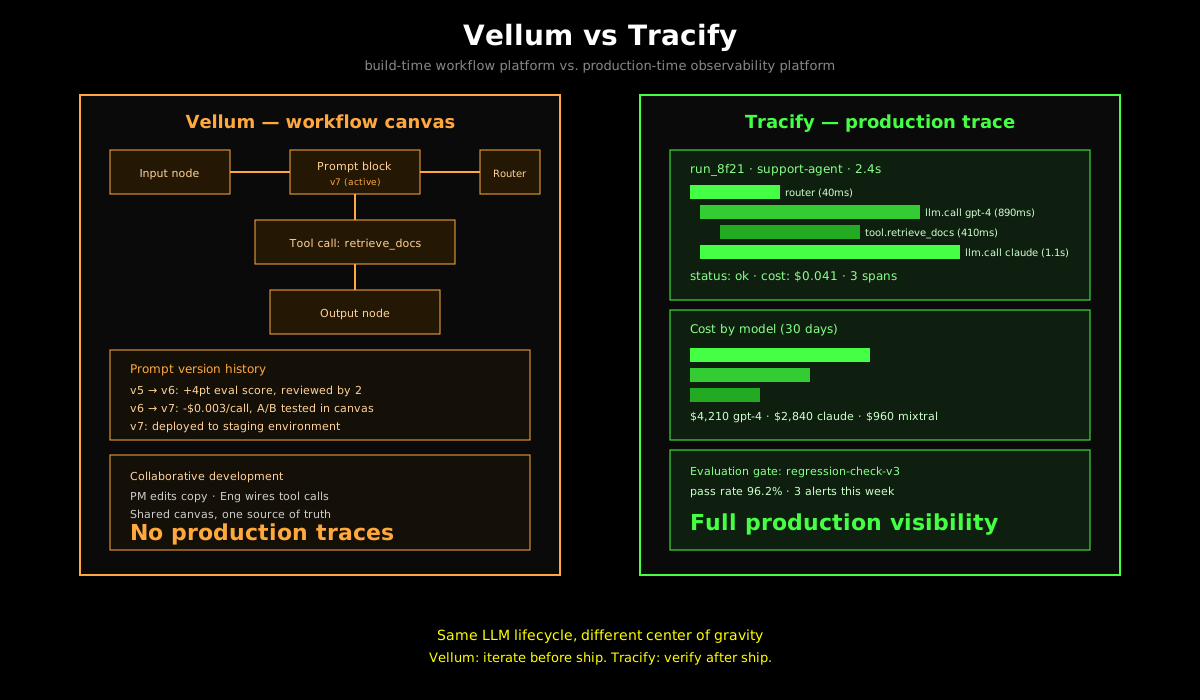
Vellum treats the LLM application as a workflow you compose: a visual canvas of prompt blocks, routers, and tool calls, versioned like code and testable before you ship. Tracify treats the LLM application as a system you must keep honest in production: every call traced, every dollar accounted for, every regression caught against a baseline. Choose Vellum when your bottleneck is iteration speed on the workflow itself — non-engineers contributing, prompt diffs, offline testing before rollout. Choose Tracify when your bottleneck is production confidence — knowing what a live agent actually did, what it cost, and whether it is still behaving the way your last eval said it would.
Opening situation: the build-loop / production-loop tradeoff
A ten-person startup ships a customer support agent built on GPT-4 and Claude. In week one, the team spends most of its time inside a workflow editor: wiring a router that decides which model handles a ticket, versioning three variants of the system prompt, running a small eval set against each variant. This is fast, visual, and collaborative — the product manager edits copy directly, the engineer wires the tool call, and nobody touches a terminal.
In week six, the agent is live and handling 40,000 tickets a month. A support lead flags that resolution quality dropped for a specific ticket category. Now the job changes completely: someone needs to find the actual production runs that match that category, see which model handled them, check whether cost per resolution changed, and determine if the drop correlates with a deploy, a provider model swap, or a retrieval index update. This is not a workflow-editing problem. It is a needle-in-a-haystack problem across live traffic.
These are two different jobs performed by two different tools, and conflating them is where teams lose the most time. This article breaks down the real differences, walks through two worked scenarios, and gives you a framework for deciding — including when to run both platforms together, which many teams end up doing.
Core difference: composition vs. confirmation
Vellum answers "how do I build and iterate on this LLM workflow before I ship it?" Tracify answers "what is actually happening once real traffic hits it, and can I prove quality and cost held?" They are not competing for the same job.
Vellum is built for teams that need a visual, versioned, collaborative way to compose LLM workflows. You get a drag-and-drop canvas for chaining prompts, routers, and tool calls; native prompt versioning with diffs and rollback; offline evaluation suites you run against a workflow version before publishing; and one-click deployment that turns a workflow into a hosted API endpoint. The upside: non-engineers can contribute directly, iteration is fast, and you go from idea to a testable workflow version in hours. The downside: once that workflow is deployed and handling real traffic, Vellum's visibility into individual production runs, cost per session, and live regression detection is comparatively shallow — it was not built to be your system of record for what happened in production.
Tracify is built for teams that need deep, trustworthy visibility into what a deployed agent does in production. You get span-level tracing of every LLM call and tool invocation, automatic cost calculation per call and per session, a native evaluation framework you can run continuously against live traffic, and regression alerts when quality drifts. The upside: you always know what happened, what it cost, and whether your quality bar is still being met, regardless of how the code that produced the run was built. The downside: Tracify does not give you a canvas to build the workflow in the first place — you still need something (Vellum, your own code, another framework) to author and iterate on the agent logic.
Scenario 1: a five-person team building and iterating on a RAG assistant
Your team is building a retrieval-augmented support assistant. You are pre-launch, with three weeks to get something usable in front of five design partners. The primary constraint is iteration speed: your product manager wants to tune prompt wording without waiting on engineering, and you need to compare two retrieval strategies before committing to one.
With Vellum
Day 1-2: Compose the workflow.
- Build the workflow on the canvas: an input node, a retrieval tool call against your vector store, a prompt block that synthesizes the answer, and an output node.
- Add a router that sends short factual questions to a cheaper model and longer reasoning questions to a stronger one.
- The PM opens the same canvas and edits the system prompt copy directly — no pull request, no deploy.
Day 3-5: Version and test.
- Save the workflow as v1, then v2 after the PM's prompt edit. Vellum shows a diff between the two versions.
- Build a small offline test set (20 representative questions with expected answer characteristics) and run it against both v1 and v2.
- v2 scores four points higher on the offline eval. Promote v2.
Day 6: Deploy.
- Publish the workflow as a hosted endpoint. Vellum gives you a URL and an API key.
- Your frontend calls that endpoint directly. No additional infrastructure to stand up.
Result: By day 6, you have a working, versioned, tested workflow live behind an endpoint, and your PM contributed directly without touching code. This is the scenario Vellum is built for.
What you do not get: once design partners start using it, you have workflow-run logs (inputs, outputs, execution status) but not deep production observability — no automatic per-session cost rollup across your five partners' actual usage patterns, no continuous regression evaluation running against live traffic, no waterfall view of exactly how long retrieval took versus generation on a specific slow run a partner complained about.
With Tracify
Day 1-5: Build the workflow yourself.
- Tracify does not give you a canvas. You write the RAG pipeline in code: retrieval call, prompt construction, model call, response formatting.
- Your PM cannot edit the prompt directly; they hand you copy in a doc and you paste it into the code.
- This is slower for iteration during the pre-launch composition phase — there is real friction here that a visual builder removes.
Day 5: Instrument.
// Illustrative: Tracify instrumentation on a RAG pipeline
import { Tracify } from "@tracify/sdk";

const tracify = new Tracify({ apiKey: process.env.TRACIFY_API_KEY });

async function answerQuestion(question: string, sessionId: string) {
  const session = tracify.session({ sessionId });

  const retrievalSpan = session.span({ name: "retrieve_docs" });
  const docs = await vectorStore.query(question);
  retrievalSpan.end({ output: { docCount: docs.length } });

  const llmSpan = session.span({ name: "llm.synthesize", input: { model: "gpt-4" } });
  const answer = await callLLM("gpt-4", buildPrompt(question, docs));
  llmSpan.end({ output: answer }); // cost calculated automatically
}
Day 6 onward: Observe design partner usage.
- Every partner question is traced with full span detail: retrieval latency, doc count, model call cost, total session cost.
- You can immediately see that partner #3's questions are 3x more expensive per session because they ask multi-part questions that trigger two retrieval calls.
- You define an evaluation gate ("answer must cite a retrieved document") and run it continuously; it flags two responses where the model answered without grounding.
Result: Tracify gives you production-grade visibility from day one of real usage, but you paid for it with slower composition — no visual canvas, no PM self-service editing, no offline diffing between prompt drafts.
Scenario 2: an enterprise scaling a multi-agent system to production
A 60-person engineering org is scaling a multi-agent system — a router agent, a research agent, and an action-execution agent — from an internal pilot (200 requests/day) to a customer-facing rollout (500,000 requests/month) across three model providers. The requirements now include quality regression detection, per-customer cost attribution for billing, and an audit trail for a compliance review.
With Vellum
- The workflow is already composed and versioned from the pilot phase — this part transfers cleanly. Vellum's deployment step scales the hosted endpoint to handle higher throughput.
- Offline evaluation suites still run against each new workflow version before promotion, catching regressions introduced by prompt or routing changes before they reach production traffic.
- Where the gap widens: at 500,000 requests/month, "workflow-run logs" is a very different problem than a searchable, cost-attributed, session-correlated trace store. Building per-customer cost attribution, a production regression dashboard, or a compliance-grade audit trail on top of workflow-run logs means exporting data and building the analysis layer yourself.
With Tracify
- Every one of the 500,000 monthly requests is traced automatically, with cost attributed per call and rolled up per session and per customer (via metadata tags set at instrumentation time).
- A regression gate compares live evaluation scores against the pilot-phase baseline continuously; when the research agent's citation accuracy drops after a retrieval index update, an alert fires within hours, tied to the exact runs affected.
- The compliance team gets a queryable trace history: every model call, every tool invocation, every cost, timestamped and retained per your data policy — the audit trail Vellum's workflow logs were not designed to be.
- What Tracify does not do: it did not compose the router-agent logic, version the three prompt variants that got you here, or give a PM a canvas to propose the next iteration.
Architecture comparison: dev-focus vs. production-focus
Vellum: canvas, version store, deployment target
Vellum's architecture centers on the workflow as the unit of value:
- Visual workflow canvas. Prompt blocks, routers, and tool-call nodes are composed visually and connected with typed edges. This is the primary authoring surface — for both engineers and non-engineers.
- Prompt version store. Every save creates a version. Versions are diffable, reviewable, and can be promoted or rolled back independently of a code deploy.
- Offline evaluation. Test suites run against a specific workflow version, comparing outputs against expected characteristics before you promote that version to production.
- Managed deployment. Publishing a workflow creates a hosted API endpoint. Vellum operates the runtime that executes the workflow at request time.
- Execution logs. Each run of the deployed workflow produces a log entry: inputs, outputs, status, and coarse timing. This is closer to an audit log of workflow executions than a distributed trace store.
Tracify: ingestion, trace store, evaluation engine
Tracify's architecture centers on the production event as the unit of value:
- SDK instrumentation. You add the Tracify SDK to code you already wrote — whatever authored it, including a Vellum-deployed endpoint calling out, or your own service. Spans capture model calls, tool invocations, and custom application steps.
- Ingestion pipeline. Spans flow through an ingestion layer into a time-series trace store, built to handle high-cardinality production telemetry rather than periodic workflow-execution logs.
- Cost calculation. Every span with a model call is priced automatically against current provider rates; costs roll up per call, per session, per project.
- Evaluation engine. Test cases run continuously or on-demand against live or historical traces — not just against a single workflow version's offline test set — with LLM-as-judge and exact/semantic match evaluators, plus regression alerting when scores drop below a threshold.
- No authoring surface. Tracify does not compose, version, or deploy the logic that produced a trace. It assumes that logic exists somewhere else.
This asymmetry is the whole story: Vellum owns the thing that produces behavior; Tracify owns the proof of what that behavior actually did in production.
Deep comparison: feature by feature

The chart above visualizes the same seven dimensions covered below, scored 0-10 by how deeply each platform handles that job. Neither profile is "more advanced" overall — they are optimized for opposite ends of the LLM lifecycle.
Workflow composition
Vellum: A true visual builder — drag prompt blocks, routers, and tool-call nodes onto a canvas, wire them together, and branch conditionally. Non-engineers can build and modify workflows without a pull request. This is Vellum's signature capability and the reason teams adopt it in the first place.
Tracify: No composition surface at all. You build the workflow in whatever framework or raw code you already use, and Tracify instruments it after the fact.
Winner: Vellum, decisively, if visual composition and non-engineer contribution are requirements. If your team is comfortable authoring workflows in code, this dimension matters less.
Prompt versioning
Vellum: Native, first-class versioning with diffs between versions, rollback, and the ability to A/B test versions before promoting one. This is deeply integrated into the canvas — every meaningful edit can become a reviewable version.
Tracify: Tracks which prompt version produced a given trace (as metadata you attach at instrumentation time) but does not provide an authoring or diffing surface for the prompt content itself. You need a source of prompt versions upstream — which is exactly the gap Vellum fills.
Winner: Vellum for authoring and diffing prompts. Tracify for correlating a prompt version with what it actually cost and how it actually performed once live — read our practical guide to agent evaluation for how that correlation is built into a regression workflow.
Production instrumentation and tracing
Vellum: Execution logs per workflow run: inputs, outputs, status, and coarse timing. Useful for debugging a specific failed run, less suited to answering aggregate questions across thousands of runs — "which step is slowest across the last 10,000 requests" is not a query Vellum's execution logs are built to answer quickly.
Tracify: Full span-level tracing with a waterfall view per run, high-cardinality filtering across all production traffic, and session correlation for multi-turn interactions. Built specifically to answer aggregate and drill-down questions across large trace volumes.
Winner: Tracify. Execution logs tell you what one run did. Span-level tracing at scale tells you what your system is doing — the difference between debugging an incident and understanding a pattern.
Testing and evaluation
Vellum: Offline evaluation suites run against a specific workflow version before you promote it. This is a pre-deployment gate — good for catching regressions introduced by a prompt or workflow change before it ships.
Tracify: A native test case library, batch evaluation runner, and LLM-as-judge evaluators that run continuously against live or historical traces, with automated alerts when scores drop below a threshold. This is a post-deployment (and ongoing) gate — good for catching regressions caused by anything, including things Vellum's offline suite would never see: a provider silently changing a model's behavior, retrieval index drift, or a shift in real user question patterns that your offline test set didn't anticipate.
Winner: Depends on the failure mode you are defending against. Pre-ship regressions in a version you're about to promote: Vellum's offline suite catches this earlier and cheaper. Post-ship regressions caused by anything outside your last code change: only continuous production evaluation catches this, which is Tracify's job. Our agent observability guide covers why production-time evaluation catches categories of failure that pre-ship testing structurally cannot.
Cost tracking
Vellum: Execution counts and coarse usage metrics per workflow. Useful for understanding how often a workflow runs, less useful for understanding exactly what a given session cost or which model selection drove spend.
Tracify: Automatic per-call cost calculation against real-time provider pricing, rolled up per session, per customer (via tags), and per model. Built to answer "what did this cost and why" at the level of granularity a finance or product conversation actually needs.
Winner: Tracify, clearly. Cost attribution at the level Tracify provides is close to a structural requirement once you are billing customers by usage or optimizing model routing decisions based on real spend data.
Deployment and hosting
Vellum: Publishing a workflow version creates a managed, hosted API endpoint. Vellum operates the runtime. This is a genuine deployment target — you can point production traffic directly at a Vellum-hosted endpoint with no additional infrastructure.
Tracify: Not a deployment target. It observes wherever your code runs — your own servers, a Vellum-hosted endpoint calling out to Tracify, a Lambda function, anything with the SDK installed.
Winner: Vellum, if you want the workflow's execution to also live in a managed runtime you didn't have to build. This is a meaningful convenience that Tracify does not attempt to replicate — the two tools are not competing here, they are simply doing different jobs.
The hybrid approach: using both together
The comparison above is not actually an either/or in most real deployments. The most common pattern among teams past the prototype stage is:
- Design and version in Vellum. Build the workflow on the canvas, iterate on prompts with PM and engineering collaboration, run offline evaluation before promoting a version.
- Deploy. Either publish the workflow as a Vellum-hosted endpoint, or export the logic into your own service — either path works.
- Instrument with Tracify. Whatever is handling production traffic (Vellum's endpoint calling out, or your own service) sends spans to Tracify.
- Observe. Tracify traces every production call, tracks cost per session, and runs continuous evaluation against live traffic.
- Feed findings back. When Tracify surfaces a regression or a cost anomaly, that finding becomes the input to the next prompt version — authored and versioned back in Vellum.
The loop closes without either platform needing to do the other's job. Vellum never needs to become a production trace store; Tracify never needs to become a visual workflow canvas. Each stays focused on what it does best.

Operational note: running both means two integrations and two things to keep in sync — most teams tag Tracify sessions with the Vellum workflow version that produced them, so a regression can be traced back to the exact prompt version responsible. Do this from day one; retrofitting version tags onto historical traces is not possible.
Decision framework
For technical practitioners
| Question | Score if yes | Suggests |
|---|---|---|
| Do non-engineers need to edit prompts directly? | +5 Vellum | Visual canvas removes the code-review bottleneck |
| Is your workflow still pre-launch, with no production traffic? | +4 Vellum | Offline iteration speed dominates before traffic exists |
| Do you need per-session, per-customer cost attribution? | +5 Tracify | Vellum's execution counts are too coarse for billing-grade attribution |
| Do you need continuous regression detection against live traffic? | +5 Tracify | Offline test suites can't see provider drift or real usage patterns |
| Do you want a managed hosting target for the workflow itself? | +3 Vellum | Vellum's deployment step is a genuine convenience |
| Do you need span-level tracing across three or more model providers? | +4 Tracify | Execution logs don't answer aggregate, cross-provider questions |
| Is prompt version diffing and rollback a daily workflow? | +3 Vellum | This is a core, mature Vellum capability |
Scoring: If Vellum score > 12, prioritize it for the composition and pre-launch phase. If Tracify score > 12, prioritize it for the production and confidence phase. If both are high — which is common — plan for both from the start rather than retrofitting one in later.
For engineering and product leaders
Where is your team's time actually going right now?
- Stuck iterating on prompts and workflow logic: Vellum removes the friction.
- Stuck debugging "why did this cost spike" or "why did quality drop" in production: Tracify removes the friction.
Who needs to contribute to the LLM logic?
- Engineers only: Vellum's visual canvas is a nice-to-have, not a requirement.
- PMs, prompt engineers, or non-engineers too: Vellum's collaborative canvas is close to a requirement.
What does "production confidence" mean for your compliance posture?
- We need a searchable, cost-attributed, session-correlated audit trail: Tracify's trace store is built for this; Vellum's execution logs were not designed as a compliance surface.
- We just need a log of what a workflow returned for debugging: Vellum's execution logs are sufficient.
Trade-offs and honest boundaries
Choose Vellum-first when:
1. You are pre-launch or in an active workflow-design phase. There is no production traffic yet to observe, and the bottleneck is composing and testing the workflow itself.
2. Non-engineers need to contribute directly. A visual canvas that a PM or prompt engineer can edit without a code review is a genuine unlock that no observability tool provides.
3. You want deployment bundled with authoring. Publishing straight from the canvas to a hosted endpoint removes a deployment step you would otherwise own.
4. Your evaluation need is "did this version regress before I ship it," not "is live traffic still meeting the bar." Offline test suites are the right tool for pre-ship gates.
Choose Tracify-first when:
1. You already have production traffic and need to know what it's actually doing. Span-level tracing, cost attribution, and continuous evaluation only matter once there is real traffic to observe.
2. Cost visibility is a business requirement, not just an engineering curiosity. Per-session and per-customer cost attribution at the granularity finance or billing needs is a Tracify-native capability that execution counts cannot approximate.
3. You need to catch regressions caused by anything other than your own last change. Provider model swaps, retrieval drift, and real-world usage pattern shifts are invisible to offline test suites and only visible to continuous production evaluation.
4. Multiple systems (not just one Vellum-authored workflow) need to be observed under one roof. If your production surface includes custom code, multiple frameworks, and possibly Vellum-hosted endpoints all together, Tracify's SDK-based instrumentation covers all of it uniformly; Vellum's execution logs only cover what Vellum itself deployed.
Where either choice has a real cost
Choosing Vellum without a production observability layer means you will eventually be debugging a live quality or cost problem with only workflow-run logs, which were not built for aggregate, cross-run analysis. Choosing Tracify without a composition and versioning layer means you still need to solve "how do we build and iterate on the workflow itself" with something else — your own code, a different framework, or eventually Vellum. Most teams that try to make one platform do both jobs end up building the missing half themselves, badly, in spreadsheets and ad hoc scripts.
Migration and transition paths
Starting in Vellum, adding Tracify later (low friction)
- Keep Vellum for authoring (ongoing). No change to how you build and version workflows.
- Instrument the deployed endpoint (week 1). Add the Tracify SDK to whatever calls the Vellum-hosted endpoint, or to the endpoint's own request handling if you control it.
- Tag sessions with the workflow version (week 1). Attach the Vellum workflow version as metadata on each Tracify session so regressions can be traced back to a specific prompt version.
- Stand up evaluation gates (week 2). Define the quality checks that matter in production — these can differ from your Vellum offline test set, since production evaluation should catch things offline testing structurally cannot.
- Review the loop after 30 days. Confirm that findings from Tracify are actually feeding back into new Vellum versions, not sitting in a dashboard nobody checks.
Risk: Low. Adding Tracify does not require changing anything about how Vellum is used; it is additive instrumentation.
Starting in Tracify, adding a composition layer later
- Keep instrumenting production code as-is. No change to your Tracify setup.
- Introduce Vellum for the next iteration cycle, not a rewrite. Bring in the visual canvas for the next round of prompt or workflow changes, rather than migrating existing, working logic wholesale.
- Deploy the new version, keep tracing it the same way. Whether the logic now lives in a Vellum-hosted endpoint or your own service, the Tracify instrumentation pattern doesn't need to change.
- Compare before/after using Tracify's own evaluation history. Since Tracify was already tracing the old version, you have a real production baseline to compare the Vellum-authored version against — a stronger comparison than an offline eval set alone.
Risk: Low-to-moderate. The main risk is scope creep — treating this as an excuse to rewrite working production logic rather than simply changing how future iterations are authored.
Trade-off: Vellum addresses workflow authoring and offline iteration; Tracify addresses the evidence loop once real users exercise the deployed workflow.
Action checklist
- [ ] Name your current bottleneck. Iteration speed on the workflow itself, or confidence in what production is actually doing — these point to different platforms.
- [ ] Check who needs to edit prompts. If non-engineers need direct access, weight Vellum's visual canvas heavily.
- [ ] Check your traffic stage. Pre-launch with no production data: Vellum's offline iteration loop dominates. Live with real traffic: Tracify's production visibility becomes the constraint.
- [ ] Define your cost-attribution requirement. If billing or finance needs per-customer, per-session cost data, treat this as a Tracify requirement, not a nice-to-have.
- [ ] Decide your regression-detection strategy. Pre-ship gates (offline suites) and post-ship gates (continuous production evaluation) catch different failure classes — plan for both if you can.
- [ ] Plan the hybrid loop from day one if you expect to need both. Tag Tracify sessions with the Vellum workflow version at first instrumentation; retrofitting this onto historical traces later is not possible.
- [ ] Set a 30-day review. Confirm the loop is actually closing — that production findings are feeding back into new authored versions, not accumulating in a dashboard nobody acts on.
Frequently asked questions
Can Vellum replace Tracify for production observability?
Partially, and only for workflows Vellum itself deployed. Vellum's execution logs record inputs, outputs, and status per workflow run, which is useful for debugging an individual failed run. But they are not span-level distributed traces, do not provide automatic per-session or per-customer cost rollups, and do not run continuous evaluation against live traffic with regression alerting. If your production surface is entirely Vellum-hosted workflows and your needs are limited to per-run debugging, execution logs may be enough. Once you need aggregate cost attribution, cross-run pattern analysis, or continuous quality gates, you need a dedicated observability layer like Tracify.
Can Tracify replace Vellum for building and versioning workflows?
No. Tracify has no visual canvas, no drag-and-drop workflow composition, and no built-in prompt-authoring surface for non-engineers. It assumes the workflow logic already exists somewhere — in your own code, in a framework, or in a tool like Vellum — and instruments it after the fact. If your team needs a visual builder that a product manager can edit without engineering involvement, Tracify does not provide that; you need Vellum or an equivalent authoring layer alongside it.
Is it normal to run both Vellum and Tracify at the same time?
Yes, and it's the most common pattern for teams past the prototype stage. Vellum handles authoring, versioning, and offline testing of the workflow; Tracify instruments whatever is handling production traffic (a Vellum-hosted endpoint, or your own service) and provides tracing, cost tracking, and continuous evaluation. The two integrations are complementary rather than redundant — tag Tracify sessions with the Vellum workflow version that produced them so a production regression can be traced back to the exact prompt version responsible.
How do I decide which one to adopt first if I can only start with one?
Look at whether you have production traffic yet. If you are pre-launch and the bottleneck is composing and testing the workflow, start with Vellum — its visual canvas, prompt versioning, and offline evaluation are built for exactly that phase, and there is no production traffic yet for an observability platform to observe. If you already have live traffic and the immediate pain is not knowing what happened, what it cost, or whether quality is holding, start with Tracify — it instruments the code you already have without requiring you to rebuild it on a new canvas first. Most teams end up adopting both within the first two or three iteration cycles once traffic exists.
Does switching from Vellum to Tracify (or the reverse) require rewriting my LLM logic?
No, and treating it that way is the main risk to avoid. Adding Tracify to a Vellum-deployed workflow means adding SDK instrumentation to whatever calls the Vellum endpoint — the workflow logic itself does not change. Introducing Vellum after you've been using Tracify means bringing in a visual canvas for your next iteration cycle, not migrating working production logic wholesale; you can deploy the new Vellum-authored version and keep tracing it with Tracify exactly as before. In both directions, the safest path is additive and incremental rather than a rewrite.
Practical field notes from the team building Tracify and operating AI agents in production.
Related posts



Next in the loop
WhyLabs vs Tracify: Drift Detection vs Integrated Agent Observability
Keep reading →