Parea AI vs Tracify: LLM Development vs Agent Observability
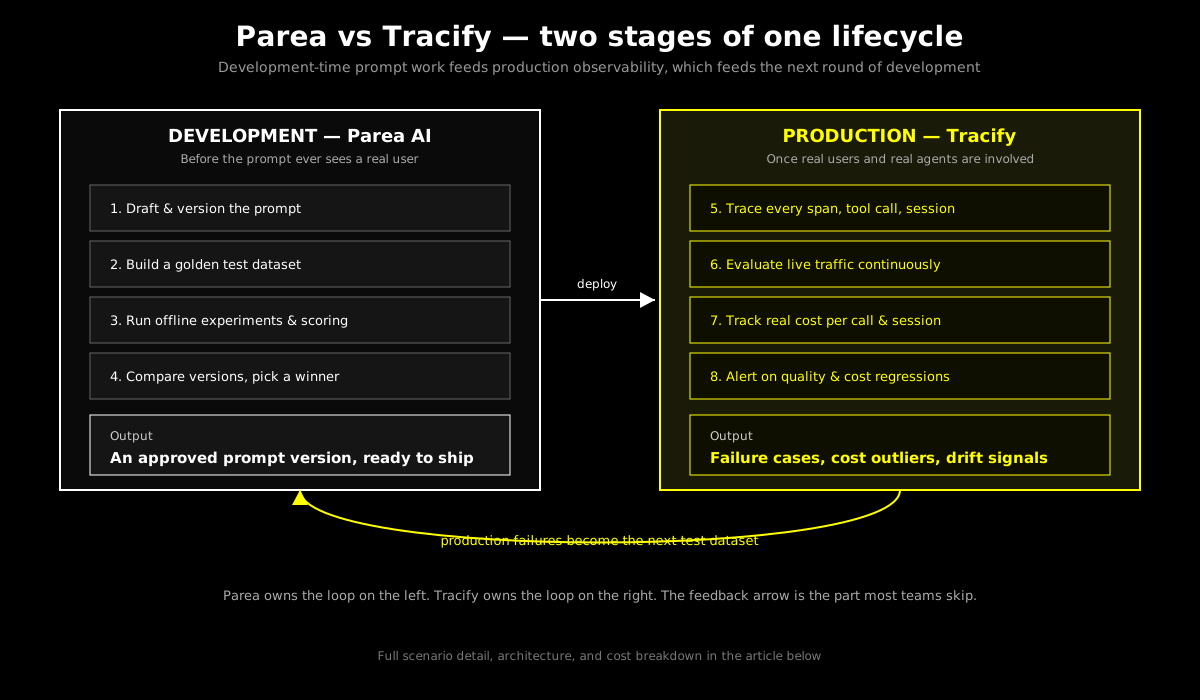
Parea AI is built for LLM development — prompt versioning, testing, and optimization before you ship. Tracify is built for production agent observability — tracing, evaluation, and cost tracking after you ship. Here is how the two fit into one lifecycle, with worked scenarios and a real cost comparison.
In this guide14 sections
At a glance
| Dimension | Parea AI | Tracify |
|---|---|---|
| Primary focus | LLM development — prompt versioning, testing, optimization | Agent observability — production tracing, evaluation, cost |
| Where it lives in the lifecycle | Before deployment, in the iteration loop | After deployment, on live traffic |
| Prompt versioning | Native — playground, version history, deployment labels | Basic — you can tag prompt versions in trace metadata |
| Offline test datasets | Native — golden datasets, batch experiment runs | Not the primary surface; evaluation runs against live and replayed traces |
| Production tracing at scale | Available, but not the product's center of gravity | Native — every span, tool call, and session traced by default |
| Live evaluation on real traffic | Limited; oriented around pre-deployment test runs | Native — continuous evaluation, LLM-as-judge, regression alerts |
| Cost tracking | Token counts surfaced in experiments; not a production cost ledger | Automatic per-call and per-session cost, by model and provider |
| Session / multi-turn tracking | Not a primary concept | Native — sessions are a first-class object |
| Setup time | Hours to first prompt experiment | Minutes to first trace |
| Best for | LLM engineers iterating on prompts before launch | Agent product teams operating in production |
Parea is where a prompt earns the right to ship. Tracify is where you find out whether it was right.
The operating model
Parea is development-first: you draft a prompt, version it, run it against a curated test set, score the outputs, and compare versions side by side until one wins. The unit of work is an experiment — a specific prompt version measured against a specific dataset. Tracify is production-first: you trace what an agent actually did for a real user, evaluate that behavior continuously, track what it cost, and get paged when something drifts. The unit of work is a trace — what happened, not what you predicted would happen. Neither claim is a knock on the other tool. They are answering different questions, at different points in an agent's life, using different inputs (a fixed dataset vs. unbounded live traffic).
Opening situation: the three-week deadline
Your team is building a customer support agent that classifies incoming tickets, retrieves relevant documentation, and drafts a response for a human to approve. Leadership wants it live in three weeks. Between now and launch, an LLM engineer needs to iterate on the classification and drafting prompts fast enough to hit a quality bar before anyone sees it. After launch, the team needs to know, in near-real time, whether the agent is actually working: is it misclassifying tickets, drafting bad responses, costing more than budgeted, or drifting as ticket volume and phrasing shift over time?
These are two different jobs with two different failure modes.
For the LLM engineer: The job before launch is comparing prompt version A against version B against a fixed set of representative tickets, and picking a winner based on a defensible score — not a gut feeling after reading five examples. Iteration speed matters more than anything else here; every day spent on tooling instead of prompt quality is a day the deadline gets closer without the agent getting better.
For the on-call engineer after launch: The job is completely different. There is no fixed dataset anymore — there is unbounded live traffic, and the questions are "did cost spike overnight," "did the retrieval step start returning empty results for a specific ticket category," and "is this specific customer's session stuck in a retry loop." None of that is answerable from an offline test suite, because the failure hasn't happened in the test suite. It happened in production, once, to a real customer.
For the engineering lead: The question spans both. How much of the three weeks should go to prompt iteration tooling versus production monitoring tooling? Get the split wrong and you either ship a mediocre prompt on time, or ship a good prompt blind and find out about problems from an angry customer instead of an alert.
For the product or founder-level reader: The real question underneath all of this is where money and risk concentrate. Development-time tooling protects launch quality. Production-time tooling protects what happens for the next twelve months after launch, when the dataset you tested against stops being representative of what real users actually send.
This article works through the operating differences in detail, walks three concrete scenarios — pre-launch prompt optimization, post-launch production monitoring, and the full lifecycle where both tools run together — and gives you a cost model and decision framework for your own team.
Core difference: a fixed test set vs. unbounded live traffic
The single most useful way to understand Parea vs Tracify is this: Parea evaluates a prompt against a dataset you chose. Tracify evaluates an agent against traffic you did not choose. Those are structurally different problems, and no amount of feature overlap changes that.
Parea is built around the experiment as the core object. You maintain one or more golden datasets — real or representative examples with expected outputs or scoring criteria — and every prompt change becomes an experiment run against that dataset. The playground lets you edit a prompt, immediately see outputs across the dataset, and compare a numeric or LLM-judged score against the previous version. Deployment is a label change: you promote a specific prompt version from "staging" to "production" once its experiment score clears your bar. The strength here is repeatability — the same test runs the same way every time, so a score delta genuinely reflects a prompt change, not noise in what you happened to read that day.
Tracify is built around the trace and the session as the core objects. Every call your agent makes — LLM calls, tool calls, retrieval steps — is captured with full input/output, latency, and cost, correlated into a session for multi-turn interactions. Evaluation runs continuously against this live stream: LLM-as-judge scoring, regex or exact-match checks, and custom evaluators flag traces that look wrong, and alerts fire when the rate of flagged traces or average cost per session crosses a threshold. The strength here is coverage — you see everything that actually happened, including the ticket phrasing nobody thought to put in a test dataset, the tool call that timed out at 2 a.m., and the session where a user rephrased the same question four times because the agent kept misunderstanding it.
Read how agent observability platforms are architected end to end if you want the fuller picture of what a production tracing layer needs to capture beyond what either tool's marketing page will tell you.
The architecture comparison
Parea: dataset-centric, deployment as a checkpoint
Parea's architecture optimizes for fast, repeatable comparison:
- Prompt store and versioning. Every prompt lives in Parea with a version history. Editing in the playground creates a new version; you never lose a previous wording.
- Datasets. You upload or curate example inputs, optionally with expected outputs or grading rubrics. These datasets are the fixed ground truth an experiment runs against.
- Experiments. Running a prompt version against a dataset produces a scored table — one row per example, with the model's output and a score from an automatic evaluator, a human reviewer, or both.
- Comparison view. Two prompt versions run against the same dataset side by side, so a score delta is attributable to the prompt change and nothing else.
- Deployment labels. Once a version wins, you flip a label (for example,
production) and your application code fetches whichever version currently holds that label, instead of hardcoding prompt text. - Logging and light tracing. Calls made through a deployed prompt are logged, and Parea does expose call-level logs you can inspect. This is useful for spot-checking, but the product's center of gravity — datasets, experiments, scoring — sits upstream of production traffic, not inside it.
The trade-off: you get very fast, very repeatable prompt iteration. You do not get a purpose-built system for correlating a spike in cost with a specific tool-call failure across a multi-step agent session at 2 a.m. on a Saturday, because that was never the primary job Parea was designed to do.
Tracify: trace-centric, evaluation as a continuous process
Tracify's architecture optimizes for visibility into what already happened, at scale, continuously:
- Automatic instrumentation. SDKs for Python, Node.js, and TypeScript capture spans for LLM calls, tool calls, and retrieval steps with minimal manual wiring.
- Sessions as a first-class object. Multi-turn agent interactions are grouped automatically; cost and quality metrics roll up to the session level, not just the individual call.
- Continuous evaluation. Test cases and LLM-as-judge evaluators run against live traces, not a static dataset you have to remember to update. New traffic patterns get evaluated the moment they arrive.
- Automatic cost tracking. Every call is priced against current provider rates for the model actually used, rolled up by project, agent, and session.
- Experiments on production data. You can also run comparisons — but the input is real historical traffic, not a hand-picked dataset, which surfaces edge cases a curated test set would never have included.
- Alerting. Cost, latency, and evaluation-score thresholds trigger notifications so a regression is caught in minutes, not discovered a week later in a customer complaint.
The trade-off: Tracify is not built as a prompt-authoring workspace. There is no dedicated golden-dataset curation UI, no side-by-side prompt-diff playground built for pre-launch iteration speed. You can tag prompt versions in trace metadata and compare their production performance, but the tight, fast "edit → score → compare" loop that a prompt engineer wants during active development is not the product's reason for existing.
Scenario 1: optimizing a prompt before launch
You are the LLM engineer on the support-agent project from the opening scenario. You have a first-draft classification prompt and eleven days before launch to get its accuracy from "roughly works" to "defensible."
With Parea
- Build the dataset (day 1). Pull 150 real historical tickets, spanning the ticket categories you expect: billing, technical, account access, and a long tail of "other." Label each with the correct category. This becomes your golden dataset.
- Run the baseline experiment (day 1). Run the current prompt version against all 150 examples. Score: 71% exact-match accuracy against your labels.
- Iterate in the playground (days 2-6). Edit the prompt directly — adjust the category definitions, add two-shot examples for the categories the model confuses most, tighten the output format instruction. Each edit reruns instantly against the same 150 examples.
- Compare versions side by side (days 2-6). The comparison view shows version 4 scoring 84% against version 1's 71%, with the specific rows where each version disagreed. You can see exactly which billing-vs-account-access tickets flip between versions — the kind of detail a spreadsheet of scores alone would hide.
- Add an LLM-as-judge evaluator for the free-text drafting prompt (day 7). Exact match does not work for a drafted response, so you configure a rubric-based judge: does the draft address the customer's actual question, is the tone appropriate, does it avoid promising something support cannot deliver. Score improves from 6.2/10 to 8.1/10 over three more iterations.
- Promote to production (day 8). Flip the deployment label. Your application code now fetches this version automatically; no redeploy of the application itself required.
Result: By day 8, you have two prompts with defensible scores against a fixed dataset, and three more days to spend on the rest of the launch checklist. This is the job Parea is built for, and it does it well — the loop from prompt edit to comparable score is close to instant.
With Tracify
You could technically run this same loop by manually crafting 150 test calls, logging them as traces, and building custom evaluators to score them against your labels. It would work. But you would be reconstructing a dataset-and-experiment workflow that Parea already ships as the product's primary interface — the playground's instant side-by-side diff, the dataset versioning, the built-in comparison view. Tracify's evaluation framework is built to run continuously against a stream of live traffic; bending it into a repeatable, offline, dataset-fixed comparison tool is possible but fights the grain of the product.
Result: Parea wins this scenario clearly. If prompt iteration speed before launch is your bottleneck, this is not a close call.
Scenario 2: monitoring quality and cost after launch
Fast-forward six weeks. The support agent is live, handling roughly 4,000 tickets a day across three model providers depending on ticket complexity. You need to know, continuously: is classification accuracy holding up on real traffic, is any customer segment getting worse responses, and did last week's provider price change blow up the budget.
With Tracify
- Traces are already flowing. Every classification call, every retrieval step, every drafted response, and every human-approval decision is captured as a span, correlated into a session per ticket.
- Continuous evaluation runs automatically. The same rubric-based judge from the drafting prompt now scores a sample of live drafts every hour, not just the 150 examples from the original test set. When a new ticket-phrasing pattern appears that the original dataset never anticipated — say, a wave of tickets referencing a specific new product feature — the evaluator scores it immediately, without anyone having to notice the pattern first and add it to a dataset.
- Cost is broken down automatically. You see, without building anything, that classification calls average $0.004 each, drafting calls average $0.031 each, and the 12% of tickets that get escalated to the higher-cost model for complex drafting account for 38% of total spend. That is the kind of imbalance a static test-set score would never surface, because it only shows up at real traffic volume and mix.
- An alert fires. Average evaluation score for drafted responses drops from 8.0 to 6.9 over four hours. Tracing shows the drop correlates with a change upstream: the retrieval step started returning stale documentation after a content update, so the drafting prompt was working from outdated source material — the prompt itself never changed.
- Root cause in minutes, not days. Because the trace shows the full session — retrieval input, retrieval output, drafting input, drafting output, score — you find the actual cause (a stale document index) instead of wrongly concluding the prompt regressed and starting an unnecessary prompt-rewrite cycle.
With Parea
You could periodically pull a sample of production logs into a new dataset and re-run your existing experiment to spot-check for drift. This catches drift only as often as you remember to run it, and it will not catch a cost spike, a session stuck in a retry loop, or a retrieval failure unless you specifically thought to test for it in advance. Parea's logging surface can show you individual calls, but it is not built to continuously score, alert, and roll cost up across a full production session the way a dedicated observability platform is.
Result: Tracify wins this scenario clearly. Once real traffic is flowing and the risk is drift, cost, and failures you did not anticipate, a continuous production observability layer is not optional.

Modeled annual cost for an 8-engineer team running active prompt development plus 150k production calls/month. Full breakdown in the cost analysis section below.
Scenario 3: the full lifecycle, both tools together
Nine months after launch, the support agent has expanded to handle three more ticket categories, and the team is now iterating on prompts regularly instead of once before a single launch. This is where the two tools stop being alternatives and start being stages of the same pipeline.
Step 1 — Tracify surfaces the problem. The weekly evaluation report shows drafted-response quality is measurably worse for tickets mentioning a newly launched product feature — a category that did not exist when the original golden dataset was built. Cost per session for this category is also 40% above average, because the model is generating long, uncertain responses and getting re-drafted twice per ticket on average.
Step 2 — The failing traces become a dataset. The team exports the 60 lowest-scoring traces for this ticket category from Tracify — real customer phrasing, real retrieval context, real failure patterns — and imports them as a new dataset in Parea.
Step 3 — Parea runs the iteration loop. The LLM engineer drafts three candidate prompt revisions specifically targeting this failure category, runs each against the new 60-example dataset plus the original 150-example regression dataset (to make sure nothing else breaks), and picks the version that improves the new category without dropping the baseline score.
Step 4 — Deploy and re-observe. The winning version is promoted in Parea. Tracify's continuous evaluation confirms, on live traffic over the following week, that the score improvement holds up outside the curated dataset too — and that cost per session for the category drops back toward average because responses no longer need re-drafting.
Step 5 — The loop repeats. Six weeks later, a different category starts drifting. Same process.
Result: Neither tool alone closes this loop well. Parea has no visibility into which real-world category is failing and by how much — it only knows what you put in the dataset. Tracify has no purpose-built workspace for fast, repeatable, side-by-side prompt comparison — it can tell you something is wrong and show you the evidence, but iterating on the fix is not its job. Used together, the loop closes: production tells you what to fix, development tells you whether the fix worked, production confirms it held up at scale.
Deep comparison: feature by feature
Prompt versioning and iteration
Parea:
- Full version history for every prompt, with a playground for rapid manual edits.
- Deployment labels decouple "which version is live" from application code changes.
- Side-by-side comparison view for two or more versions against the same dataset.
- Few-shot example management embedded directly in the prompt editor.
Tracify:
- Prompt version can be attached as trace metadata, so you can filter and compare production performance by version.
- No dedicated playground for editing and instantly re-scoring a prompt against a fixed dataset — the workflow is oriented around what already ran, not around drafting the next version.
Winner: Parea. This is the workflow it was built around, and it shows in the speed of the edit-score-compare loop.
Offline testing and experimentation
Parea:
- Native dataset management: upload, version, and curate golden examples with expected outputs or grading rubrics.
- Batch experiment runs score an entire dataset against a prompt version in one pass.
- Human review and LLM-as-judge scoring both supported, with results attributable to a specific version.
Tracify:
- Evaluation is built around continuous scoring of live or historical trace data, not a fixed, hand-curated dataset workflow.
- You can replay historical traces as an evaluation input, which is powerful for catching real drift, but it is not the same tool as a purpose-built dataset curation UI.
Winner: Parea for structured, repeatable offline testing. If your bottleneck is "does version B genuinely beat version A on our known cases," this is a decisive win for Parea.
Production tracing and session tracking
Parea:
- Logs calls made through deployed prompts, useful for spot-checking recent behavior.
- Session correlation and automatic multi-turn rollups are not a primary product surface.
Tracify:
- Every span — LLM call, tool call, retrieval step — traced automatically by default.
- Sessions are a first-class object; multi-turn agent interactions roll up cost and quality at the session level, not just per call.
- Full input/output capture for debugging a specific failed interaction end to end.
Winner: Tracify. Once you are operating at production scale with multi-step, multi-turn agents, session-level tracing is not a nice-to-have — it is the only way to see what a user actually experienced across an entire interaction.
Live evaluation and regression detection
Parea:
- Evaluation is primarily oriented around a specific experiment run against a specific dataset, executed on demand.
- Detecting a regression in production traffic requires manually pulling recent logs into a new dataset and re-running.
Tracify:
- Evaluators run continuously against live traces without manual intervention.
- Regression alerts fire automatically when scores, cost, or latency cross a threshold.
- New traffic patterns get evaluated the moment they appear, not only when someone remembers to check.
Winner: Tracify. Continuous evaluation catches the failure you didn't think to test for. A fixed dataset can only catch the failure you already anticipated.
Cost tracking and analysis
Parea:
- Token counts are visible per call in experiment results, useful for comparing the relative cost of two prompt versions during testing.
- No automatic production cost ledger, no per-session cost rollup, no cost-based alerting at scale.
Tracify:
- Automatic per-call cost calculation against current provider pricing for the model actually used.
- Cost rolls up by session, agent, and project, with trending over time.
- Cost-based alerts flag when spend per session or per day crosses a threshold.
Winner: Tracify. Comparing token counts between two prompt versions in a test run is useful during development; knowing your actual dollar spend across 150,000 monthly production calls, broken down by which agent and which model, is a different problem entirely, and it is the one Tracify is built to solve.
Deployment integration and rollout control
Parea:
- Deployment labels let application code fetch "whichever prompt currently holds the
productionlabel" without a code deploy — a genuinely useful decoupling for teams that want product managers or prompt engineers to ship copy changes without an engineering release cycle. - No native rollout controls (canary, percentage-based rollout) beyond the label mechanism itself.
Tracify:
- Not a prompt deployment mechanism — Tracify observes whatever your application is already running, however you deployed it.
- Experiments can compare prompt or model versions against real traffic, which is a different kind of rollout confidence: not "did it score well on a test set" but "did it perform well for actual users."
Winner: Different jobs. Parea controls what ships; Tracify tells you how what shipped is actually performing. For a deeper look at keeping a prompt's rollout connected to measurable outcomes once it's live, see prompt versioning in production.
Cost analysis: standalone vs. combined
Model this for a mid-size team: 8 engineers, one to two of whom actively iterate on prompts, running an agent product at roughly 150,000 production LLM calls per month. Figures below are modeled estimates for this scenario, not published vendor list prices — use them to reason about the shape of the trade-off, then verify current pricing directly with each vendor for your own volume.
Parea only, stretched to cover production too
| Category | Item | Modeled cost |
|---|---|---|
| Platform | Team-tier plan covering prompt versioning, datasets, and experiments | $500/month |
| Hand-built production tracing | Custom logging, session correlation, and dashboards built and maintained in-house | $2,800/month (0.3 FTE) |
| Hand-built cost tracking | Scripts to pull token counts from logs and price them against provider rates | $1,200/month (0.15 FTE) |
| Hand-built alerting | On-call scripts to flag score or cost anomalies, since there is no continuous evaluation surface | $1,500/month (0.15 FTE) |
| Total monthly | $6,000 | |
| Total annual | $72,000 |
Tracify only, stretched to cover prompt development too
| Category | Item | Modeled cost |
|---|---|---|
| Platform | Production tracing, evaluation, and cost tracking at 150k calls/month | $1,400/month |
| Ad-hoc prompt testing | Engineers running comparison tests manually in notebooks, without a shared dataset workflow | $1,800/month (0.2 FTE) |
| Rework from missed regressions | Time spent re-diagnosing prompt regressions that a proper offline comparison would have caught pre-launch | $1,200/month (0.12 FTE, conservative estimate) |
| Total monthly | $4,400 | |
| Total annual | $52,800 |
Parea + Tracify, each doing its own job
| Category | Item | Modeled cost |
|---|---|---|
| Parea | Team-tier plan for prompt development and testing volume, which is lower-frequency than production traffic | $900/month |
| Tracify | Production tracing, evaluation, and cost tracking at 150k calls/month | $1,400/month |
| Glue work | Exporting flagged production traces into Parea datasets periodically | $0 (manual export, roughly 1 hour/month) |
| Total monthly | $2,300 | |
| Total annual | $27,600 |
The combined approach is not just cheaper — it is 2.6x cheaper than Parea alone and 1.9x cheaper than Tracify alone in this model. The gap is not platform license fees. It is engineering time spent rebuilding, badly, the exact thing the other tool already does well.
Where this model breaks down: If your production call volume is very low (a few hundred calls a month, an internal tool, or a product still pre-launch), the "hand-built production tracing" line in the Parea-only column shrinks toward zero, and Parea alone may genuinely be sufficient — you might not need production-grade observability yet. Conversely, if prompt iteration is rare after an initial launch (a stable agent that almost never gets a new prompt version), the "ad-hoc prompt testing" line in the Tracify-only column shrinks, and Tracify alone may cover you well past launch.
Integration and workflow guidance: wiring the two together
If Scenario 3 is where your team is heading, the mechanics of connecting the two tools matter more than the individual feature lists. This is not a native, automated integration between the two products — it is a workflow your team owns.
- Tag prompt versions consistently. Whatever version identifier Parea assigns to a deployed prompt, pass that same identifier as metadata on every Tracify trace produced by calls using that prompt. This is the join key for everything downstream.
- Set a review cadence for flagged traces. Weekly or biweekly, pull the lowest-scoring traces from Tracify's evaluation results, filtered by prompt version and, if relevant, by ticket or task category.
- Convert real failures into dataset examples. Add the flagged traces — actual customer input, actual retrieval context, actual failure — as new rows in the relevant Parea dataset, alongside your original golden set. Keep the original examples too; you want a regression check as well as new coverage.
- Run comparisons against the combined dataset. Any new prompt candidate should be scored against both the original golden set and the accumulated production-failure set, so a fix for the new problem cannot silently reintroduce an old one.
- Promote and re-observe. Once a version wins offline, promote it and let Tracify's continuous evaluation confirm the improvement holds at real traffic scale and mix — which is a different, and stricter, test than any fixed dataset can provide.
- Close the loop on cost, not just quality. When a prompt is optimized for accuracy without checking token cost, average response length can quietly grow. Track cost-per-session in Tracify after every promotion, not just the quality score. If you want a deeper treatment of that specific trade-off, reducing LLM costs without hurting quality covers the mechanics in detail.

The loop only closes if someone owns step three — turning flagged production traces into new offline test cases. Skipping it means re-discovering the same failure repeatedly.
Who owns this loop? In most teams that run this well, one person — often the LLM or prompt engineer, sometimes a rotating on-call role — owns pulling flagged traces into the dataset on a fixed schedule. Without an owner, the loop quietly stops closing: Tracify keeps flagging the same category of failure every few weeks, and nobody ever turns it into a Parea dataset update.
Trade-offs and honest boundaries
Choose Parea when:
1. You are pre-launch, or actively iterating on prompts.
- Prompt quality, not production visibility, is the immediate bottleneck.
- Mitigation if you're wrong about timing: Parea's cost is low enough that starting here rarely wastes much even if production concerns arrive sooner than expected.
2. You need repeatable, defensible comparisons.
- "Version B scored 84% against our 150-example set, version A scored 71%" is a stronger internal argument than "I read through some outputs and B looked better."
- Mitigation: Keep the dataset representative and update it — a comparison against a stale dataset stops being defensible over time.
3. Non-engineers need to ship copy changes.
- Deployment labels let a prompt owner promote a new version without an application code release.
- Mitigation: Pair this with a review step; a fast deploy path is also a fast way to ship an unreviewed regression.
Choose Tracify when:
1. You are in production, at any meaningful traffic volume.
- Once real users are involved, the failures that matter are the ones you did not anticipate, and only continuous observability surfaces those.
- Mitigation: "Meaningful traffic volume" is a judgment call; a few hundred calls a month from an internal pilot may not yet justify a dedicated observability platform.
2. Cost visibility is a business requirement, not just an engineering curiosity.
- Finance or product leadership needs real per-request or per-session cost, not a token count from a test run.
- Mitigation: None needed — this is close to a hard requirement once you operate at real scale across multiple models.
3. Multi-turn, multi-step agent sessions are central to your product.
- A single LLM call's output rarely tells the whole story for an agent that retrieves, calls tools, and drafts across several steps.
- Mitigation: If your product genuinely is single-call, stateless completions, session tracking matters less; weigh accordingly.
Use both when:
Your agent is live and still evolving. This is the common case for any product past its first few months. Prompts keep changing because the product keeps changing, and production traffic keeps drifting because real users are unpredictable. The two problems do not go away once you pick one tool; they run in parallel for as long as the product exists.
Do not buy both "just in case." If you are still pre-launch with no production traffic, Tracify has nothing to observe yet — wait until you actually have traffic. If your agent has been stable in production for a year with no active prompt work, a full Parea subscription may be more tooling than you need. Match the tool to the job you are actually doing.
Decision framework for practitioners and leaders
For technical practitioners
| Question | Score if yes | Suggests |
|---|---|---|
| Is your primary blocker prompt quality before launch? | +8 Parea | Fast, repeatable offline comparison is the bottleneck |
| Do you have production traffic today (any meaningful volume)? | +8 Tracify | Continuous observability is no longer optional |
| Do you need per-session or per-call cost broken down automatically? | +5 Tracify | Manual token-counting will not scale |
| Do you need a fast playground for side-by-side prompt edits? | +5 Parea | This is Parea's core interaction model |
| Are your agents multi-step or multi-turn? | +4 Tracify | Session-level tracing matters more than single-call logs |
| Do you maintain (or want to maintain) a golden test dataset? | +4 Parea | Dataset-centric testing is Parea's native workflow |
| Is your agent still actively changing month over month? | +3 both | You likely need both tools running together |
Scoring: If Parea score is clearly higher and you have no meaningful production traffic yet, start with Parea alone. If Tracify score is clearly higher and prompt iteration is rare, start with Tracify alone. If both scores are high, or the "still actively changing" question scored, plan for both from the outset — the combined cost model above shows this is usually the cheaper outcome, not the more expensive one.
For engineering and product leaders
Where are you in the product lifecycle?
- Pre-launch: Parea. There is no production traffic to observe yet.
- Just launched, prompts still settling: Both, but weight Parea more heavily short-term.
- Stable in production, occasional prompt updates: Both, but weight Tracify more heavily short-term.
What does the team actually spend time on today?
- Mostly reading through outputs manually to judge prompt quality: Parea removes that manual review bottleneck directly.
- Mostly reacting to customer complaints about agent behavior after the fact: Tracify turns reactive incident response into proactive alerting.
What is the cost of being wrong?
- A bad prompt version ships: Parea's offline comparison is your primary defense.
- A quiet production regression goes unnoticed for days: Tracify's continuous evaluation and alerting is your primary defense.
- Cost quietly climbs without anyone noticing: Tracify's automatic cost tracking is the only one of the two built to catch this.
Trade-off: Parea is optimized for fast offline prompt iteration; Tracify is optimized for understanding and evaluating live agent behavior after deployment.
if production_traffic:
    observe_with = "tracify"
else:
    iterate_with = "parea"
Action checklist
- [ ] Identify your current bottleneck. Is it prompt quality before launch, or production visibility after launch? Be honest about which one is actually costing you time and money right now.
- [ ] If pre-launch: Set up Parea, build a representative golden dataset (100+ examples covering your real category distribution, not just the easy cases), and establish a baseline score before you start iterating.
- [ ] If in production: Set up Tracify, instrument your agent's spans and sessions, and let evaluation and cost tracking run for at least a week before setting alert thresholds — you need a real baseline first.
- [ ] If both apply: Set up both, and assign an owner for the feedback loop between them — specifically, who pulls flagged production traces into the Parea dataset, and how often.
- [ ] Tag consistently. Decide on a prompt-version identifier now and pass it through both systems, so you can join production behavior back to the specific version that produced it.
- [ ] Track cost alongside quality. A prompt optimized purely for an accuracy score can quietly get more expensive. Check cost-per-session after every promotion, not just the evaluation score.
- [ ] Set a review cadence. Weekly or biweekly, review flagged traces and update your dataset. A one-time setup with no ongoing cadence degrades into exactly the standalone-tool trade-offs described above.
- [ ] Revisit the split quarterly. As your product moves through its lifecycle, the balance between development-time and production-time tooling needs shifts. Revisit the decision framework above every few months rather than assuming the original split still holds.
Frequently asked questions
Is Parea a production observability tool?
Not primarily. Parea logs calls made through deployed prompts, which is useful for spot-checking recent behavior, but it is not built around continuous evaluation of live traffic, automatic session correlation, or production cost tracking at scale. Its center of gravity is dataset-based prompt testing before deployment. If your primary need is understanding what an agent is doing for real users right now — cost, failures, drift — that is a production observability job, which is what a platform like Tracify is built for.
Does Tracify replace the need for offline prompt testing?
Not well. You can technically use Tracify's evaluation framework against historical or replayed traces to approximate an offline test, but it lacks the purpose-built dataset curation, versioning, and instant side-by-side comparison playground that make Parea's iteration loop fast. If your team is actively iterating on prompt wording and needs a repeatable, defensible score for each version, a dedicated development tool like Parea will get you there faster.
Can I use Parea and Tracify together without a native integration?
Yes, and this is the common pattern for teams past their first few months in production. There is no automatic sync between the two products, but the workflow is straightforward: tag prompt versions consistently as metadata in both systems, periodically export low-scoring production traces from Tracify into a Parea dataset, and run new prompt candidates against that combined dataset before promoting them. This costs roughly an hour a month of manual export work and closes the loop between what production is telling you and what your next prompt iteration should fix.
Which one is cheaper?
It depends on what you are actually trying to cover with a single tool. In a modeled scenario of 8 engineers with active prompt development and 150k production calls/month, stretching Parea alone to also cover production monitoring costs roughly $72,000/year once you include the engineering time spent hand-building tracing, cost tracking, and alerting. Stretching Tracify alone to also cover structured prompt testing costs roughly $52,800/year once you include ad-hoc testing time and rework from missed regressions. Running both together, each doing its native job, costs roughly $27,600/year in this model — cheaper than either standalone option, because you stop paying engineering time to rebuild what the other tool already does well.
Should a small team just pick one and skip the other?
If you are pre-launch with no production traffic yet, skip Tracify for now — there is nothing to observe. If your agent has been stable in production for a long time with no active prompt work, a full Parea subscription may be more than you need; periodic ad-hoc testing might suffice. But for most teams somewhere in between — shipped, still iterating on prompts as the product evolves — the combined cost model above shows that running both is usually the cheaper and lower-risk path, not the more expensive one. The mistake is buying both before you need them, not buying both once you do.
Practical field notes from the team building Tracify and operating AI agents in production.
Related posts



Next in the loop
Portkey vs Tracify: LLM Gateway vs Native Observability
Keep reading →