AI Agent Drift Detection: How to Detect Behavioral Changes Before Users Report Them
A five-source drift model and baseline/comparison-window method for catching silent AI agent behavior changes that aggregate dashboards miss.
In this guide14 sections
At a glance
AI agent drift is a meaningful, unplanned change in an agent's behavior over time. It has five possible sources: the underlying model, the prompt, the data the agent retrieves, the tools or APIs it calls, and the mix of users or traffic it serves. Detecting drift means comparing current behavior against a defined baseline window across output, cost, latency, and quality signals — not watching one dashboard metric and assuming stability. Because two of the five sources (retrieval-data drift and population drift) can shift behavior with zero code, prompt, or model change, aggregate metrics regularly miss real regressions that only show up when you compare a specific segment across two time windows.
This guide is for the engineer or AI-ops practitioner responsible for an agent that has been stable in production and needs a repeatable way to notice when that stability quietly ends — before a support ticket or a churned account tells them first.
| Before you start | What to define | What good looks like |
|---|---|---|
| An agent that has run in production long enough to have a "normal" | A baseline window, comparison window, and the segments that matter | A repeatable comparison that separates real drift from ordinary variance |
The Five-Source Drift Model
Use Model → Prompt → Retrieval → Tool/API → Population as the diagnostic path. Each source leaves a different fingerprint in traces, so the same symptom — "answers got worse" — points to a different root cause depending on which signal actually moved. The full table is below in Five sources of agent behavior drift.
Decision rule: If an aggregate metric is flat but a support channel, an eval score for one cohort, or a spot-check sample looks off, do not close the investigation. Run a segment-level comparison before concluding nothing changed.
This article covers detecting behavioral drift through observability signals — baselines, comparison windows, and segment-level checks. It is not about classical ML training-data drift monitoring, and it does not duplicate prompt versioning and management, which covers how to manage and roll back prompt versions rather than how to notice that a prompt-driven behavior change happened at all.
What counts as drift (and what's just normal variance)
Every production agent has run-to-run variance: temperature-driven wording differences, retries after transient tool timeouts, a slower day because of provider load, a slightly longer answer because the question itself was more complex. None of that is drift. Drift is a persistent shift in the distribution of a behavior — not one weird run, but a new normal that the agent settles into and stays in.
Drift is a persistent shift in the distribution, not one weird run. The practical test is whether the change survives averaging over a real sample size. If you pull 200 runs from this week and 200 comparable runs from four weeks ago, and a meaningful fraction of the distribution has moved — not just the mean, but the shape, the tail, or a specific segment within it — you are looking at drift, not noise. A single outlier run, or a metric that moved for one hour during a known incident, is not evidence of drift on its own.
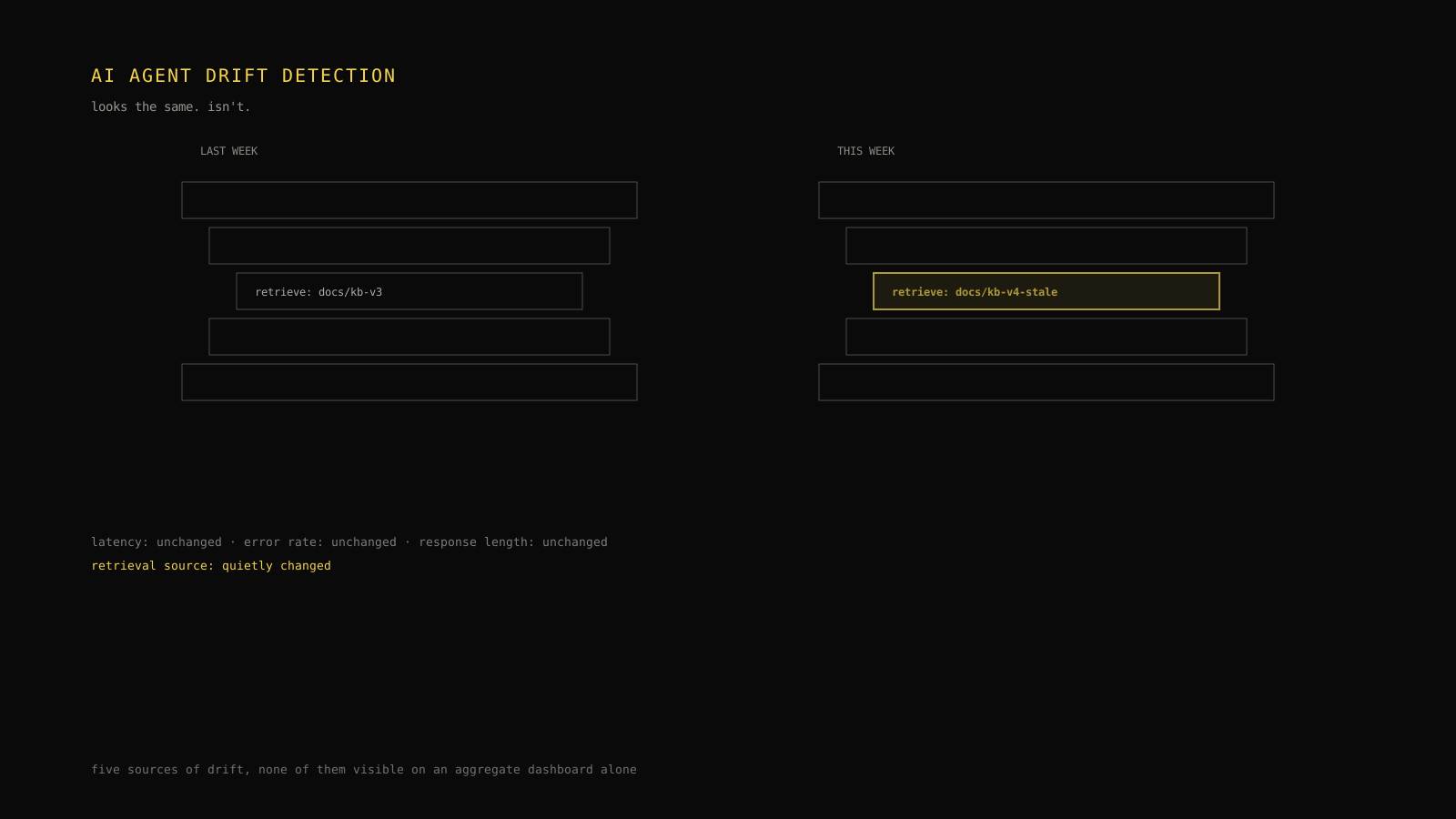
This distinction matters because the failure mode described in the opening scenario is specific: the aggregate mean was stable. The retrieval-data drift only showed up in one product line's segment. That's the core argument of this article — an agent can drift substantially while every top-level dashboard number stays flat, because the drift is diluted by everything that didn't change.
Five sources of agent behavior drift
Different root causes change different observable signals. Knowing the fingerprint lets you go from "something feels off" to "this is probably retrieval, not the model" without waiting for a root-cause investigation to catch up with the symptom.
| Drift source | What actually changed | Primary detection signal / fingerprint | Typical trigger |
|---|---|---|---|
| Model drift | The underlying LLM the agent calls (a provider-side update, a new model version, a routing change) | Shifts in output length distribution, refusal rate, tone, or tool-call formatting without any deploy on your side | Provider model update, silent version alias change, model-router fallback |
| Prompt drift | The instructions sent to the model (system prompt, few-shot examples, injected context template) | Output structure or instruction-following changes that correlate with a prompt/template deploy in your own history | Prompt edit, template refactor, unreviewed change to a shared prompt fragment |
| Retrieval-data drift | The underlying documents, embeddings, or knowledge base the agent retrieves from | A shift in which sources are retrieved (by document ID, collection, or freshness) even when the final answer's tone is unchanged | Content migration, reindexing, stale embeddings, deleted or renamed documents |
| Tool/API drift | The behavior, schema, or reliability of a tool or external API the agent calls | Changes in tool-call success rate, argument shape, retry count, or response latency for one specific tool | Upstream API version bump, rate-limit change, third-party schema change |
| Population/traffic-mix drift | The mix of users, request types, or channels sending traffic to the agent | Aggregate metrics move only because the composition of traffic changed, not because any single segment's behavior changed | New customer cohort, marketing campaign, feature launch shifting request types |
Two of these — retrieval-data drift and population drift — deserve emphasis because they are the ones most observability setups miss: neither requires a code, prompt, or model change to alter what users experience.
Model drift
Model drift happens when the model itself changes underneath a stable prompt and stable code. Providers version and sometimes silently update models behind an alias; a routing or fallback tier can shift traffic to a different underlying model during high load. The fingerprint is usually structural: output length distribution moves, formatting conventions shift (a model that used to return clean JSON starts wrapping it in prose), or refusal/safety behavior changes — all without any entry in your own deploy history.
Prompt drift
Prompt drift is any change to the instructions, few-shot examples, or injected context template that reaches the model. It is often intentional but under-tracked: a shared prompt fragment gets edited for one agent and silently affects three others, or a context-window trimming change reorders what the model sees first. The detection signal is that the shift correlates cleanly with an entry in your own prompt-version history — which is exactly why disciplined prompt versioning (see prompt versioning and management) turns prompt drift from a mystery into a fast diagnosis.
Retrieval-data drift
This is the drift source in the opening scenario. The model and prompt are untouched, but the corpus, index, or embeddings the agent retrieves from has changed — a content migration renamed pages, a reindex dropped a collection, or embeddings went stale relative to a schema update. The fingerprint does not show up in output tone or length; it shows up in which document IDs or sources appear in retrieval spans. If your traces record retrieved-source identifiers, this is directly comparable across time windows even when nothing else in the trace looks different.
Tool/API drift
Agents that call external tools inherit the tool's stability, or lack of it. A third-party API can change a default parameter, tighten a rate limit, or alter a response schema without warning. The fingerprint is tool-scoped: watch success rate, retry count, argument validation failures, and latency for one tool in isolation rather than the agent's overall error rate, which can stay low if the agent has a fallback path that quietly absorbs the failures.
Population/traffic-mix drift
Sometimes nothing about the agent changed at all — the traffic did. A marketing push brings in a wave of users asking questions the agent was never tuned for; a new feature launch shifts the request mix toward a harder task type. Aggregate metrics can move (or stay artificially flat, masking a real regression in the original segment) purely because the weighting of the average changed. This is why segment-level comparison, covered next, is not optional for a mature drift-detection process.
Establishing a baseline window
A baseline window is the reference period you consider "normal" — the distribution everything else gets compared against. Without one, every comparison is just gut feeling applied to two arbitrary time ranges.
Baseline-window methodology checklist:
- [ ] Pick a window long enough to average out routine variance. A single day is rarely enough for a production agent; most teams need at least one full weekly cycle to smooth out day-of-week effects (weekday support volume looks different from weekend volume).
- [ ] Confirm the window was actually stable. Check your own deploy log, prompt-version history, and any known incidents during the candidate window. A baseline that secretly contains a partial rollout is not a baseline.
- [ ] Capture segment composition, not just aggregate stats. Record the traffic mix (channel, cohort, request type) for the baseline window alongside the behavior metrics, so a later population shift is visible as a composition change rather than hidden inside a blended average.
- [ ] Store distributions, not single numbers. A mean and a p95 are not enough; keep enough of the underlying distribution (or a reasonable histogram) to detect a shape change — a new mode, a fatter tail — that a single summary statistic would erase.
- [ ] Re-baseline deliberately, not automatically. After a verified, intentional change (a reviewed prompt update, a model upgrade you chose), set a new baseline explicitly. Never let a rolling window silently absorb an unreviewed regression as the new normal.
- [ ] Version the baseline itself. Know which baseline window a given comparison used, the same way you'd version a prompt or a model — otherwise "we compared against baseline" stops being a reproducible claim.
A baseline is a decision, not a default. Treat it the same way you'd treat a release: reviewed, recorded, and revisited only on purpose.
Comparing at the segment level, not just the aggregate
The opening scenario exists precisely because segment-level comparison catches what aggregate comparison cannot. An agent serving multiple product lines, customer tiers, or request types should be compared within each segment, then rolled up — not averaged first and inspected second.
Illustrative segment-level comparison — behavior by product line, baseline week vs. current week:
| Segment | Baseline avg. answer accuracy* | Current avg. accuracy* | Baseline top retrieval source | Current top retrieval source | Signal |
|---|---|---|---|---|---|
| Product A support | 91% | 90% | docs/product-a/v3 | docs/product-a/v3 | Stable |
| Product B support | 89% | 88% | docs/product-b/v2 | docs/product-b/v2 | Stable |
| Product C support | 92% | 74% | docs/product-c/v4 | docs/product-c-legacy/v1 | Retrieval-data drift |
| Blended average | 90.7% | 88.7% | — | — | Looks like normal variance |
*Accuracy figures are illustrative, from a hypothetical periodic eval sample — not a claim about any specific automated scoring system.
Notice the blended average moved by two points — well within normal week-to-week noise for most teams. Only the Product C row shows the real signal: accuracy fell 18 points, and the retrieval source changed from the current documentation collection to a legacy one, consistent with a migration that left old content still indexed and now ranking higher for some queries. That is a textbook retrieval-data drift fingerprint, and it is invisible unless you look at Product C on its own.

The practical rule: define your segments in advance (by product, customer tier, channel, or request type — whatever partitions your real traffic meaningfully), and run every comparison at that granularity before you also check the rollup. The rollup is a screening tool, not the whole investigation.
Detecting drift without perfect labels
Most teams do not have a continuously labeled ground-truth dataset telling them which production answers were "correct." Waiting for one before starting drift detection means never starting. Instead, compare distributions of observable signals across time windows — proxies that correlate with quality even without a correctness label on every run:
- Output length distribution — a sudden shift in typical response length, in either direction, often precedes a quality change.
- Tool-selection frequency — if an agent that used to call a lookup tool on 40% of runs now calls it on 15%, something about its reasoning path changed, whether from prompt, model, or retrieval.
- Retrieved-source identifiers — which documents, collections, or IDs show up in retrieval spans, independent of what the model does with them.
- Cost per run — a jump can indicate longer context windows, more retries, or a routed model change.
- Retry and error-recovery rate — a rising rate of "succeeded on retry" runs can mask a tool/API drift that never surfaces as a hard failure.
- A small periodic labeled sample — even a modest, consistently-sized human or eval-graded sample per segment per window turns a pure-proxy comparison into one anchored by at least some ground truth, without requiring full production labeling.
None of these alone proves drift. Together, a coordinated shift across two or more of them — especially when isolated to one segment — is strong evidence worth investigating, even with zero labels on the runs in question.
Healthy vs. degraded trace comparison
The clearest way to see a drift fingerprint is side by side, at the level of one representative trace from each window. The illustrative pair below shows the same support workflow, three weeks apart, using the same schema Tracify traces already record: retrieved sources, tool calls, and the final answer.
Illustrative trace, baseline window (three weeks ago):
trace: support-answer · product-c · run_8841
  span: retrieve
    sources: ["docs/product-c/v4#pricing", "docs/product-c/v4#limits"]
    latency_ms: 210
  span: generate
    model: agent-model-a
    output_tokens: 187
  span: tool_call: lookup_account_tier
    status: success
    latency_ms: 96
  final_answer_length_tokens: 187
  eval_flag: none
Illustrative trace, current window (this week):
trace: support-answer · product-c · run_9902
  span: retrieve
    sources: ["docs/product-c-legacy/v1#pricing"]
    latency_ms: 198
  span: generate
    model: agent-model-a
    output_tokens: 179
  span: tool_call: lookup_account_tier
    status: success
    latency_ms: 101
  final_answer_length_tokens: 179
  eval_flag: none
Read side by side, almost nothing here would trip an alert built on aggregate thresholds: latency is nearly identical, output length barely moved, the tool call still succeeds, and no eval flag fired. The only field that changed is the retrieval sources list — the current trace pulled from docs/product-c-legacy/v1 instead of docs/product-c/v4. That one field is the entire fingerprint of the retrieval-data drift from the opening scenario, and it is exactly the kind of change that a latency chart, an error-rate chart, and an average-length chart will all fail to surface. For more on what a trace should capture in the first place, see LLM tracing explained.
The retrieval sources field is the single most under-monitored signal for silent behavior drift. Most teams alert on latency, cost, and error rate — all three of which can stay flat while an agent quietly starts answering from the wrong documents.
"Spot the drift": two trace summaries, one week apart
The two trace summaries below are fixed, illustrative examples — not live data from any monitored system. Compare them field by field before reading the answer underneath.
Trace summary — Week 1 (baseline)
| Field | Value |
|---|---|
| Model | agent-model-a |
| System prompt version | v12 |
| Retrieved sources | docs/billing/v5#refunds, docs/billing/v5#disputes |
| Tool calls | lookup_invoice → success, 88ms |
| Output length | 142 tokens |
| Requests from mobile app channel | 18% of sample |
Trace summary — Week 2 (current)
| Field | Value |
|---|---|
| Model | agent-model-a |
| System prompt version | v12 |
| Retrieved sources | docs/billing/v5#refunds, docs/billing/v5#disputes |
| Tool calls | lookup_invoice → success, 260ms |
| Output length | 139 tokens |
| Requests from mobile app channel | 19% of sample |
Which fields differ meaningfully? Model, prompt version, retrieved sources, output length, and channel mix are all effectively unchanged — well within normal variance. The one field that moved meaningfully is lookup_invoice latency, which nearly tripled (88ms to 260ms) while its status is still reported as success. A rising latency trend on a single tool, with success rate unaffected, is the fingerprint of tool/API drift: something changed on the upstream invoice-lookup API's performance characteristics, even though nothing in your own prompt, model, or retrieval layer moved, and even though the call still technically succeeds every time. This is exactly the pattern that a plain error-rate dashboard would miss, since lookup_invoice never actually failed.
(Static presentation note: this interaction is presented as two fixed comparison tables with the answer shown directly below, rather than as a clickable widget, so the reasoning stays available to every reader without requiring a new interactive component.)
Worked example: a silent retrieval-data drift after a content migration
Put the pieces together. A content team migrates a product's documentation to a new site structure, expecting no functional impact — it's "just" a URL and information-architecture change. The agent's retrieval index, however, was pointed at document IDs, not URLs, and the migration left the old collection indexed alongside a partially-populated new one.
Week over week, the aggregate dashboard shows: latency flat, error rate flat, cost roughly flat, average response length flat. Nothing alerts. But a support lead notices a handful of tickets from Product C customers saying the agent gave outdated pricing information. Running a segment-level comparison for Product C alone — the process from the earlier section — surfaces an 18-point accuracy drop in the periodic eval sample and a retrieval-source shift from the current documentation collection to the legacy one. The baseline window (four weeks prior, confirmed stable via deploy history) makes the comparison concrete instead of anecdotal: this is not "things feel a little off," it's a measured before/after difference isolated to one segment and one retrieval source.
The fix in this scenario is operational, not a model or prompt change: deprecate the legacy collection from the retrieval index and re-verify the new collection's coverage. The detection process is what got the team there in three days instead of after a churned account raised it.
Illustrative comparison-window query
The following pseudocode is illustrative — it shows the shape of a segment-level, two-window comparison rather than a runnable query against any specific schema. Adapt field names to your own trace and eval storage.
# Illustrative: not a runnable query against a specific schema.

baseline_window = time_range(start="4 weeks ago", end="3 weeks ago")
current_window  = time_range(start="now - 7 days", end="now")

for segment in ["product-a", "product-b", "product-c"]:
    baseline_runs = query_traces(
        segment=segment,
        window=baseline_window,
    )
    current_runs = query_traces(
        segment=segment,
        window=current_window,
    )

    baseline_sources = distribution(baseline_runs, field="retrieve.sources")
    current_sources  = distribution(current_runs,  field="retrieve.sources")

    baseline_accuracy = mean(eval_sample(baseline_runs, n=50))
    current_accuracy  = mean(eval_sample(current_runs,  n=50))

    if distribution_shift(baseline_sources, current_sources) > SOURCE_SHIFT_THRESHOLD:
        flag(segment, source="retrieval-data drift")

    if (baseline_accuracy - current_accuracy) > ACCURACY_DROP_THRESHOLD:
        flag(segment, source="accuracy regression — investigate all five sources")
The two checks that matter most here: comparing the distribution of retrieved sources (not just whether retrieval "succeeded"), and comparing a segment's accuracy sample against its own baseline rather than against the blended average. Both are what the aggregate-only version of this same query would miss.
Separating real drift from normal variance
Before escalating a flagged signal, apply a short sanity pass:
- Sample size. Is the current window's sample large enough that the shift isn't just a handful of unusual runs? A 20-point accuracy swing on 8 sampled runs is noise; the same swing on 200 is a signal.
- Known changes. Cross-check your deploy log, prompt-version history, and any provider status page for the comparison window. A drift that maps cleanly onto a reviewed change is a known cause, not a mystery — go fix or accept it, rather than treating it as an open investigation.
- Direction consistency. Real drift tends to move consistently across the window, not spike for an hour and recover. A short spike that recovers is more likely an incident than drift.
- Segment isolation. Does the shift appear in one segment or across all of them? A shift isolated to one segment points at retrieval, a specific tool, or that segment's traffic mix. A shift across every segment simultaneously points more toward model or prompt drift, since those apply agent-wide.
Limitations and failure modes
Distribution-based drift detection has real limits. Proxy signals (length, tool frequency, retrieval sources) can move for benign reasons — a genuinely more complex batch of questions, a seasonal shift in what users ask — so a flagged signal is a prompt to investigate, not automatic proof of a regression. Segment definitions themselves can go stale: if your segments were drawn up a year ago and the product has changed since, the segmentation itself may now be hiding drift the same way an unsegmented aggregate would. And none of this replaces a periodic labeled eval sample; distribution comparisons narrow down where to look, they don't replace confirming what actually changed in outcome quality. Treat this as a methodology for narrowing an investigation quickly, not a fully automated anomaly-detection system — the thresholds, windows, and segments in every example above are illustrative starting points that need tuning against your own traffic before they're trustworthy.
Make the operating decision
- [ ] A baseline window is defined, confirmed stable, and recorded — not assumed.
- [ ] Comparisons run at the segment level before (or alongside) the aggregate rollup.
- [ ] At least one non-label proxy signal (retrieval sources, tool-selection frequency, output length) is tracked per segment, not just per agent.
- [ ] A small periodic labeled eval sample anchors the proxy signals to real quality, even if it can't cover every run.
- [ ] Flagged segments are investigated against the Five-Source Drift Model's fingerprints before being dismissed as noise.
- [ ] Deploys, prompt versions, and known incidents are checked before calling an unexplained shift "drift."
Comparing two time windows of your own trace data — at the segment level, against a real baseline — is the fastest way to find out whether a "green dashboard" is actually stable or just averaging over a problem. If you want to see this comparison against real trace data rather than illustrative examples, Tracify's Trace Viewer lets you compare two time windows of the same segment side by side.
Frequently asked questions
What is AI agent drift?
A meaningful, unplanned change in an agent's behavior over time, distinct from normal run-to-run variance. It can come from the model, the prompt, retrieved data, a tool or API, or a shift in traffic composition.
What's the difference between model drift and prompt drift?
Model drift comes from the underlying model changing, such as a provider-side update or routing change, with no action on your side. Prompt drift comes from the instructions given to the model changing, even unintentionally, such as an edit to a shared prompt fragment.
Can an agent's behavior drift with no code change at all?
Yes. Retrieval-data drift and population/traffic-mix drift can both change what users experience without any prompt, model, or code change — a content migration or a shift in who is using the agent is enough.
How do you detect drift without labeled data?
By comparing distributions of observable signals — output length, tool-selection frequency, retrieval sources, cost — across time windows, rather than relying on a correctness label for every run. A small periodic labeled sample strengthens but isn't required to start.
Should drift checks happen at the aggregate or segment level?
Both, but segment-level checks matter more for catching real regressions: drift that is isolated to one cohort or product line routinely averages out and disappears at the aggregate level, the way it does in the retrieval-drift example in this guide.
Practical field notes from the team building Tracify and operating AI agents in production.
Related posts

Next in the loop
AI Agent Evaluation Datasets: How to Build Test Cases From Real User Interactions
Keep reading →